Game Freezes Upon Placing Settlement

I just bought the game today and can’t play for more than a couple of minutes. The game totally freezes but sound affects continue. I’ve tried reinstalling and lowering all settings. Is this common and if so, what can I do? It appears to load up just fine and proceeding through the main set up screens is very smooth. When the new settlement map screen loads and the tutorial suggests to build a town center the cursor and animations freeze but the sound effects continue. I’ve tried adjusting the settings in game and with Nvidia APP to no avail.

NVIDIA system information report created on: 11/01/2025 17:33:46
NVIDIA App version: 11.0.5.420
Operating system: Microsoft Windows 11 Pro, Version 10.0.26200
DirectX runtime version: DirectX 12
Driver: Game Ready Driver - 581.57 - Tue Oct 14, 2025
CPU: 13th Gen Intel(R) Core™ i7-13700K
RAM: 64.0 GB
Storage: SSD - 1.8 TB

Graphics card
GPU: NVIDIA GeForce RTX 3080
Direct3D feature level: N/A
CUDA cores: 8960
Graphics clock: 1725 MHz
Resizable BAR: Yes
Memory data rate: N/A
Memory interface: N/A
Memory bandwidth: N/A
Total available graphics memory: 44926 MB
System video memory: N/A
Shared system memory: 32638 MB
Dedicated video memory: 12288 MB
Video BIOS version: 94.02.85.00.bb
Device ID: 10DE 220A B61219DA
Part number: G132 0025
IRQ: Not used
Bus: PCI Express x16 Gen4
I would be curious what happens if you roll back to these drivers:

Now it just crashes to a black screen.
Crash_2025-11-04_202551551.zip (59.2 KB)

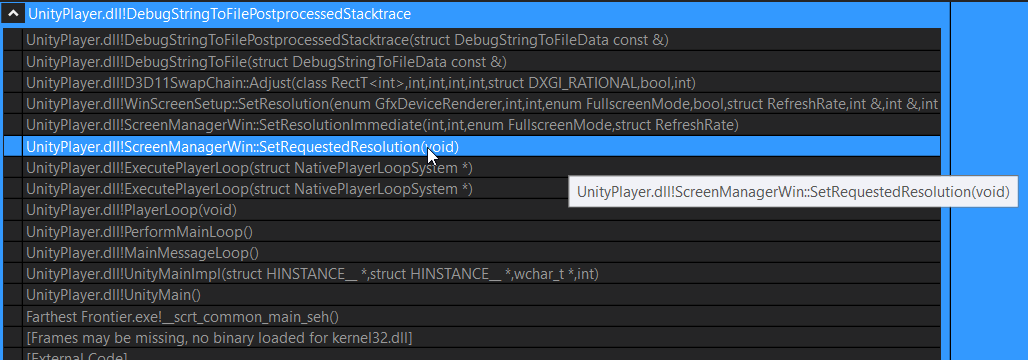
Thanks for sending those in. It seems you are crashing while setting fullscreen/screen-resolution. I wonder if you could adjust some of those values to see if that helps.

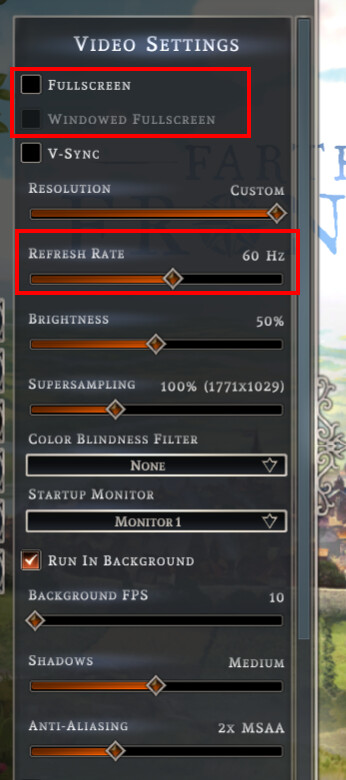
For starters, maybe uncheck Fullscreen and Windowed Fullscreen and set a resolution less than the full size of your monitor (running in a non-fullscreen window).

Also, maybe set your Refresh Rate to 60Hz.

Of course, you should be able to go fullscreen without crashing (and many are), but if we can narrow down your particular issue, it might at least get you up and running.

If going windowed-mode at 60Hz works, maybe try windowed-fullscreen, etc. Basically try a few different things. And if/until you get past the black screen, maybe leave your refresh rate at 60Hz. There have been some cases we’ve seen where high refresh rates don’t behave well.

I tried your suggestions and now I can’t even get to the screen where I would start a settlement. In the non-full screen border the response says farthest frontier not responding and then whole screen just goes to white. I had to use task manager to shut the program down. This happened in the regular version and the debug version.