I get this, regardless if I try to download from ModDB or NexusMods:
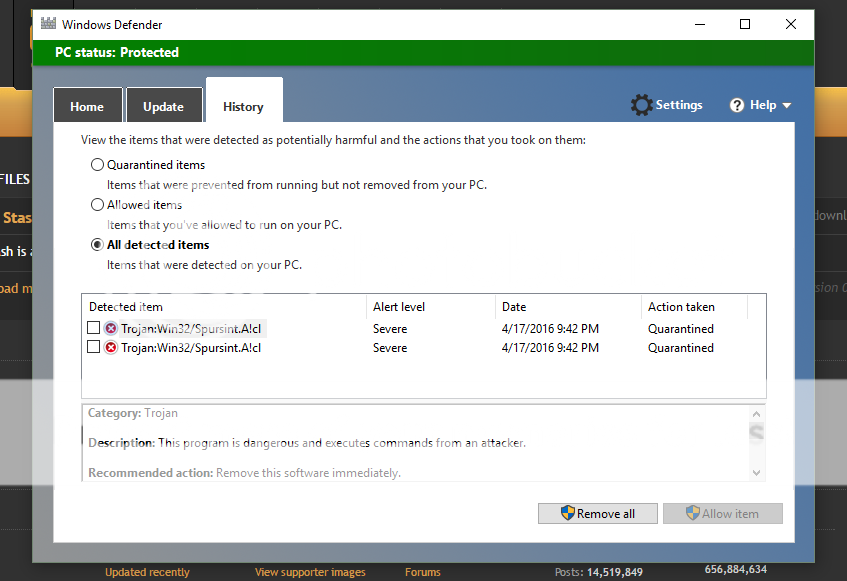
On a positive note, I scanned the zip and the files within it with several virus scanners online and BitDefender that I just installed and it comes up clean. Looks like Windows Defender is, as usual, being a dumbass…
try importing the database again on the Config page
I used the shared stash. It worked fine
But yesterday my shared stash disappeared, and now everytime i try to put somthing in it. The sharedstash is reset (i also lose all paid additionnal stash)
I worked once, i could create a legendary dagger. But it was deleted when i retried.
what made your stash ‘disappear’ ? Was that in game or the tool ?
Where is it reset after putting an item into it ? Does the game not see the item but you can still see it in the tool ? In that case I would assume that they are not the same stash, ie you may use cloud save in game but the local stash in the tool.
Do you use cloud save ?
sounds like a false positive… which file in particular does it complain about ?
yes, the file should be fine (it was identical to what I uploaded last time I checked, and that is virus free).
Importing again didn’t change the issue with the error message ;(
My problem with the stash was the following :
-I craft any item and put in the shared stash, save it.
I close GD stash and reopen it. Still there.
I launch the game, and the stash is gone! I exit and reopen GD stash => It indeed vanished.
I used cloud saving, but i was playing without internet connection. And the bug is gone for the moment. I just have to redo a component database (I shared it will all char to make it easier for rerolls and to optimize space)
No matter what you do it won’t work if you use cloud saving. You need to change that setting in game and move the save files from the steam folder to your local my documents/my games/good dawn/…
This is the only way it will work.
Sent from my Note 4 using Tapatalk
will have to check that
My problem with the stash was the following :
-I craft any item and put in the shared stash, save it.
I close GD stash and reopen it. Still there.
I launch the game, and the stash is gone! I exit and reopen GD stash => It indeed vanished.
so cloud saving used its version of the stash (which does not contain that item) and overwrites the stash on your HD with it, which is why it now also is gone in the tool
Not sure how the ‘without internet connection’ factors in here
I recommend using the tool without cloud saving. Some people say it even works with cloud saving (never tried myself) but there is definitely more potential for issues.
You could try the following, maybe that works. With cloud saving enabled, start Grim Dawn, start GD Stash and put the item in the shared stash. Open the shared stash in game and check if the item is there.
I assume it should work (as I said, never tried), as cloud sync should from my understanding only happen at the start and when exiting the game, not in between.
That item does not exist, so the best I could do is ignore it, which will remove it.
Is there a quick/easy way to search for a specific item that I have in my GD Stash (not the in-game stash), and quickly locate and restore that item into my regular stash? I’m just looking for a single item.
The search functionality… whether it finds one or more items depends on your search criteria and how many items match it, the more specific the search, the fewer items there will be listed
I assume that when you search for a specific item, you have a pretty good idea of what that item is, so that should help narrowing the search down
I think what he 8s asking is why on the collection tab there is not a text box to search for an item by name.
Sent from my Note 4 using Tapatalk
Let’s say I’m looking for a specific Legendary item I have put in a GD Stash file. Let’s call the item a Stormheart. What tab do I use to find that item? I can find it in the Collection tab, but how do I get that specific item into my actual stash so I can use it in game? I’m thinking I could use the Mass Import tab for that, but when I look at the Mass Import tab, it shows me ALL my items (if I choose “Load items from dir”). That would be fine, but I can’t seem to organize those found items in alphabetical order, so I have to manually scroll, through dozens (hundreds?) of items to find the specific item I’m looking for. Is there no way to sort the found items in the Mass Import tab?
And please correct me if the Mass Import tab is not the way to restore an individual item (like a Stormheart) from my GD stash, to my actual in-game stash so I can use it on one of my characters.
Not what I’m asking, necessarily, but that would definitely be nice/useful.
Oh go to the stash transfer tab and in the left at the top click search, find the item and click on it then click an open spot in your stash then click save stash
Sent from my Note 4 using Tapatalk
You go to the Transfer page and enter the following
- Item Info: the type, if you know it (1H Sword), otherwise select ‘All items’ from the drop-down list
- Item Name: Stormheart
- Item Rarity: Legendary, if you know it
returns exactly one item (tried it on the Crafting page, so all Grim Dawn items were available)
And please correct me if the Mass Import tab is not the way to restore an individual item
It is not, it only imports items into GD Stash, you want the Transfer tab
Version 0.99 released
- Riftgates can be edited
- minor tweaks and bugfixes
What’s the best way to update it without messing up the database I have already built? This is usually where I screw something up lol
Sent from my Note 4 using Tapatalk
All files in the zip can simply overwrite their older counterparts, your items will not be touched by this.
All items are in the ‘db’ subdir, so make sure not to delete that. Everything else you can delete and replace with the latest version without losing anything.
OK thanks, and the settings don’t get reset, correct?
Sent from my Note 4 using Tapatalk
No, they stay the same, they also are in the db dir 