nope , just a normal mouse with no software or anything
1 Like
Just making sure. When you tested this
[combo holds]
combo1=RButton:0
that was the full config? You didn’t have some other things in the config?
Also could you try it with Middle Mouse button?
[combo holds]
combo1=MButton:0
(press and hold Middle Mouse Button and check if Blade Arc is spammed with this short config where we have MButton instead of RButton)
Also maybe check with Default Attack instead of Blade Arc on 0 Hotbar just in case.
Another thing I’d like you to test - with initial_delay1 added:
[combo holds]
combo1=RButton:0
initial_delay1=100
I’ll figure this out eventually (or make it in some other way)
I may add new feature to GDAutocaster I actually planned before
1 Like
works prefectly
after sometime , ran into into a worse issue , it doesnt attack at all after 2-3 clicks at first
1 Like
I’m working at some new different solution to this. I’ll let you know when I finish so that you can test it if it works better. I’ll test too ofc
1 Like
ok thanks so much , and gl with it
Ok, you can try this
-
delete your current GDAutocaster.exe just to be sure you’re using the new version with new feature
-
download new one GDAutocaster.zip (923.7 KB) (too lazy to update OP and documentation)
-
have Stationary Attack → Shift keybinding in options
- this time I’m using Shift not a different button
-
let’s say you have Blade Arc on 0
The config is as follows:
[autocast by hold]
cast1=RButton:+0
delay1=50
It doesn’t hold but spams Shift + 0 (so Stationary Attack + Blade Arc) every 50ms when you hold RMB
In Autohotkey btw
- + means shift
- ! means alt
- ^ means ctrl
That’s why +0 is shift + 0 and ^0 would be Ctrl + 0
btw I’ve been able to replicate this. Although it’s pretty hard - 3 very fast clicks. Maybe I’ll fix / rewrite Combo Holds one day 
1 Like
yess this is the one, it works perfectly without any issues now , ty so much 
Ok so here how we add single Thermite Mines cast before that.
Let’s say Mines are on 9 on hotbar.
We do it with a Combo Press (RMB on Hotbar still empty!)
We need to delay Blade Arc with initial_delay1 a bit so that it always starts after Mines
Sth like that
[combo presses]
combo1=RButton:+9

[autocast by hold]
cast1=RButton:+0
delay1=50
initial_delay1=100
I’ll try to fix Combo Holds now so that it can also be used for that (Stationary Attack + Blade Arc spam). Combo Holds would be my preferred way so I’d rather have it working 100% reliably (I personally don’t click like a madman so I haven’t come across this issue myself [much]).
1 Like
ty for taking the time to help me with it , i will test the new script and let u know how it goes 
No problem. If players weren’t using the program, testing and giving me feedback, it couldn’t be improved like that.
Greetings. I would like to ask if this program is currently working. When trying via GDAutocaster.exe run the test.ini config with the following:
[center casts]
center=500,500
screen_width=1920
screen_height=1280
off_center=true

cast1=RButton:7,6
initial_delay1=0
delay1=200
delay_after_cursor1=40
off_center1=false
nothing works for me.
Yes. Not only in Grim Dawn but in other games too (with appropriate config).
Do other features of the program work for you? For example
[autocast by hold]
cast1=RButton:7
delay1=200
which should spam 7 while holding RMB
This configuration works, but there is a problem that I don’t understand how to make another one. I have a Shaman’s Primal Strike on my LMB and an Storm Box of Elgoloth on Q. The Primal Strike has no recharge, and the Storm Box of Elgoloth has 1.8 seconds. I would be very grateful if you could help me and tell me in more detail how to configure my configs. The fact is that English is not my native language, I don’t know it well and I write through a translator, so reading a lot of messages is considered problematic, since translators lose the essence and context. Thank you in advance for your reply.
Now I tried to make this option:
[autocast by hold]
cast1=RButton:7
delay1=10

cast2=RButton:Q
delay1=1810
and it works, but I’d like to know even more so that I can make any other variations. May I know why the previous option, which I dropped with one replay above, didn’t work?
I just tried the following configuration:
[autocast by toggle]
autocast_on_launch=false
delay=1

cast1=`:7
delay1=1500
And it works, but it works very poorly in that there’s a delay in activation, the key itself eventually stops responding, and overall it’s unreliable.
I can write you different configs so that you can test which you like the most.
I assume the goal is to not need to cast Storm Box yourself.
Btw there are 2 options in Game Settings, in 2 different places, to disable the “Skill not ready” text and sound messages. I recommend turning both off if you haven’t already.
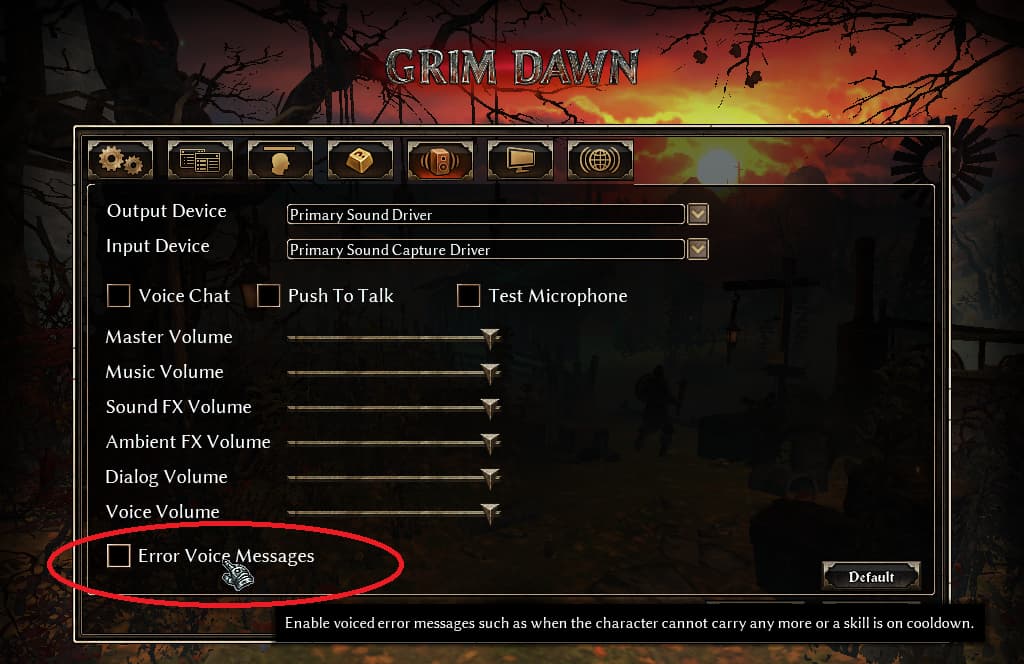
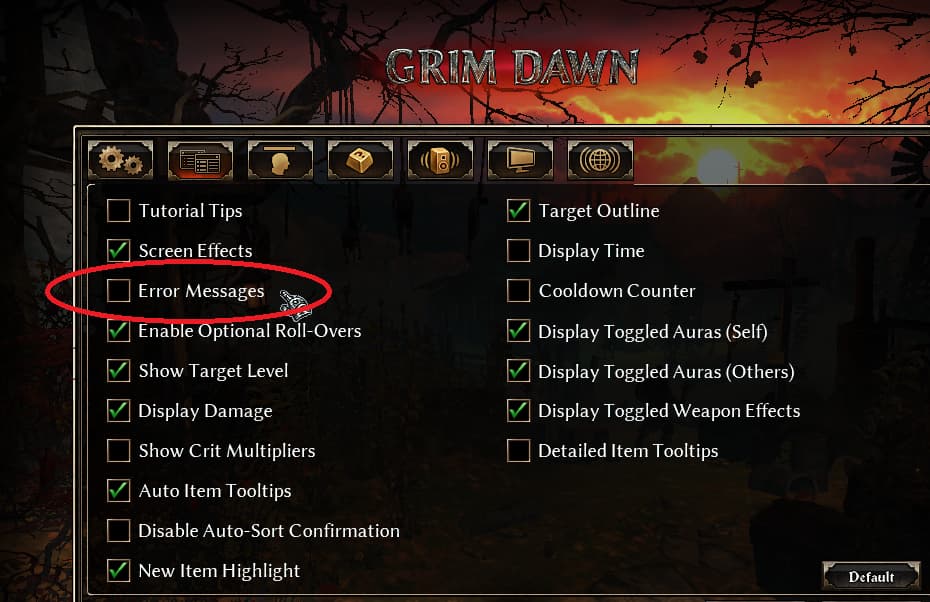
CONFIG 1
-
Primal Strike on LMB in-game
-
Storm Box on Q in-game
-
WHAT IT DOES: spams Q (Storm Box) button every 100ms when you hold LMB (Primal Strike)
[autocast by hold]
cast1=LButton:q
delay1=100
CONFIG 2
-
Primal Strike on LMB in-game
-
Storm Box on Q in-game
-
WHAT IT DOES: spams Q (Storm Box) button every 100ms when you hold LMB (Primal Strike) for at least 200 ms
[autocast by hold]
cast1=LButton:q
delay1=100
initial_delay1=200
CONFIG 3
-
Primal Strike on LMB in-game
- works better imo than if Primal Strike is on 7
- but 7 can be used to if you prefer that
- works better imo than if Primal Strike is on 7
-
Storm Box on RMB in-game
-
WHAT IT DOES: casts Storm Box once (RMB) and then holds down Primal Strike (LMB) when you hold down RMB
[combo holds]
combo1=RButton:LButton
sometimes works better with initial delay:
CONFIG 3 B
[combo holds]
combo1=RButton:LButton
initial_delay1=100
CONFIG 4
-
Primal Strike on LMB in-game
- works better imo than if Primal Strike is on 7
- but 7 can be used to if you prefer that
- works better imo than if Primal Strike is on 7
-
Storm Box on Q in-game
-
WHAT IT DOES: spams Q button (Storm Box) every 100ms and holds down Primal Strike (LMB) when you hold down RMB
[autocast by hold]
cast1=RButton:q
delay1=100

[combo holds]
combo1=RButton:LButton
sometimes works better with initial delay:
CONFIG 4 B
[autocast by hold]
cast1=RButton:q
delay1=100

[combo holds]
combo1=RButton:LButton
initial_delay1=100
CONFIG 5 (this is similar to yours)
-
Primal Strike on 7 in-game
-
Storm Box on Q in-game
-
WHAT IT DOES: spams both Box and Primal Strikes
[autocast by hold]
cast1=RButton:7
delay1=10

cast2=RButton:q
delay2=100
Yeah, so here are 5 ways to automate Storm Box with Primal Strike and it depends on individual preferences which is the best.
Thank you so much for such a detailed explanation, and a special thanks for creating the configs tailored to my situation. As I understand it, the difference between [combo holds] and [autocast by hold] is that in the first option, the skill is held while the right mouse button is held down, whereas in the second, it spams?
I’d also like to ask you to provide similar explanations for the program’s other functions, such as [center casts], [toggle holds], and the rest. It’s not necessary, since I’ve already got the basics and will try to figure it out on my own, but it would be a little easier if you could give me a little more help :).
In any case, thank you for solving the problem I was having. May luck be with you <3.
1 Like
Yes, precisely. But Grim Dawn has a limitation - if you press down and hold 2 buttons at the same time, only 1 of them will work. If you want more, you need to spam / mash by [autocast by hold].
Or in other words in Grim Dawn you can only press down and hold at most one button at the time and have it repeatedly cast your skill (either manually with your fingers or by GDAutocaster’s [combo hold]) and the rest of the buttons you need to spam / mash (either manually with your fingers or by GDAutocaster’s [autocast by hold]).
Usually what I do in this thread is that I ask players what behavior they want (for example “I want Pneumatic Burst cast automatically”) and then I propose a config for them to check out and give feedback if it’s what they want and they learn step by step in this way.
Tbf, I think you should be able to do everything you can imagine, although finding a proper config for that is sometimes not easy for sure and I’m needed since I have so much experience.
You can also read my previous explanations (starting from the most recent because the program changed somewhat with time).
Btw you chose a good/last moment to ask questions because I may stop using this forum when 1.3 playtest ends.
@DosanTeuze In the following post for example is a very detailed explanation of [autocast by toggle], various forms from the easiest to the hardest (for Inquisitor’s Word of Renewal skill):