This is a Windows 10 computer and I only use the built-in Windows firewall and antivirus. It has always been set to notify me if there are any security issues and I have not ever received any for IA (or anything else for that matter). Also, IA has updated previously without any problem, including twice in the prior 7-10 days or so. That said, I did just check the activity reports for the firewall and antivirus programs anyway and did not find any indication that they had any problem with IA.
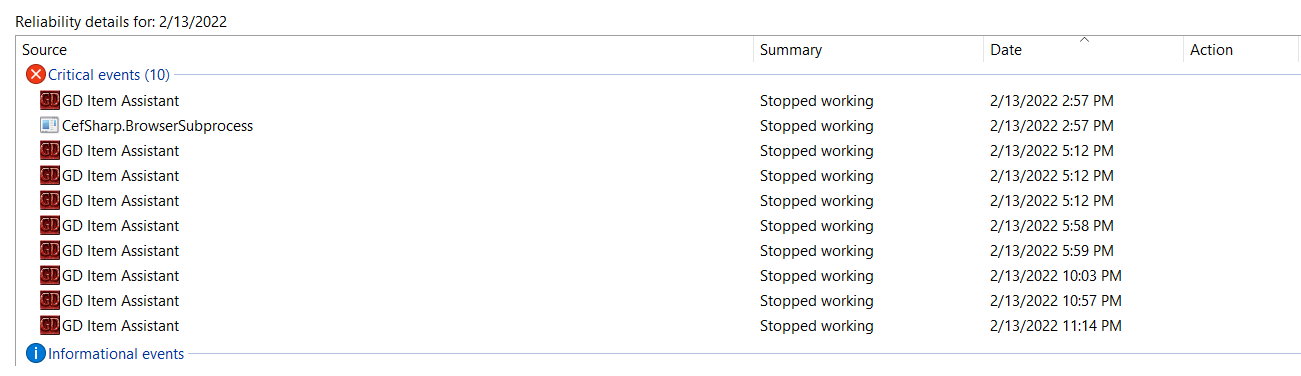
I also poked around for system problem reports and did find multiple “stopped working” items relating to IA in the Windows Reliability Monitor app for the times on 2/12 and 2/13 when I was trying to see if clicking on the update button quickly enough would forestall IA from closing (see attached pic below). Interestingly, the CefSharp.BrowserSubprocess also stopped working at the same time, which suggests that the CefSharp browser package that IA uses is somehow involved.
Given all that, I am inclined to think that the problem probably isn’t a conflict between IA and my firewall and/or antivirus programs but instead is related to IA. I suspect I probably need to reinstall IA but would like to know how to do that so that I don’t lose the 1,000+ pieces of gear in its database.
I did as you suggested and that got IA right up and running again. Also updated it tonight and auto-loot is now working too. Yay and thank you! It’s such a useful and well-done tool (love the sounds) and I was really missing it. Thank you again!
New player, just downloaded. So far one of the best mods ever. Thanks!
I’m using it with the Dawn of Masteries mod and noticed there’s at least one mastery missing from the filter list (Warfare) as well as some that don’t seem to exist (Auspex, Hoplite/Amazon).
There are also some that seem to be combined into one (Rogues & Amazons).
Hi, I’ve come across a bit of a weird one. I had one item that was marked as unknown. I transferred it to my stash and somehow I ended up with a pair of identical necklaces. Here’s the issue: those two items now refuse to be transferred back to the shared stash. All other items transfer to and from fine, and I have since reset and parsed the database so there are no more unknowns or generics in the database.
The only thing that is different is that I updated Item Assistant when a new version was shown to be available when I booted it. It’s no biggie, the amulets are basically worthless, but it’s got me a bit perturbed and I’d like to be able to deal with this if it ever comes up again with something more valuable.
They are Sister’s Amulet of Lifegiving, yes. But now that you mentioned it directly, I read up on it and it is noted that it and the Sith rings are not meant to be looted. Makes sense, being a quest item. Thank you for pointing me in the right direction. Much appreciated, I though I had a bug. Odd that I have two, but hey, lucky me I guess, heh.
I have removed all Sith rings and lifegivers from IA. If I transfer anything from IA to my in-game stash, IA says it was deposited. But when I open my stash, I get a message that IA has removed the item and transfered it back to the IA stash.
I have always had IA set to move items to Tab 2 and take items from the last tab. Does it matter that these are the same tabs? I’ve never had trouble til now.
I got some issue here, for my first time using IA;
It shows ‘Stash:Error’ in the right bottom corner of IA.
Then I do as the ‘help’ suggests me to start IA under administrator mode, but still doesn’t work.
I have searched everywhere I could reach but couldn’t get any solution to my problem.
Anybody could help me?
I got piles of error code in log.txt:
2022-03-02 23:47:26,093 [InjectionHelper] INFO [EvilsoftCommons.DllInjector.InjectionVerifier]: Running Listdlls…
2022-03-02 23:47:26,151 [InjectionHelper] INFO [DllInjector.InjectionHelper]: Running DllInjector64.exe…
2022-03-02 23:47:26,222 [InjectionHelper] WARN [DllInjector.InjectionHelper]: Injector returned status code 1 with error: [-] Error: Could not open process for PID (75392).
2022-03-02 23:47:26,223 [InjectionHelper] INFO [EvilsoftCommons.DllInjector.InjectionVerifier]: Running Listdlls…
2022-03-02 23:47:26,286 [InjectionHelper] ERROR[DllInjector.InjectionHelper]: Error injecting DLL into Grim Dawn. Injection method 6, switching to injetion method 1
2022-03-02 23:47:27,500 [InjectionHelper] INFO [EvilsoftCommons.DllInjector.InjectionVerifier]: Running Listdlls…
2022-03-02 23:47:27,559 [InjectionHelper] INFO [DllInjector.InjectionHelper]: Running DllInjector64.exe…
2022-03-02 23:47:27,633 [InjectionHelper] WARN [DllInjector.InjectionHelper]: Injector returned status code 1 with error: [-] Error: Could not open process for PID (75392).
2022-03-02 23:47:27,634 [InjectionHelper] INFO [EvilsoftCommons.DllInjector.InjectionVerifier]: Running Listdlls…
2022-03-02 23:47:27,751 [InjectionHelper] ERROR[DllInjector.InjectionHelper]: Error injecting DLL into Grim Dawn. Injection method 1, switching to injetion method 3
Yeah,I tried all these methods but it just couldn’t help.
I asume ‘something’ is interferring with IA, but just can’t find the reason.
Whether I start IA with my anti-virus software on or off, under administrator mode or not, the same problem occurred.
Can you try the 32-bit version from https://grimdawn.evilsoft.net and 32 bit GD?
Just to try to narrow it down… no clear idea right now what could be causing it.
I think I may work it out.
It perhaps be my Lenovo PC manager. It sets an anti-virus function powered by Huorong Sercurity, and can be closed through the settings.
I turn that off, turn Windows Defender off, then restart my computer, then find IA works well.
But that means there would be no denferder for my computer at all, for IA just report error as soon as I open those defenders again, quite dangerous if I want to surfing online…
Thx for your help, =)