I’ll try to get it updated today.
I don’t know what you’re talking about.
Are you playing the PC version of the game? There’s no such folder in the Windows version of the Grim Dawn, and there’s no “ja.txt” file either.
Also, this isn’t a problem with the Rainbow files, is it? You should report this in the “Bug Reporting” section of this forum.
I’m sorry. Since the conversation turned to me, I mistakenly thought you were referring to the Rainbow Filter, which I’m currently updating. If you want to localize GDIA into Japanese, it’s best to edit the Japanese language files and send them to slipperypete.
No promlem at all. It’s only changing one line, and slipperypete said he will update it so I guess he don’t need the entire file.
Perhaps he means he shares the info so as that line not to be changed back in future translation update.
I noticed it because an item has two “Elemental Damage” descriptions when shown in Japanese.
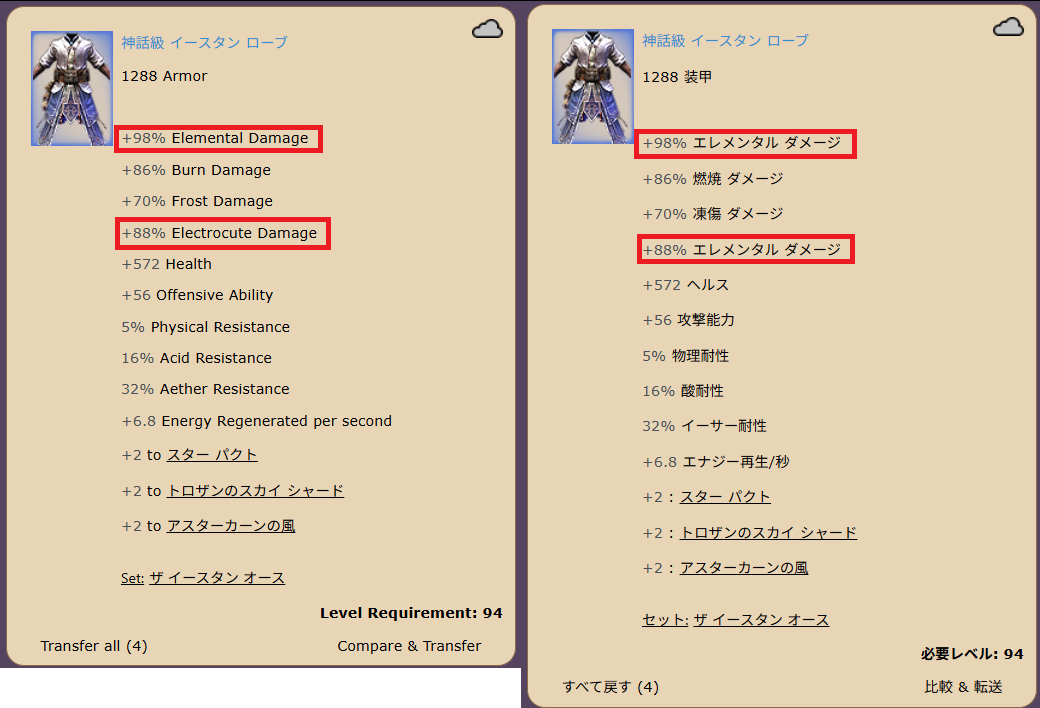
I see. I understand. Thanks for your reply.
Hello, I noticed a small issue when using IA since the last update.
When I was in-game with IA running, I couldn’t change or modify in-game settings (such as display options or keyboard shortcuts). I had to turn off IA for my changes to take effect.
It’s not a major problem, but I wanted to let you know.
Thank you again for this great software and for the work you do to keep it up to date
You closed IA without restarting the game, and it solved the problem?
Even when restarting the game the problem was present as long as I had not closed IA. But as soon as IA closed, everything was back to normal
Is anyone else having issues with new items not depositing in to IA?
Can you try going to “Grim Dawn” tab at the top then hit the “Clean Database” button and then “Load Database” button. It should probably be fixed after that.
1 Like
That worked! Thank you!
1 Like
Item Assistent Webview2 Error.
Since yesterday i can’t load this mod without a critcal webview2 error. I have checked my system and its all normal.
I’ve noticed an issue with items that I deposit into my “move” tab that display the message “Item looted by Item Assistant” but then a few seconds later, they are deposited into my “Loot” tab. It’s happened to about 15 or so items and the rest deposit just fine. Curious to know if anyone else has seen this and if there is an identified root cause on this issue?
tfoz
It happened to me , IAS didn’t want to accept the FOA items. I fixed it by loading the database from Grim Dawn tab in the tool.
I’m in the same situation after installing FOA as well. It’s the same even after performing a ‘Clean DB’ and ‘Load DB’. If anyone has solved it using a different method, I would appreciate it if you could let me know.
Did you load the right install? Did it say FOA on the grim dawn tab?
Ex: Do you perhaps have a GOG And a steam install, and you re-parsed the gog one?
IA rejects items it cannot identify, as you would be unable to search for them, as such it would be a pain to retrieve them again later.
I suddenly can’t use IA anymore because of this:
“2026-08-04 22:27:51,863 [Main] FATAL[EvilsoftCommons.Exceptions.ExceptionReporter]: Could not load file or assembly ‘D:\Program Files\IAGD\DllInjector.dll’. An Application Control policy has blocked this file. (0x800711C7)
2026-08-04 22:27:51,863 [Main] FATAL[EvilsoftCommons.Exceptions.ExceptionReporter]: at IAGrim.UI.MainWindow.MainWindow_FormClosing(Object sender, FormClosingEventArgs e)
at IAGrim.UI.MainWindow.MainWindow_FormClosing(Object sender, FormClosingEventArgs e)
at System.Windows.Forms.Form.RaiseFormClosingOnAppExit()
at System.Windows.Forms.Application.Exit(CancelEventArgs e)
at System.Windows.Forms.Application.ThreadContext.OnThreadException(Exception ex)
at System.Windows.Forms.NativeWindow.Callback(HWND hWnd, UInt32 msg, WPARAM wparam, LPARAM lparam)
at Windows.Win32.PInvoke.DispatchMessage(MSG* lpMsg)
at System.Windows.Forms.Application.LightThreadContext.FPushMessageLoop(msoloop uReason)
at System.Windows.Forms.Application.LightThreadContext.RunMessageLoop(msoloop reason, Boolean fullModal)
at System.Windows.Forms.Application.ThreadContext.RunMessageLoopInner(msoloop reason, ApplicationContext context)
at System.Windows.Forms.Application.Run(Form mainForm)
at IAGrim.Program.Run(String args)
at IAGrim.Program.Main(String args)”
I thought it could be windows blocking the software but I already added both the normal folder and the appdata folder as an exception…
I have no idea what this is, but the good news is that you have exactly what you need to google a solution.
Something external is blocking/preventing IA from running.
It was working yesterday. Today, it isn’t looting items. I didn’t change anything; it was working and then just stopped. The operating system is Linux. Here is the log.
log.txt (18.7 KB)
Update: It started working. I didn’t do anything.
Im assuming it just hasnt been updated yet? Its rejecting all FoA items rn
Same here, any suggestions?