Hello,
I recently bought the Loyalist Item Pack 4 on GOG.com. I really enjoy the game and wanted to support Crate. I already own the 3 previous Items packs and they worked immediately, no issues.
However when I bought the Pack 4 right after it was released. It just does not show up in my game… which really sucks.
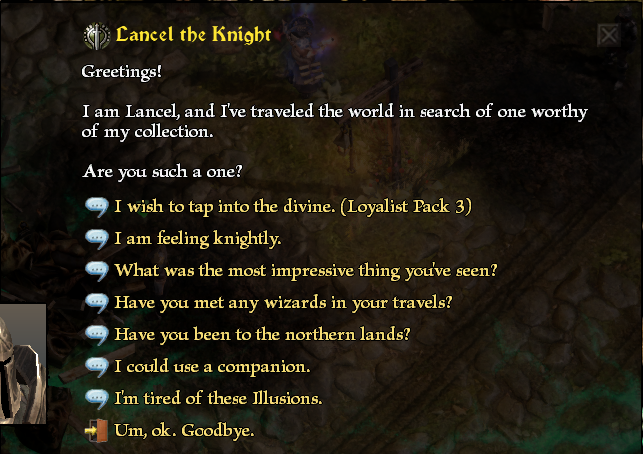
I will provide screenshots that show that the knight NPC does HAVE the dialogue option mentioned in the Item Pack 4 description (“I wish to tap into the divine.”), but the problem is, it only gives access to the Loyalist Item Pack 3 sets. Even when I click on it, it only gives the Item Pack 3 items, nothing else.
I am on the latest possible version of Grim Dawn on GOG (1.3.1.1_b), and I did restart my PC. If it matters/helps I own all the DLC and all the Item Packs and I don’t have any bugs/issues with those.
I already tried these steps(!):
- The Item Pack is visible in the game files, so I was able to uninstall it and then install it again. And there was no problem with the installation process (the usual GOG offline installer method).
- I restarted my PC.
- The NPC shows the same dialogue options on both my existing characters. So I tried creating a 3rd brand new one, which had the exact same options too…
- I already own all the previous Item Pack skins, I tried interacting with the skin NPCs and activating them again, then re-interacting with the knight NPC, still, Item Pack 4 does not show up.
Has anyone experienced this? Or is there a dev/moderator who can help please? Should I just contact support directly?