There’s a new opening screen so I assume development is in process, but since that change, picking up weapons is not possible. I don’t know if it’s a setting I need to toggle, but I can pick up cash and certain non-weapon goodies like the bits for weapon and armor enhancements, like corpse dust and so on. Since I’m here, maybe I can ask what’s the toggle to get the mini-map in the upper right corner of the screen back on. Thanks. Oh, and I’m on Steam and have bought the DLC expansions and my character is maxed out at Level 100 – if that matters. Clearly I have been enjoying this game quite a lot. But I can’t really play it now because of the problem mentioned.
Welcome to the forum. 
What do you mean by can’t pick up exactly? There is a setting in the Options menu that allows you to automatically pick up components, crafting materials, iron, etc, but it doesn’t work for weapons/gear; that you have to do manually by clicking on them.
The mini-map is toggled by the triangle on the right of your mana bar.
Maybe it’s a bit stupid if you’re already lvl 100, but do check whether you have enough room in your inventory?
Also, if you have filters enabled (default hotkey O, if memory serves) then dropped equipment can disappear.
Also also, have you installed mods? (Unofficial community extensions, in a way)
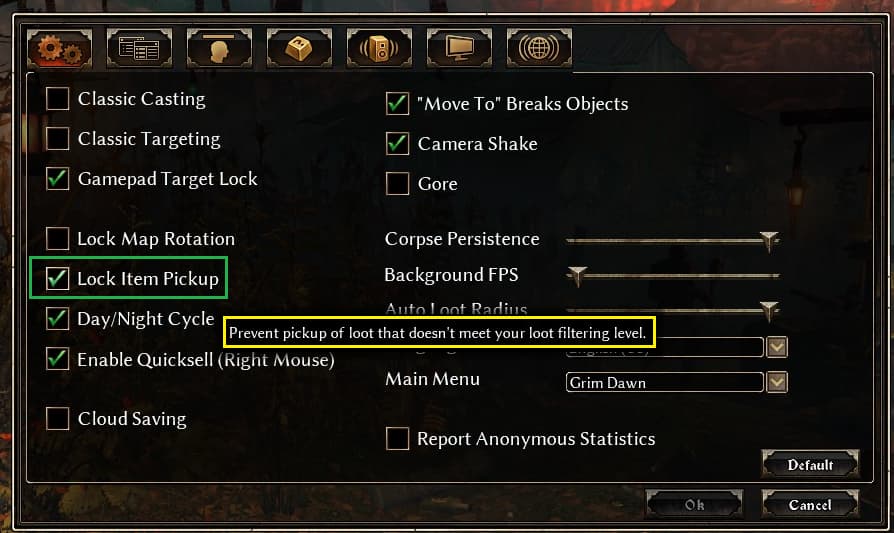
Yeah, I sure am maxed out in my inventory and that may have been automatic. But I went into options and made sure the settings were right. All’s good now. Thanks.
I should know that stuff, you might think but I haven’t ever not had it so I didn’t know where the button was. Did the trick thanks. And I messed with the settings and it all works fine now. Live and learn. I have gone through the game quite a lot and never had to change anything from default. So now I have. A Christmas Gift of sorts.
Yep. That did it. Thank you!
This topic was automatically closed 60 days after the last reply. New replies are no longer allowed.