Controller Feedback

GD’s controller support has made the genre accessible to me. Point-and-click RTS-styled controls have always been one of the specific reasons I avoided ARPGs. GD’s controller support has given me the chance to actually enjoy the game and finally find the action in the game-play. Love it to death.

I am using a Switch Pro controller via Steam, with all the DLC installed. I’m not running any mods other than Rainbow.

My experience after about, eh… 40 or 50 hours, brings me to these points consistently:

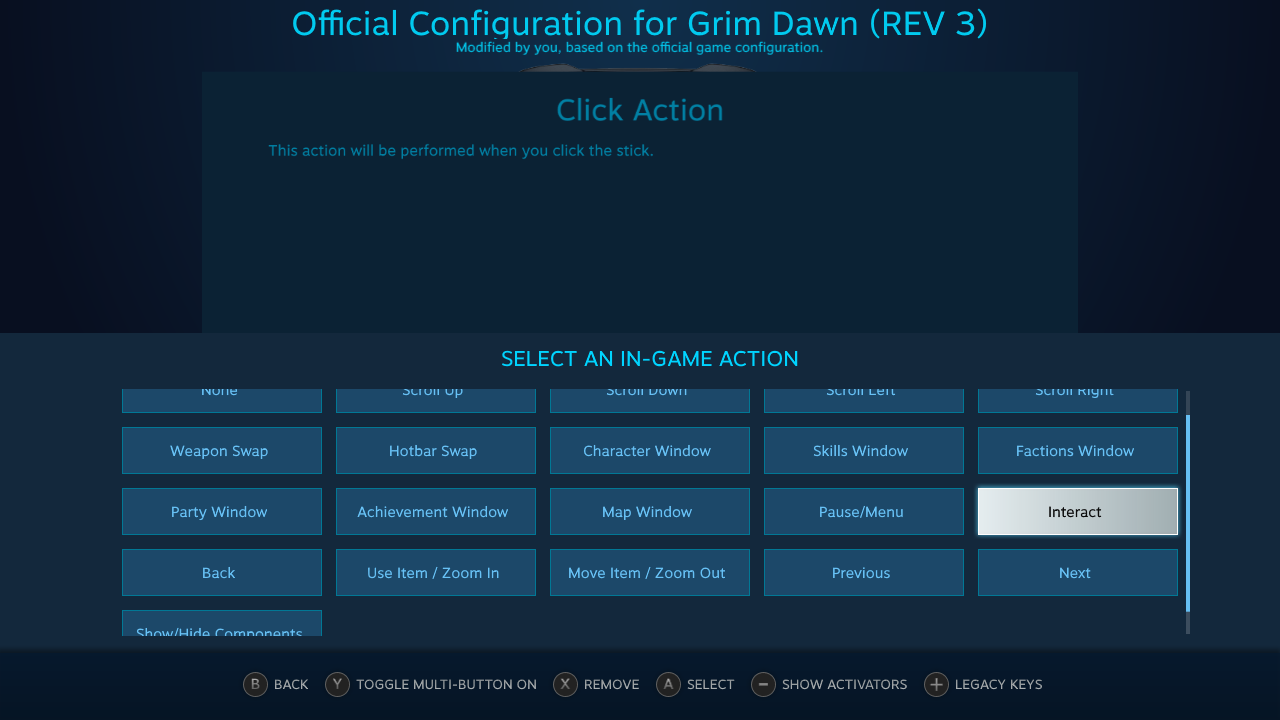
  1. I cannot find the option to Split Stacks with a controller input in Steam. I believe it was there before I rebound it, but the option to bind it back eludes me. I primarily play with a friend, so this feature is pretty important to me.
  1. There are two instances in the game that I’ve found where an NPC appears beneath loot – the Avatar of Mogdrogden, and a confused ghost in Forgotten Gods. In both of these cases, I’m having to spam the A button to pick up my loot, but in the process of doing so this makes me accidentally speed through a few of the dialogue options, because the targeting switches from loot to NPC before I’m done looting.

This was super frustrating as a new player who wanted to read the dialogue; particularly since with Mogdrogden I almost initiated combat unwittingly.

  1. The teleportation runes of Forgotten God and movement inputs interact funkily on a regular basis. I assume the stick isn’t polling movement inputs frequently enough, because I will teleport while holding the stick to the side in order to run in the same direction I am teleporting, and the character will immediately turn around after teleporting and run the wrong way for about half a second to a full second sometimes. This does not seem to happen on charges or teleports that target a monster; just the plain old teleport that targets a space on the ground.

  2. Sometimes I have a hard time getting my auras to toggle on. I’m not sure this is a controller issue, but I often times have to hit the button three or four times in order to make the game register that I have cast my aura, and display it above my hot-bar.

  3. Controller players have no way to mouse over the Treacherous Territory icons in order to read their tool tips and learn what they do.
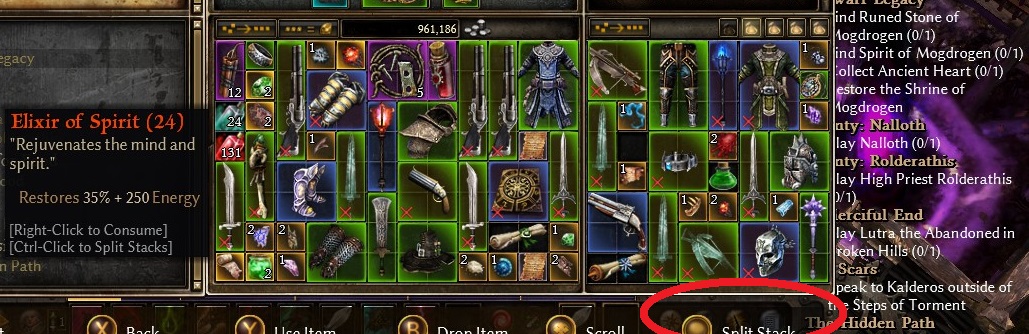
  1. Don’t you have it here?

  1. I highly recommend installing Grim Internals mod. You can turn automatic item pick up and turn off everything else.

3-4. Never had/noticed such problems so I cannot comment on that.

  1. It chooses to interact with the item rather than split stack, which I suspect is due to the controller input setup having been changed in Steam. I do not have the option to bind the right stick click back into splitting stacks, either. :frowning:

  2. I am running GI now; ultimately I found that lacking the ability to mouse over high priority targets to see healthbars in bigger fights made me unable to make critical decisions I’d have been able to make if I could mouse over enemies to see HP. Auto-pickup and healthbars on hero+ have compensated for what i lose by not playing mouse/keyboard, immensely!

  3. I have identified this as something that happens exclusively in multiplayer, after further testing. Multiplayer also denies me auto-loot occasionally, so I’m assuming this is latency and not input delay or lag.

  4. I have identified and resolved this problem. PEBKAC.

  5. Still no way to mouse over the mutators. Opening up the menu to access the cursor is something I haven’t tried yet, though it feels like it’d be suicide at higher difficulties/shards/waves. Will return with more feedback later.

1 It’s left stick click in my case. The right stick click picks up the item. If it still doesn’t work, maybe restore the default configuration and go from there.

5 I tried to bind Mouse to my Dualshock 4’s touchpad but it doesn’t work well (sometimes the cursors doesn’t move/the input switches from mouse to gamapepad and vice versa constantly). I’ve got no other ideas except having a mouse at your side to quickly look at the mutators, put it back quickly and then use gamepad only.

Or a script in Autohotkey that moves the cursors to every mutator position for a moment (is the number of mutators constant and is their position on the screen fixed? I don’t remember). The script would work because you can bind a keyboard key to your gamepad button in Controller configuration and Autohotkey enables you to rewrite keyboard key to any action you like, including moving the cursor on the screen. Something like

Y::
   MouseMove, 1500, 100 ;sample numbers
   Sleep, 1000
   MouseMove, 1600, 100 
   Sleep, 1000
   MouseMove, 1700, 100
   Sleep, 1000
Return

The amount of mutators is variable; but they grow from the right into fixed positions as far as I can tell – each symbol should have the same width, and they all appear at the same height. Autohotkey will probably work for this; though hopefully a work-around can be introduced in a future patch.

I’m left wondering if console players are SOL; but I don’t own any modern consoles other than a switch so I don’t know if USB mice work with them.

I’ll double check the stick click. PEBCAK is very likely, I am not a smart man. :stuck_out_tongue: