So, I downloaded both Grimarillion and DoM. Tried both in separate playthroughs. Nothing worked. Both mods dont work. I installed both mods manually in the Mods folder. Unless I did something wrong, how did you get the mods to work? And yes, I started under custom game.
Custom game - select the mod you want to play, make a new character since you can’t use your vanilla ones.
Doesnt work. Grimarillions and Doms map I can select, but when playing either mod in game, its all vanilla. Even the stash.
Try extracting the files using WinRAR or similar and put them in the mods folder.
Ok, I have 7zip. I use it to extract files. THIS DOESNT WORK.
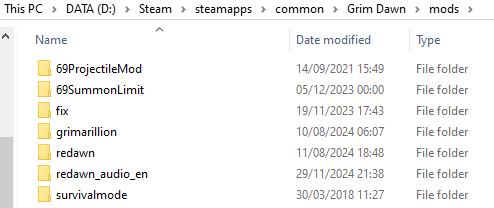
Show where you’re putting the files.
bro, in the Mods folder.
What is the path to it? Is it the same as mine?
then you did not install them correctly. A proper installation is in the mods directory, have a subfolder and files for the mod as follows mods/[modname]/database/[modname].arz
If you do not have that, then you will end up in a vanilla game even after selecting the mod
So instead of putting the extracted mod in the Mods Folder, do I just put the resource and database folders in the mod folders? Or do I put the second subfolder in the mods folder? Cause you have the first folder which is the mod name, then a second sub folder with both the resource and database files in it…
E-Steam-Steamapps-Common-GrimDawn-Mod…
So I think I got it to work. Grimarillion at least. So I guess I have to put the 2nd subfolder in the mods folder, not the entire folder. Now I know. The stash is huge at least.
The mods work, you just installed wrong or have some other kind of error.
Depending where you download it from - the sites might change the structure of the zip file, which is out of the modder’s hands. My MEGA links for grimarillion are the intended way to download it but I know some people can’t or won’t use those links, they only trust nexus. However I have seen nexus do the renaming BS which ruins the zip file. So if you download the mod and open the zip file and see a file/folder name that has more than just the mod name, like a series of numbers - it’s wrong. Check one layer deeper.
The intended structure of either mod needs to be this:
…Grim Dawn/Mods/dom (Or Grimarillion)/
And in that mod folder you should see two other folders, Database and Resources. Within the database folder there should be a file, for dom it will be dom.arz, for grimarillion it will be grimarillion.arz. These file names must match the folder name.
If the structure deviates from that at all - it won’t work.
If you really want to figure it out you’ll need to post screenshots cause you’re not really providing useful information.
I got em to work. Thanks guys.
you place it exactly as I described, in theory simply extracting the mod’s .zip file in the mods folder should set it up correctly
Hello, mamba. I’ve discovered that summoning the Grim Dawn Legend Blacksmith is missing a one-handed mace: Bysmiel’s Grasp.https://www.grimtools.com/db/items/11677
I forgot how to install the mod entirely. From what everyone has been posting for the past few days. Apparently it’s changed from what the installation was prior. It used to be extracting the files and placing in the ‘MOD’ folder. Now it’s just the ZIP file into the ‘MOD’ folder?
Or is it the same way it was prior?
same as before, download mod, place it in mods folder, unzip it there to get mods\dom
my stash and skill windo UI is broken, does anyone have any idea how I can fix it?
Broken in which way? Do you have a screenshot?