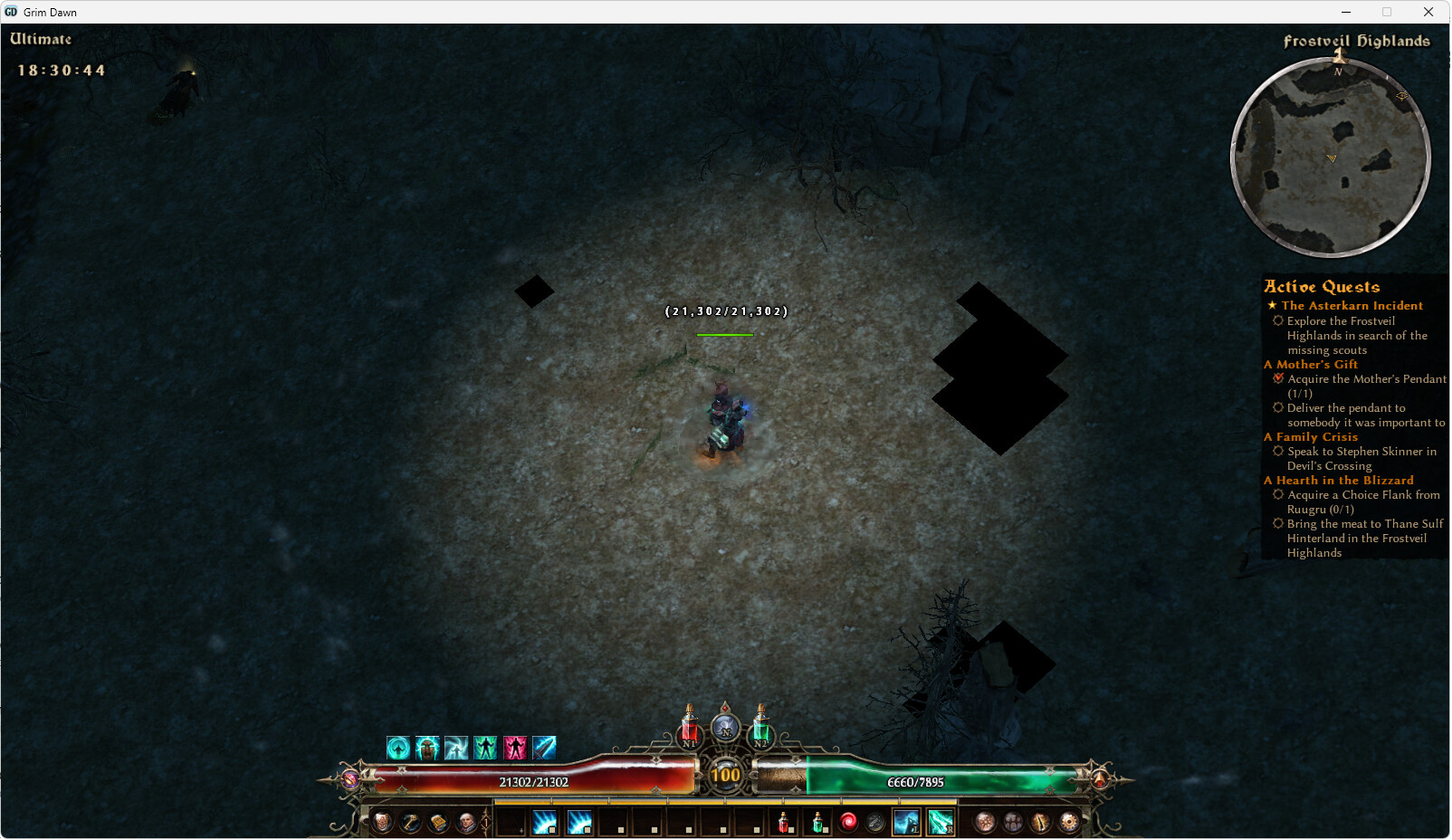
Since starting FoA I see these large black spots on the ground, some locations have none and some have big spots of them, I am guessing its some sort of texture issue?
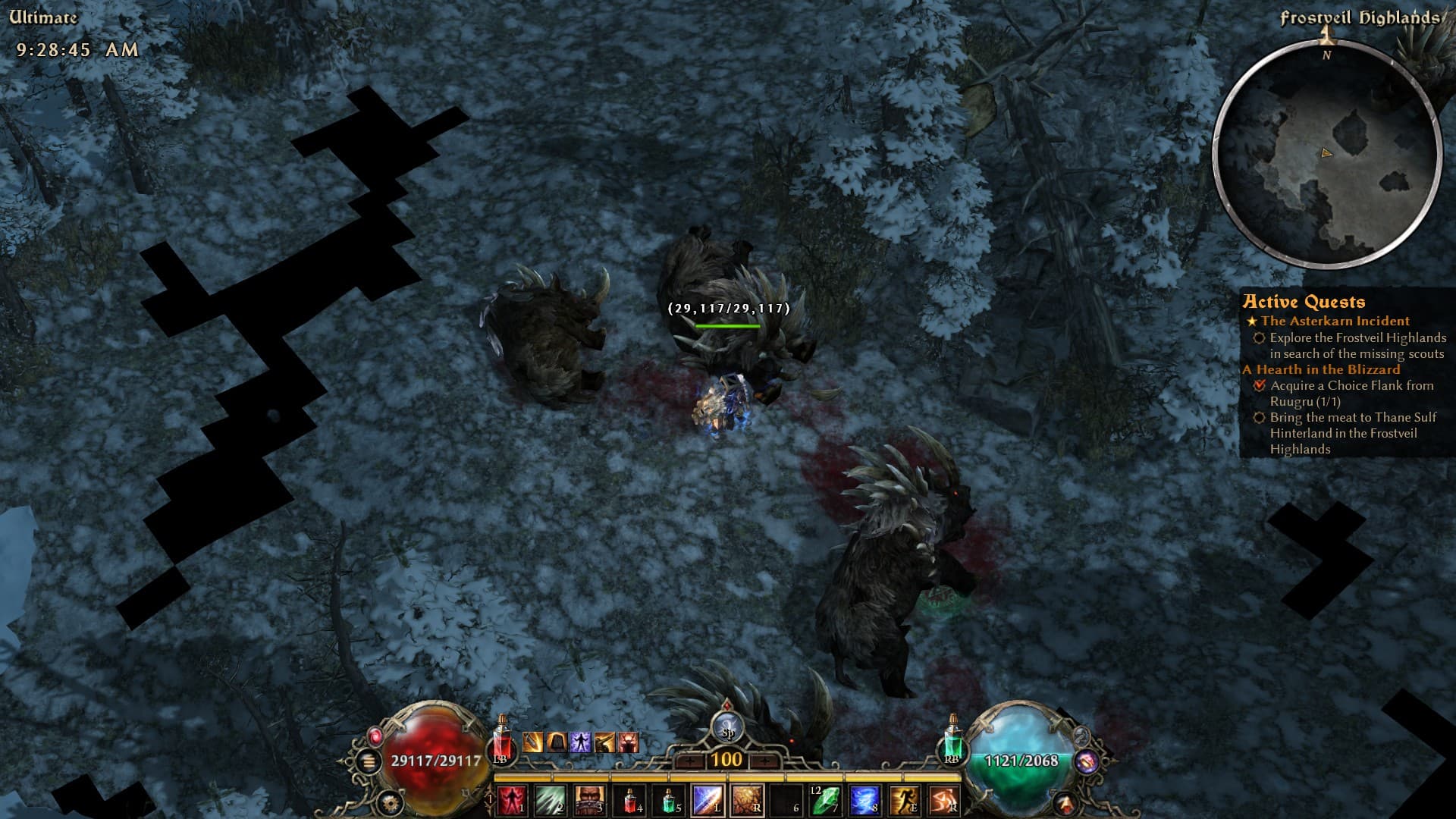
2 Likes
Same problem with me.
2 Likes
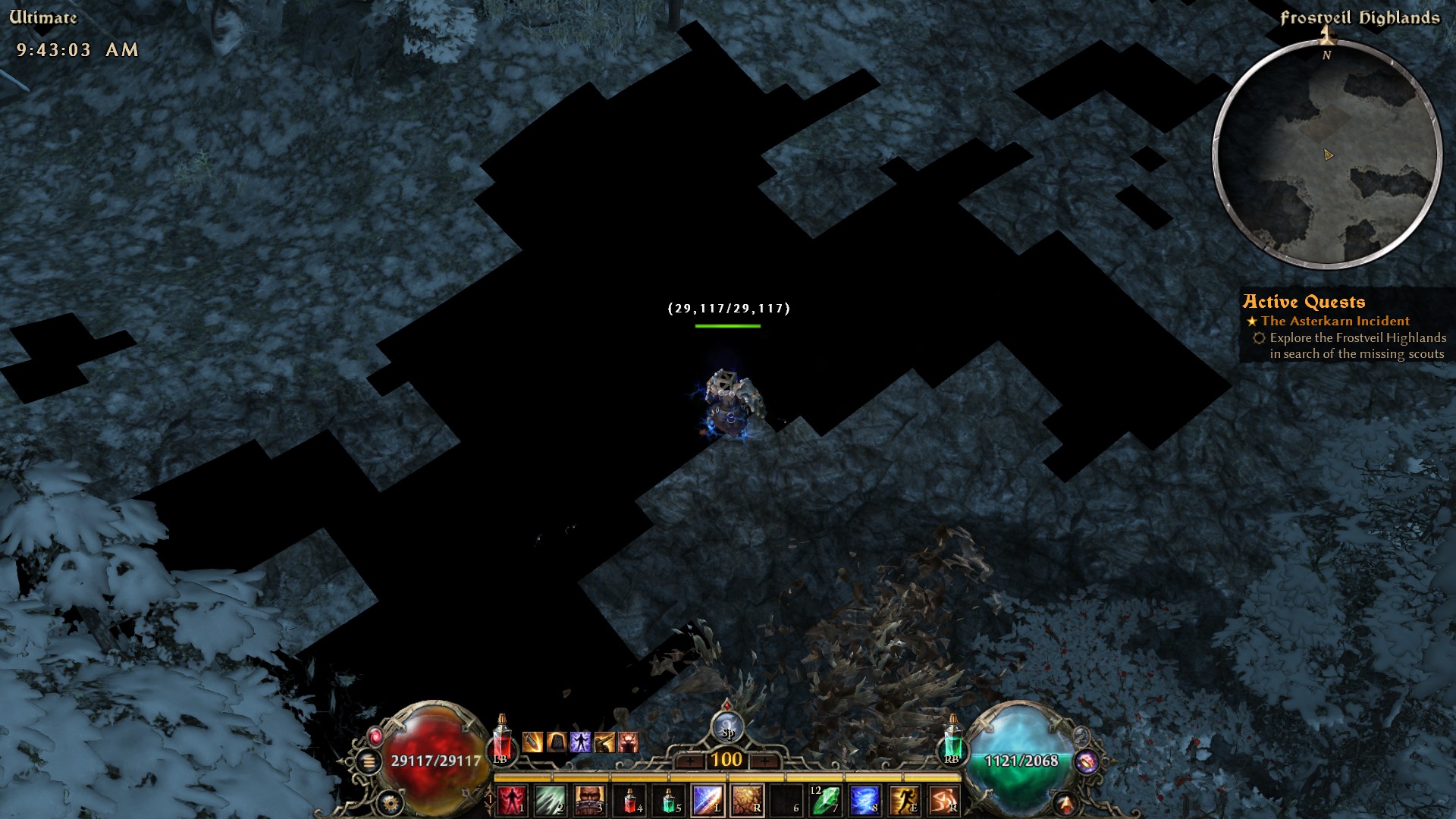
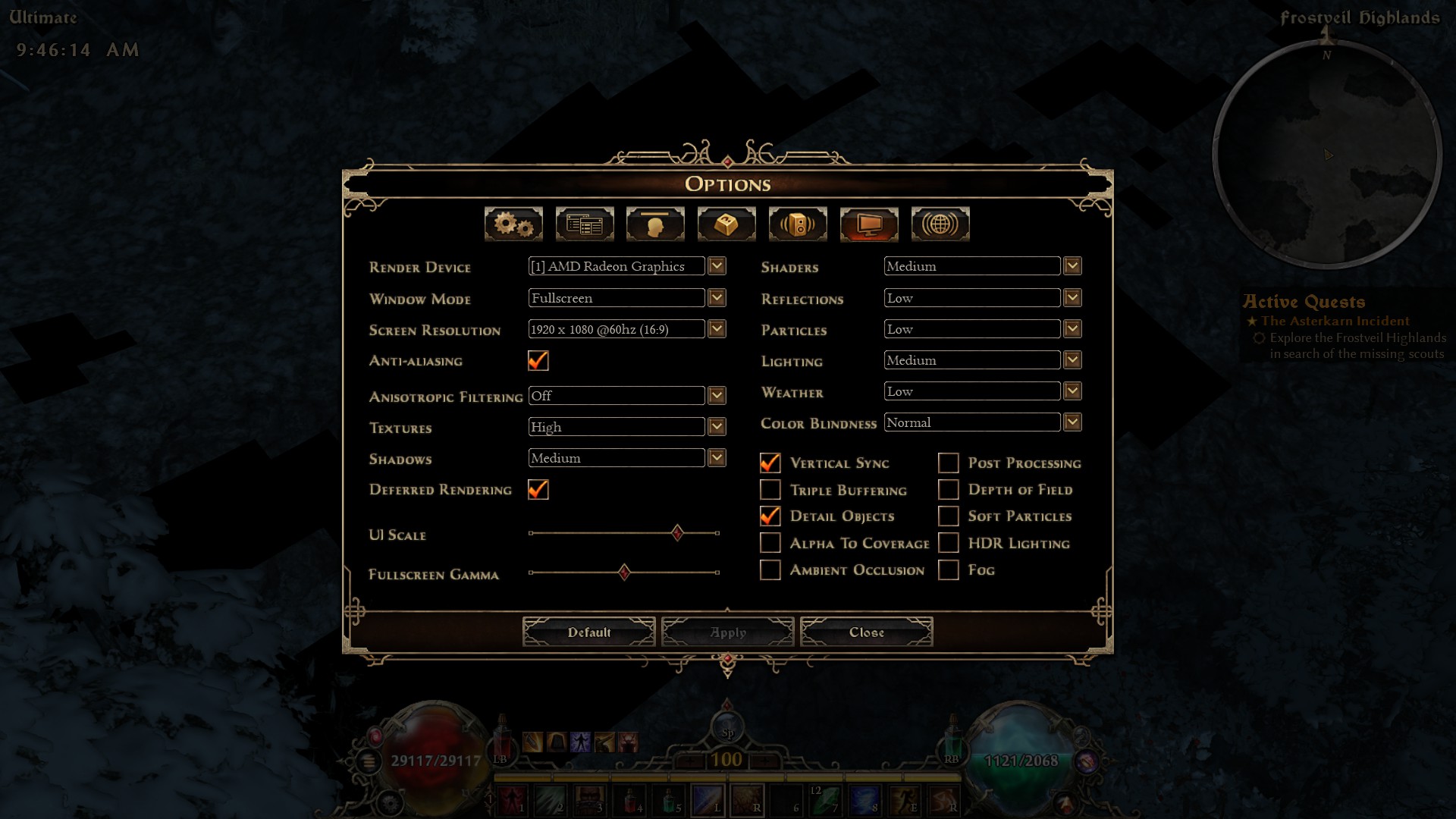
What launch option and video settings are you using?
seeing the same thing
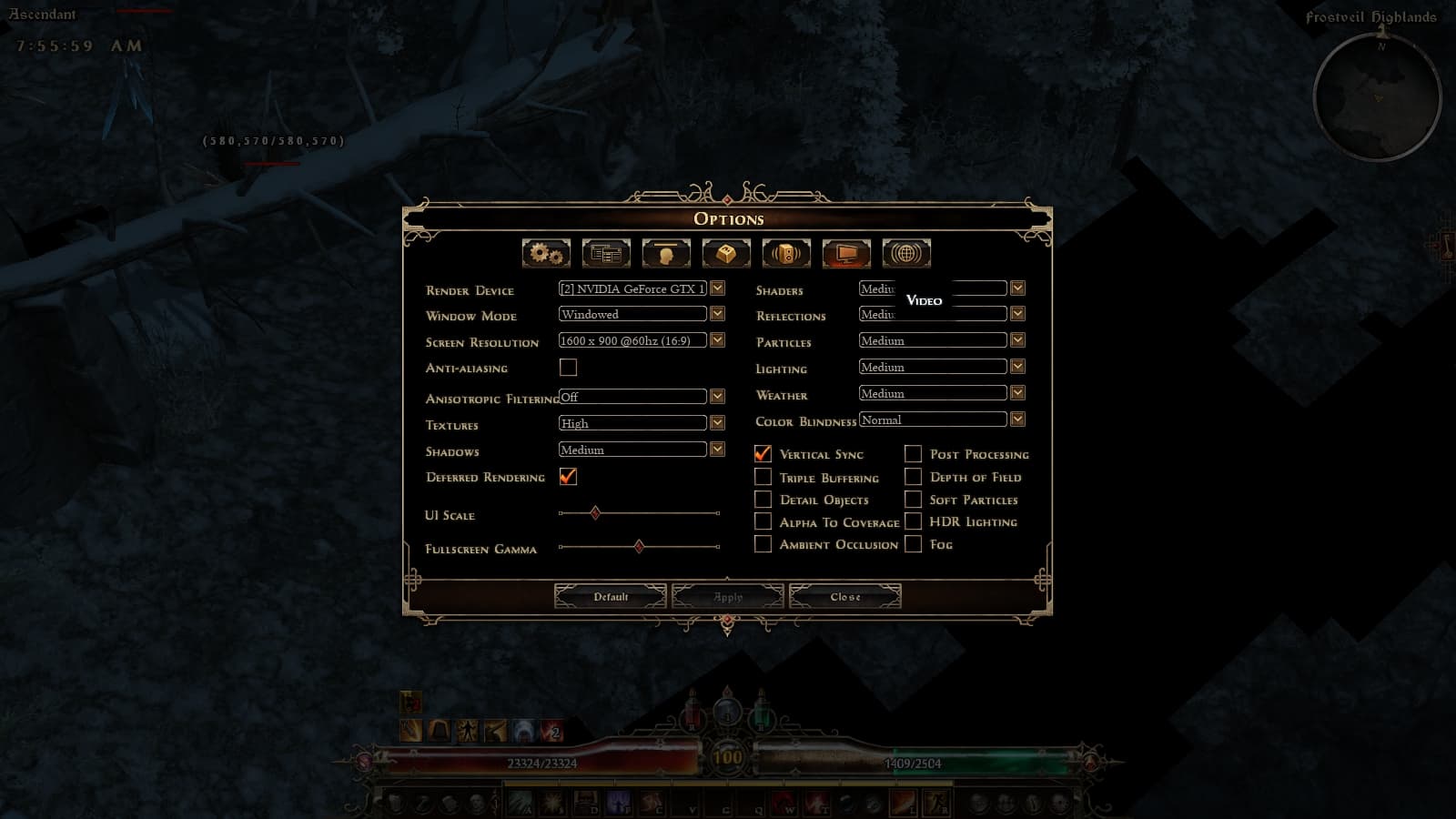
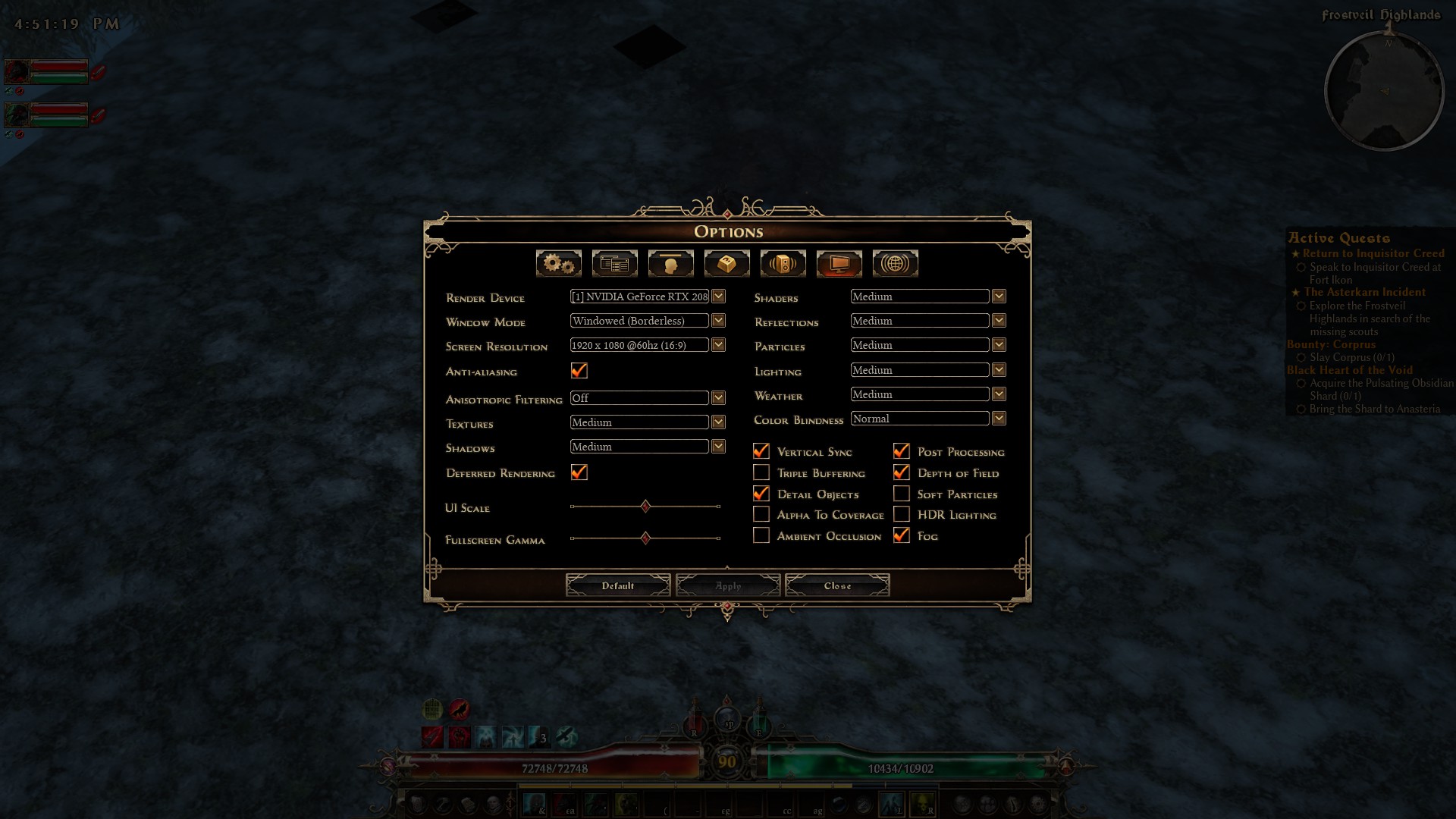
Here’s mine.
System:
  Kernel: 7.0.0-28-generic arch: x86_64 bits: 64 compiler: gcc v: 13.3.0 clocksource: tsc
  Desktop: Xfce v: 4.18.1 tk: Gtk v: 3.24.41 wm: xfwm4 v: 4.18.0 with: xfce4-panel
    tools: light-locker vt: 7 dm: LightDM v: 1.30.0 Distro: Linux Mint 22.3 Zena
    base: Ubuntu 24.04 noble
Machine:
  Type: Desktop System: ASUS product: All Series v: N/A serial: <superuser required>
  Mobo: ASUSTeK model: SABERTOOTH Z97 MARK 2 v: Rev 1.xx serial: <superuser required>
    part-nu: All uuid: <superuser required> UEFI: American Megatrends v: 3503 date: 04/18/2018
CPU:
  Info: quad core model: Intel Core i7-4771 bits: 64 type: MT MCP smt: enabled arch: Haswell rev: 3
    cache: L1: 256 KiB L2: 1024 KiB L3: 8 MiB
  Speed (MHz): avg: 3455 high: 3895 min/max: 800/3900 cores: 1: 3895 2: 3793 3: 3874 4: 3797
    5: 3874 6: 3800 7: 3812 8: 800 bogomips: 55967
  Flags: avx avx2 ht lm nx pae sse sse2 sse3 sse4_1 sse4_2 ssse3
Graphics:
  Device-1: NVIDIA TU104 [GeForce RTX 2080] vendor: Micro-Star MSI driver: nvidia v: 595.71.05
    arch: Turing pcie: speed: 8 GT/s lanes: 16 ports: active: none off: HDMI-A-1 empty: DP-1, DP-2,
    DP-3, Unknown-2 bus-ID: 01:00.0 chip-ID: 10de:1e82 class-ID: 0300
  Display: x11 server: X.Org v: 21.1.11 with: Xwayland v: 23.2.6 compositor: xfwm4 v: 4.18.0
    driver: X: loaded: nvidia unloaded: fbdev,modesetting,nouveau,vesa
    gpu: nv_platform,nvidia,nvidia-nvswitch display-ID: :0.0 screens: 1
  Screen-1: 0 s-res: 1920x1080 s-dpi: 81 s-size: 602x343mm (23.70x13.50") s-diag: 693mm (27.28")
  Monitor-1: HDMI-A-1 mapped: HDMI-0 note: disabled model: Idek Iiyama PL2793H serial: <filter>
    res: 1920x1080 hz: 60 dpi: 82 size: 597x336mm (23.5x13.23") diag: 685mm (27") modes:
    max: 1920x1080 min: 640x480
  API: EGL v: 1.5 hw: drv: nvidia platforms: device: 0 drv: nvidia device: 2 drv: swrast gbm:
    drv: nvidia surfaceless: drv: nvidia x11: drv: nvidia inactive: wayland,device-1
  API: OpenGL v: 4.6.0 compat-v: 4.5 vendor: nvidia mesa v: 595.71.05 glx-v: 1.4
    direct-render: yes renderer: NVIDIA GeForce RTX 2080/PCIe/SSE2
  API: Vulkan v: 1.3.275 layers: 9 surfaces: xcb,xlib device: 0 type: discrete-gpu driver: N/A
    device-ID: 10de:1e82 device: 1 type: cpu driver: N/A device-ID: 10005:0000
Audio:
  Device-1: Intel 9 Series Family HD Audio vendor: ASUSTeK 9 driver: snd_hda_intel v: kernel
    bus-ID: 00:1b.0 chip-ID: 8086:8ca0 class-ID: 0403
  Device-2: NVIDIA TU104 HD Audio vendor: Micro-Star MSI driver: snd_hda_intel v: kernel pcie:
    speed: 8 GT/s lanes: 16 bus-ID: 01:00.1 chip-ID: 10de:10f8 class-ID: 0403
  API: ALSA v: k7.0.0-28-generic status: kernel-api
  Server-1: PipeWire v: 1.0.5 status: active with: 1: pipewire-pulse status: active
    2: wireplumber status: active 3: pipewire-alsa type: plugin
Network:
  Device-1: Intel Ethernet I218-V vendor: ASUSTeK driver: e1000e v: kernel port: f040
    bus-ID: 00:19.0 chip-ID: 8086:15a1 class-ID: 0200
  IF: eno1 state: up speed: 1000 Mbps duplex: full mac: <filter>
Drives:
  Local Storage: total: 704.24 GiB used: 585.4 GiB (83.1%)
  ID-1: /dev/nvme0n1 vendor: Western Digital model: WDS500G3X0C-00SJG0 size: 465.76 GiB
    speed: 31.6 Gb/s lanes: 4 tech: SSD serial: <filter> fw-rev: 102000WD temp: 35.9 C scheme: GPT
  ID-2: /dev/sda vendor: SanDisk model: SDSSDHP256G size: 238.47 GiB speed: 6.0 Gb/s tech: SSD
    serial: <filter> fw-rev: 6RL scheme: MBR
Partition:
  ID-1: / size: 456.89 GiB used: 389.98 GiB (85.4%) fs: ext4 dev: /dev/nvme0n1p2
  ID-2: /boot/efi size: 511 MiB used: 6.1 MiB (1.2%) fs: vfat dev: /dev/nvme0n1p1
Swap:
  ID-1: swap-1 type: file size: 2 GiB used: 32 KiB (0.0%) priority: -1 file: /swapfile
USB:
  Hub-1: 1-0:1 info: hi-speed hub with single TT ports: 14 rev: 2.0 speed: 480 Mb/s lanes: 1
    chip-ID: 1d6b:0002 class-ID: 0900
  Device-1: 1-5:2 info: Logitech G105 Gaming Keyboard type: keyboard,HID
    driver: hid-generic,usbhid interfaces: 2 rev: 1.1 speed: 1.5 Mb/s lanes: 1 power: 200mA
    chip-ID: 046d:c248 class-ID: 0300
  Device-2: 1-6:3 info: Logitech G403 HERO Gaming Mouse type: mouse,HID
    driver: hid-generic,usbhid interfaces: 2 rev: 2.0 speed: 12 Mb/s lanes: 1 power: 300mA
    chip-ID: 046d:c08f class-ID: 0300 serial: <filter>
  Hub-2: 2-0:1 info: full speed or root hub ports: 2 rev: 2.0 speed: 480 Mb/s lanes: 1
    chip-ID: 1d6b:0002 class-ID: 0900
  Hub-3: 2-1:2 info: Intel ports: 6 rev: 2.0 speed: 480 Mb/s lanes: 1 chip-ID: 8087:8009
    class-ID: 0900
  Hub-4: 3-0:1 info: super-speed hub ports: 6 rev: 3.0 speed: 5 Gb/s lanes: 1 chip-ID: 1d6b:0003
    class-ID: 0900
  Hub-5: 4-0:1 info: full speed or root hub ports: 2 rev: 2.0 speed: 480 Mb/s lanes: 1
    chip-ID: 1d6b:0002 class-ID: 0900
  Hub-6: 4-1:2 info: Intel Integrated Hub ports: 8 rev: 2.0 speed: 480 Mb/s lanes: 1
    chip-ID: 8087:8001 class-ID: 0900
  Hub-7: 5-0:1 info: hi-speed hub with single TT ports: 2 rev: 2.0 speed: 480 Mb/s lanes: 1
    chip-ID: 1d6b:0002 class-ID: 0900
  Hub-8: 6-0:1 info: super-speed hub ports: 4 rev: 3.1 speed: 10 Gb/s lanes: 1 chip-ID: 1d6b:0003
    class-ID: 0900
  Hub-9: 7-0:1 info: hi-speed hub with single TT ports: 2 rev: 2.0 speed: 480 Mb/s lanes: 1
    chip-ID: 1d6b:0002 class-ID: 0900
  Hub-10: 8-0:1 info: super-speed hub ports: 2 rev: 3.0 speed: 5 Gb/s lanes: 1 chip-ID: 1d6b:0003
    class-ID: 0900
Sensors:
  System Temperatures: cpu: 54.0 C mobo: N/A gpu: nvidia temp: 48 C
  Fan Speeds (rpm): N/A gpu: nvidia fan: 23%
Repos:
  Packages: 2488 pm: dpkg pkgs: 2458 pm: flatpak pkgs: 30
  No active apt repos in: /etc/apt/sources.list
  Active apt repos in: /etc/apt/sources.list.d/fish-shell-release-4-noble.list
    1: deb [signed-by=/etc/apt/keyrings/fish-shell-release-4-noble.gpg] https: //ppa.launchpadcontent.net/fish-shell/release-4/ubuntu noble main
  Active apt repos in: /etc/apt/sources.list.d/gottcode-gcppa-noble.list
    1: deb [signed-by=/etc/apt/keyrings/gottcode-gcppa-noble.gpg] https: //ppa.launchpadcontent.net/gottcode/gcppa/ubuntu noble main
  Active apt repos in: /etc/apt/sources.list.d/hluk-copyq-noble.list
    1: deb [signed-by=/etc/apt/keyrings/hluk-copyq-noble.gpg] https: //ppa.launchpadcontent.net/hluk/copyq/ubuntu noble main
  Active apt repos in: /etc/apt/sources.list.d/libreoffice-ppa-noble.list
    1: deb [signed-by=/etc/apt/keyrings/libreoffice-ppa-noble.gpg] https: //ppa.launchpadcontent.net/libreoffice/ppa/ubuntu noble main
  Active apt repos in: /etc/apt/sources.list.d/official-package-repositories.list
    1: deb http: //linux-mint.froonix.org zena main upstream import backport
    2: deb http: //mirror.kamp.de/ubuntu noble main restricted universe multiverse
    3: deb http: //mirror.kamp.de/ubuntu noble-updates main restricted universe multiverse
    4: deb http: //mirror.kamp.de/ubuntu noble-backports main restricted universe multiverse
    5: deb http: //security.ubuntu.com/ubuntu/ noble-security main restricted universe multiverse
  Active apt repos in: /etc/apt/sources.list.d/qbittorrent-team-qbittorrent-stable-noble.list
    1: deb [signed-by=/etc/apt/keyrings/qbittorrent-team-qbittorrent-stable-noble.gpg] https: //ppa.launchpadcontent.net/qbittorrent-team/qbittorrent-stable/ubuntu noble main
  Active apt repos in: /etc/apt/sources.list.d/steam-stable.list
    1: deb [arch=amd64,i386 signed-by=/usr/share/keyrings/steam.gpg] https: //repo.steampowered.com/steam/ stable steam
    2: deb-src [arch=amd64,i386 signed-by=/usr/share/keyrings/steam.gpg] https: //repo.steampowered.com/steam/ stable steam
  Active apt repos in: /etc/apt/sources.list.d/brave-browser-release.sources
    1: deb [arch=amd64 arm64] https: //brave-browser-apt-release.s3.brave.com stable main
  Active apt repos in: /etc/apt/sources.list.d/volian-archive-nala-unstable.sources
    1: deb deb-src https: //deb.volian.org/volian/ nala main
  Active apt repos in: /etc/apt/sources.list.d/winehq-noble.sources
    1: deb [arch=amd64 i386] https: //dl.winehq.org/wine-builds/ubuntu noble main
Info:
  Memory: total: 20 GiB available: 19.47 GiB used: 5.11 GiB (26.2%)
  Processes: 330 Power: uptime: 6h 1m states: freeze,mem,disk suspend: deep wakeups: 0
    hibernate: platform Init: systemd v: 255 target: graphical (5) default: graphical
  Compilers: clang: 18 gcc: 13.3.0 Client: Unknown python3.12 client inxi: 3.3.34
Edit : X64 launch option, forgot sorry.
Hope that helps.
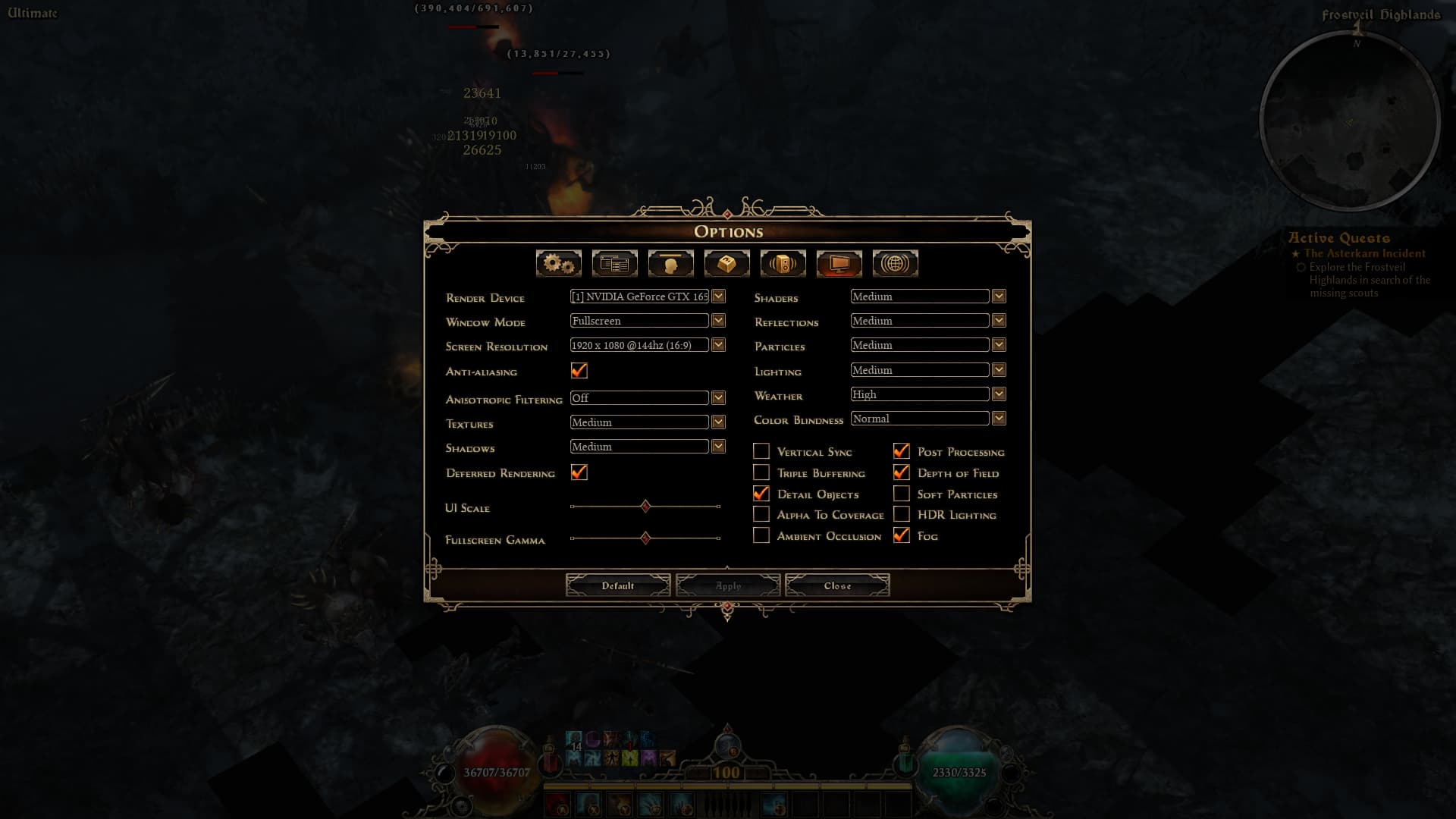
In my case, textures were missing when the shader setting was “Medium,” but setting it to “High” resolved the issue. 
3 Likes
Damn, confirmed. Well done, sir.
That seems to have fixed it for me as well!
Worked for me as well. Glad to see it wasnt my GPU dying yet 
I can confirm @Zantai , any shader setting, lower than “medium” (including medium) generates those missing squares… In my case, it was set to “low” -