New standalone update 0.7.8.2 downloadable here.
Edit Nexus mods link is available here: Reign of Terror at Grim Dawn Nexus - Mods and Community. The file on Nexus Mods is the standalone for 0.7.8.4.
Changelog is inside the update.
Warning, this patch needs a few additional steps regarding your save files
This has to do with another future update and renaming of the map files.
Install instructions
First, unzip/extract the folder into your Grim Dawn/mods folder. If you do not have the mod installed yet, you’re done! If you have an older version installed, overwrite the existing files when asked.
In order to prepare for some additional maps, the mod has a new world file to choose in the main menu: ReignOfterror ~campaign.map.
This means you’ll have to do a small adjustment on existing characters, as quest and exploration progress is saved per world file.
So the steps to take are:
- Take your existing character into a
ReignOfTerror ~ Campaign.map, select this in the main menu, under Custom Game.
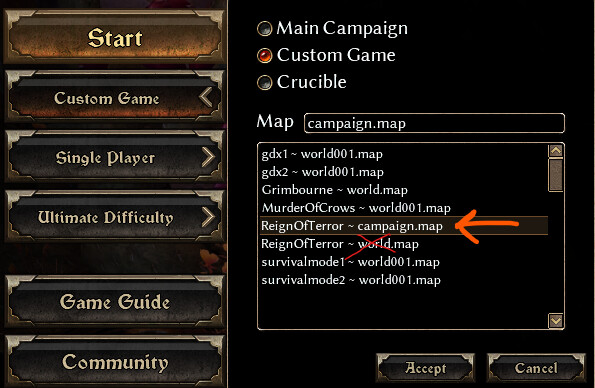
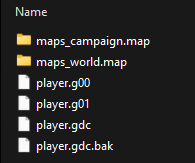
game, this will add the maps_campaign.map folder to your character save file (see the pictures).
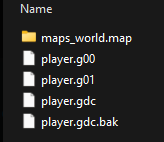
2. Exit the game, and go to your character save file (easily found by searching in the Windows explorer for your charactername but with an underscore in front of it: e.g. _fuzzydunlop .
3. Copy and paste all the content from the maps_world.map (the old world), into the maps_campaign.map For a new character, just select the new map (campaign.map), and you’re good to go.
For new characters, just select the campaign map from the Custom Game menu and you’re good to go.
See the 2 pictures for how the folder currently looks, and the folder that will be added after step 2.
I’ll ask Ram to adjust the main post of course!