I might need some help here as to what changed in 1.3.1 that could cause this.
Previous testing patches Reign of terror has always worked, but in 1.3.1 the game will crash during the loading screen. It’s not even possible to load in at all.
I attached two crashdumps, one from an attempt at dx9 Legacy mode.
crashdump-dx9-26beae22-2fde-4353-a4f1-4d72d688fb11.zip (28.7 KB)
crashdump162c4e6d-321a-41ef-9aa0-68a88924f100.zip (28.4 KB)
As a quick check, I also tried if I could load in my Grimborne mod but that too now causes a crash when attempting to load in.
grimborne-f1354f2d-1586-40fc-9678-0dd3244dbdc4.zip (28.5 KB)
Did something change as to what determines where character spawn in or something? The loading screen gets to the point where it loads in the music if the area you’re about to spawn into the game but never makes it past that.
I’ll necro of this thread, as I’m at a loss. I dont know what’s happening or what’s causing this. Anyone with a custom map mod who can still play on the playtest?
Or anyone from Crate who knows what the deal could be that’s in 1.3.1 but not in live?
By testing patches, do you mean that you have been able to work with other FoA patches (1.3.0 through 1.3.0.8) and only this current playtesting is causing crashes?
In my experiences in getting FoA to work, it was the stash system that was the major problem. Making a fresh character and purchasing stash tabs then made it possible for my other characters to load in. Otherwise, I had the exact same problems you had where the game would just crash before being able to load my character.
I have modified vanilla map, added a few new regions and modified a few vanilla ones. At first it had a few issues with 1.3 / foa but gradually found them and fixed them with reports from the mod players.
I had a few map regions that were crashing the game, I had to reimport many of these regions to fix the issues. Also had a few dbrs and mesh files that mysteriously got corrupted and I had to fix that. Dbrs just needed to be opened and saved as they were tbh, meshes are a bit harder to fix, but sometimes simply deleting the asset and then rebuilding with the mif it was fixed.
I assume your issue is the same, or similar. It’s gonna be tough to find what is the cause of the crash, but if it crashes on load, it’s either the area you’re spawning in, an item in your stash or on your character, or an npc that spawns near you, or a broken skill/ui dbr. The new ui dbrs are very finicky and crash the game if it’s not just right.
As a test, you’ll have to really isolate alot of the mod elements to find the source. There’s not really an easy fix.
I’ve had several meshes causes crashes since 1.3, but i’ve always been able to at least load the game.
But the fact that it works in 1.3.0.7 (or are we at 1.3.0.8 already?) but not in the playtest, isn’t that indicative of a new change, maybe some kind of template change, that now causes a crash? I guess I can rebuild the entire map and arz though as a start.
Does it only crash on GD’s public test version + RoT_0804? If that works, then most likely it is something you have changed that’s causing the issue.
Start by deleting .arc files one by one (scripts file always being a good suspect). Most should be safe to delete without causing a crash. If no issues on the .arc, build the mod by excluding part of the dbr folders. It can be a case of a wrongly formatted dbr file or something big in the game folder being outdated.
In response to this specific question: I can still play ReDawn, which is fully custom map.
As Stan already said, the primary method for determine the problem is resource dichotomy.
I was able to “load” RoT on the play test only when removing the .arz file. Even with only an .arz and 0 .arc, still got a crash.
So yeah, dbr digging it is. Try compiling the entire mod without the “game” folder. If it works, slowly start adding files one by one till it crashes.
When you find a file which crashes it, start removing couple of entries till the crash stops. And remember to back up  .
.
Ofcourse, the issue may also be multi layers, which is going to complicate things.
1 Like
Alright thanks! Guess I’ll do some digging!
Pinpointed the file causing the issue:
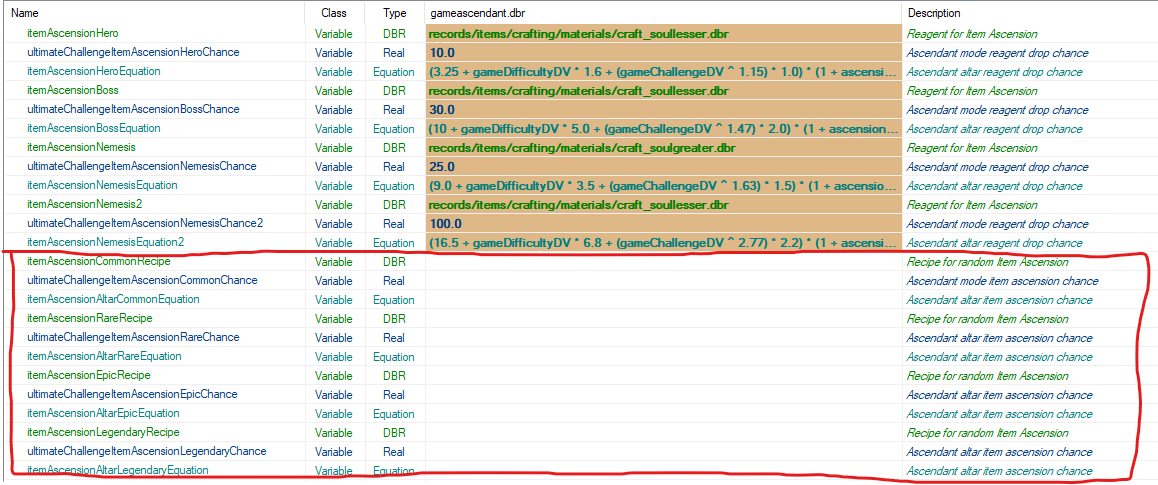
gameascendent.dbr, I suspect some changes in the template which aren’t available or something but so far:
I’ve rebuild the entire database.arz folder by folder until I pinpointed the folder, and subsequently the file(s).
Speaking specifically for Reign of Terror gameengine.dbr by itself does not cause a crash, if it’s referring to the gameascendent.dbr located in gdx3. I first thought to just copy over all entries from the gdx3 version into RoT and see when it would be fixed. It never would be fixed, so I started over.
the RoT gameengine.dbr which was working by itself, and then just copy gameascendent.dbr into RoT, without touching it at all. This too was enough to case a crash upon loading.
extracting the templates.arc from the base GD folder then led me to this. While I was sort of distracted and didn’t pay attention to the template prior to extracting it, I’m fairly sure the default one didnt have the entries in the red rectangle (I at least dont remember there being so many empty entries) (I opened the newly extracted template in Notepad++, copied over the contents into the existing template and see the change):
Edit: filling in all the empty entries did not fix the crashing.
So far the progress. I dont know if this is manually fixable or if Crate needs to supply the proper template with a new patch but something is off with gameascendent.dbr
Final update then, hopefully:
The issue was with new templates for both gameascendent.dbr and gameengine.dbr, updated both, and after fixing some copy-paste errors to fill in the new template slots, it seems to be working. Special thanks to Serious Stan for helping me out here!
2 Likes