Hi Crate team,
I’ve encountered a UI bug when upgrading Dirt Roads (Unbefestigte Straße) to Paved Roads that completely locks control over the construction process.
The Issue:
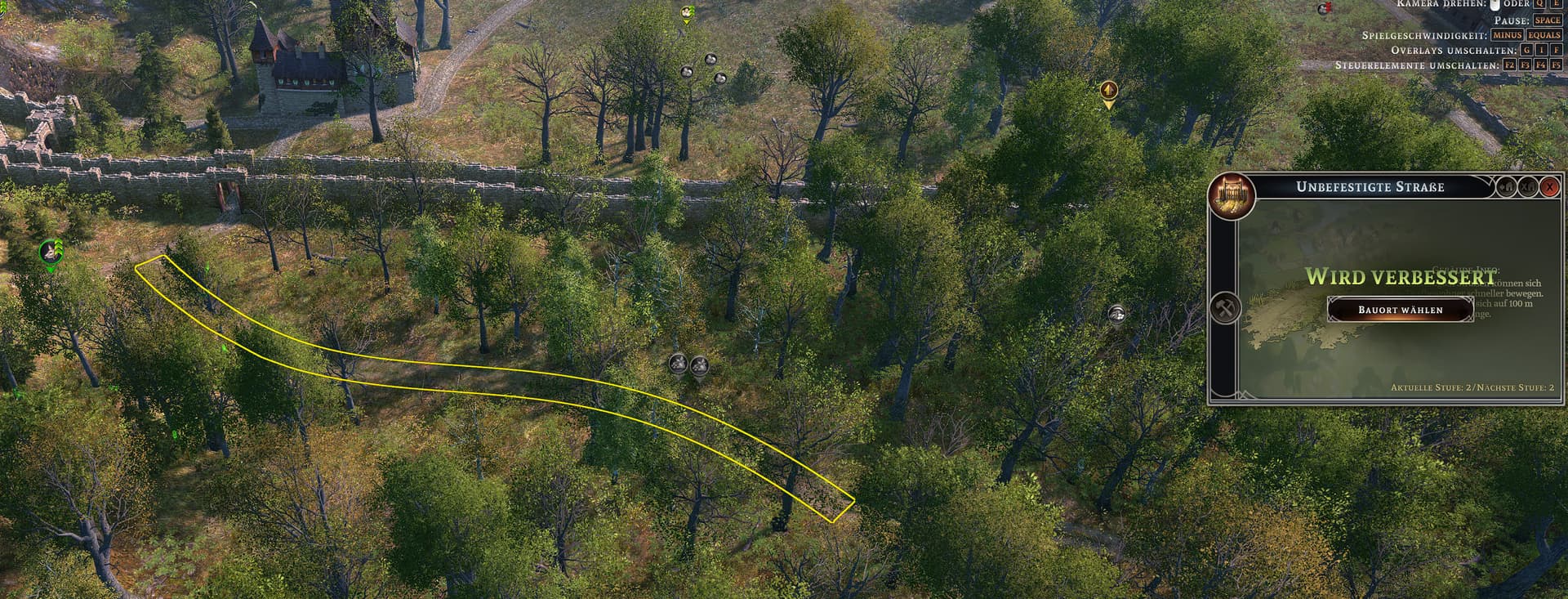
When a Dirt Road segment is queued for an upgrade, the inspection window shows the state “Wird verbessert” (Being upgraded) and provides a “Bauort wählen” (“Select Construction Site”) button.
However, clicking this button does absolutely nothing:
- It does not focus the view or open the construction management options.
- As a result, players are unable to prioritize the road construction, assign additional workers, or cancel the ongoing upgrade.
- The road segment remains visually highlighted on the terrain (yellow border) but cannot be interacted with via its menu UI.
Expected Behavior:
Clicking the button (or selecting the active upgrade site) should open the standard construction management overlay, allowing players to adjust worker priority, manage labor allocation, or cancel the upgrade request if needed.
Attached is a screenshot showing the unresponsive menu overlay while the road upgrade is active.