Update 1.2.1.3 broke the addon, it is showing only received damage.
Same issue with v16 as RxJunkie - game just freezes on loading screen when trying to load any character. Doesn’t seem to be config or character related.
Been this way since playtest and now same thing on live 1.2.1.3 version.
Sorry this was my bad!
The missing illusion checking code was running before the game fully loaded into the world, causing crashes on newer GD versions.
This should be fixed in 16b.
No worries! Thanks for the update and for continuing to support your awesome tool. Always appreciated! 
The game is unplayable for me  . Here’s the crash report.
b946b52b-9420-42c6-96da-eaecc38668da.zip (29.5 KB)
note: I rolled back to 14l and the game is playable. All functions but the DPS meter are working.
Hi @sleepless. I’m experiencing the same situation as “BlackMage”. What is the problem?
- The moment damage is inflicted on the enemy, the screen turns black and freezes.
- The same problem occurs after reinstalling Grim Dawn, and initializing settings and saved data.
- There was no problem until version 15. Starting with 15b, this problem occurs.
I also appear to be having the same issue as “Daileviathan” and “BlackMage”. As soon as damage is inflicted to any enemy target the game crashes.
I’ll add this has occurred for me for 16a and 16b running 64bit. Replicated across 5 characters with the crashes only occurring if DPyes is active (regardless of autolaunch or not).
I can provide logs if helpful - I’m not particularly savvy on what to include from the logs (Just game engine entries?)
Really appreciate all you’ve done. Super cool tool when it’s worked for me!
Unfortunately, I haven’t been able to reproduce a crash.
I can provide logs if helpful - I’m not particularly savvy on what to include from the logs (Just game engine entries?)
The game engine logs aren’t likely to be detailed enough to debug what’s going on in DPYes’ damage tracking.
If you’re up for it, if you could send me a minidump of the game after it crashes/freezes, that would be helpful.
- Install WinDbg – Install WinDbg - Windows drivers | Microsoft Learn
- Attach to Grim Dawn.exe
- File → Attach to process → Select
Grim Dawn.exe
- File → Attach to process → Select
- In the
Commandsub window, run
.dump /m d:\gd-dump.dmp
which will save a minidump tod:\gd-dump.dmp
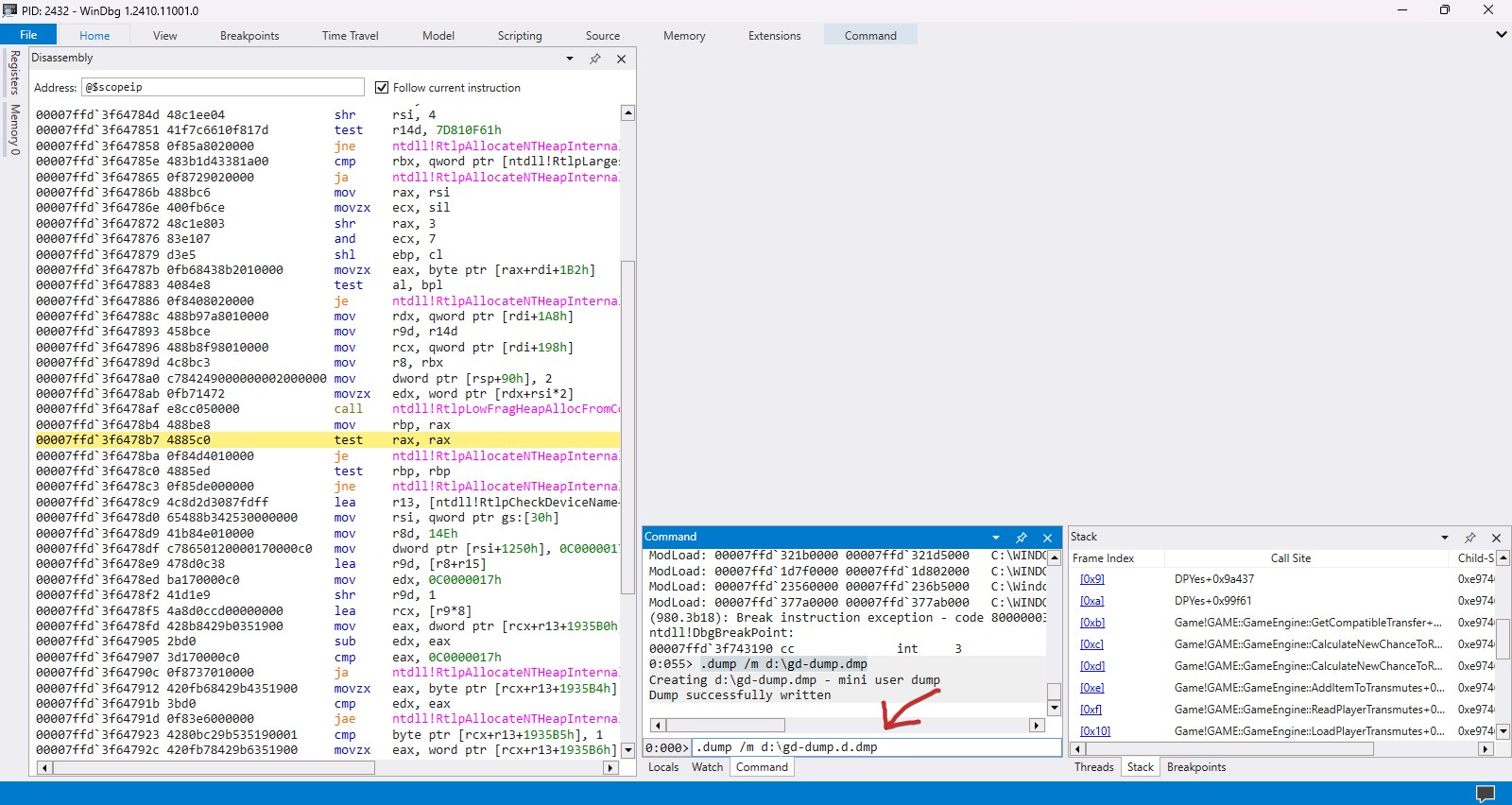
This file may contain basic information about your system as well as paths to Grim Dawn and Steam. This is similar to the crash information Crate collects with its Crash Reporter.
1 Like
Gave it a go - let’s see if I did it right lol.
gd-dump.zip (32.8 KB)
Thanks, that was very helpful!
From my reading, this seems to be a MSVC runtime version issue[1], which might explain why only some users encounter it.
Can you try installing the latest MSVC 2015-2022 redistributable?
If that works for you, I’ll update the OP with the latest MSVC redist as a requirement.
https://aka.ms/vs/17/release/vc_redist.x64.exe
Link from: Latest supported Visual C++ Redistributable downloads | Microsoft Learn
[1] Per Changelog · microsoft/STL Wiki · GitHub
Fixed
mutex’s constructor to beconstexpr. #3824 #4000 #4339
- Note: Programs that aren’t following the documented restrictions on binary compatibility may encounter null dereferences in
mutexmachinery. You must follow this rule:When you mix binaries built by different supported versions of the toolset, the Redistributable version must be at least as new as the latest toolset used by any app component.
2 Likes
It seems that was the issue! Thanks for the help.
Confirmed that the tool is working for me again for both auto launch and normal launch on GD version 1.2.1.3
Would advise anyone experiencing the same issue to give this a try!
@daileviathan @BlackMage - based on your descriptions this may help you, although I don’t think I ever experienced a black screen when my crashes were occurring on damage.
Thanks again Sleepless. You’re the best!
1 Like
That msvc thing seemed to have fixed the ‘black screen on attack’ (worst proc) problem. My hits tested on enemies and the dummy worked as it should with no crash.
Also retested manual start, and auto-start on Grim Dawn version 1.2.1.3.
*edit: Tested manual start and auto-start, separately. Not together.
Thanks @Jenkinz94 for the heads-up.
Thanks @Sleepless for the fix!
Thanks for figuring it out @Sleepless!
Worked for me.
No more crashing. Everything is working as intended so far. TYVM !!!
The problem was successfully resolved. Thanks, @Sleepless and @Jenkinz94!

it keeps marking items even if u disable it in option.
any way to make it stop marking items? im using only auto loot function, for rares specifically, cuz default key to loot in game sometimes does not work unless u literally stand on top of item and its so triggering. and that mark is little bit of an eyesore, especially in crafting window. honestly i dont know how hard it is to make such tools, but i wish u had made a standalone auto-loot function :).
im also curious how good is loot filter, but i have yet to try it )
16c fixes the config for marking missing illusions not working properly, my bad!
3 Likes
Hello,
I am new here.
Thank you very much for yourDPyes mod.
May I ask, if it was already tested with v1.2.1.4?
Or how the experience with the current game build is so far?
Thank you again and best wishes for 2025!
1 Like
Hey,
Trying to get this download to work but it says there’s a decryption key required on mega, any tips?
Ty!