Ah I see, I also realized that many people have the same problem with me on playtest it isn’t about DPYes at all hehe.
the game freezes anyway…I don’t know what it’s related to.
Good afternoon. Could you tell me, in theory, how feasible is it to implement a search function in a teleportlist? Thank you in advance for your answer!
Due to a Steam update, it seems that winmm.dll is no longer working and can no longer mount DPYes.dll. Please check for an update. Thank you.
Hello! I’m having trouble auto-looting items according to custom rule filter rules. In particular, specifying any particular prefix or suffix does not seem to work. Neither “Loot” nor “Hide” options seem to do anything. This is for version 18c on the playtest branch of Grim Dawn, version 1.3.
For example, this is my loot list (which is “Any” in all fields except for “Prefix”):
[
    {
        "itemRarity": "ANY",
        "matchResponse": "LOOT",
        "prefixRarity": "ANY",
        "prefixTags": [
            "tagPrefixAO003"
        ],
        "suffixRarity": "COMMON",
        "suffixTags": [],
        "typeSet": []
    }
]
If I clear the particular prefix and select “Magic” or “Rare” instead, looting works as expected. Maybe I’m missing something?
Don’t be too certain, there is a small chance this was Item Assistant.
There is a race condition issue, where IA may cause GD to crash if you dump items into the last stash tab and then immediately exit to the menu.
The stack trace may look something like this, as it’s calling this, probably to render the stats for your equipment in the menu, while IA in parallel is still running the exact same code.
It’s something I have on my roadmap to at least alleviate, by fetching stats on item drop instead of a few seconds afterwards. (Symptom fixing, since the root cause is that these are allowed to run in parallel when exiting to the menu)
I’ve add a hook to the Engine::render method and added a mutex there which is used when I call my code in Engine::update, however it did not seem to resolve the issue.
EDIT: Should be fixed in the latest version
2 Likes
I don’t even touch grim cam settings I use this mod mostly for the teleport function.
But recently I found a pattern. The crash happens when I’m playing and press “Esc” to bring up the pop that has Return to Game, Options Menu, Exit to Main Menu, Quit to desktop.
I don’t know if that is the moment the memory sends some data to the hard drive to update the character file.
That must be it! Most of my crashes happen when I just dump items I farmed and try to get back to the initial screen to farm on another toon. Will try to wait a bit before pressing “Esc” and see if that is the case.
Sorry about this! This was broken in 18a, I was accidentally comparing against the affix dbr path instead of the tag 
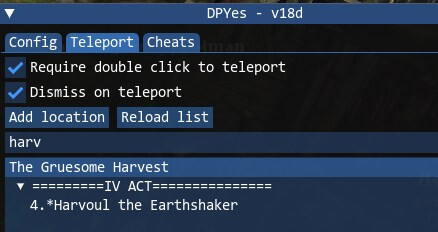
This has been fixed in DPYes 18d, also present in 18d is a simple search bar for the teleport list @Valera:
Auto-launch via winmm.dll still works for me, is Steam still set to launch the x64 version of Grim Dawn for you?
1 Like
Thank you, works like a charm! Off I go to loot all items I need instead of overlooking them in piles of other loot.
Good evening. Thank you for your work, it’s invaluable! I tried it, and the search works great, but the game still freezes constantly. They happen while moving or turning the camera, but not during combat. Will you look into the issue when the patch is released, or do you need any other information from me now? Thank you.
1 Like
Yes, when I launch the game in x64 mode using Steam, pressing F5 does nothing and I can’t bring up DPYes. winmm.dll is not working.
Same problem. Patch 1.3 playtest. I stopped playing for now, waiting.
Can you share any crash dumps, DPYes config files (DPYes.ini, DPYes_lootfilter.json) and any locations where you’ve observed the crash?
When sharing a crash dump, please also note the Build ID as reported by Steam.
I ran through a dozen or so areas with GrimCam camera movement and other than a few stutters (due to overly high GrimCam settings), there weren’t any issues.
Can you share logs from having DebugView open when you try to auto launch DPYes?
e.g. with some logs from Steam included:
[12944] Game process added : AppID 219990 ""D:\SteamLibrary\steamapps\common\Grim Dawn\x64\grim dawn.exe"", ProcID 13924, IP 0.0.0.0:0
[13924] GDL: existCurDir=1, existParDir=0, existx64Dir=0
[13924] GDL: Load 2
[12944] Game Recording - would start recording game 219990, but recording for this game is disabled
[12944]
[12944] Adding process 13924 for gameID 219990
[12944]
[12944] GameAction [AppID 219990, ActionID 2] : LaunchApp changed task to WaitingGameWindow with ""
[12944] GameAction [AppID 219990, ActionID 2] : LaunchApp changed task to Completed with ""
[13924] GDD: Hello from DPYes 18d
[13924] GDD: DPYes compiled with MSC 194134123
[13924] GDD: Installed MSVC Runtime Version: v14.44.35211.00
[13924] GDD: Installed MSVC Runtime Build: 35211