I’m trying to import GD Item Assistant database into GDStash but keep getting the error:
Version not supported and then this code, any ideas?
org.gdstash.util.FileVersionException
 org.gdstash.util.FileVersionException
 	at org.gdstash.db.DBStashItem.loadIAS(DBStashItem.java:3419)
 	at org.gdstash.ui.GDMassImportPane$ItemAssistantLoadListener.actionPerformed(GDMassImportPane.java:153)
 	at javax.swing.AbstractButton.fireActionPerformed(Unknown Source)
 	at javax.swing.AbstractButton$Handler.actionPerformed(Unknown Source)
 	at javax.swing.DefaultButtonModel.fireActionPerformed(Unknown Source)
 	at javax.swing.DefaultButtonModel.setPressed(Unknown Source)
 	at javax.swing.plaf.basic.BasicButtonListener.mouseReleased(Unknown Source)
 	at java.awt.Component.processMouseEvent(Unknown Source)
 	at javax.swing.JComponent.processMouseEvent(Unknown Source)
 	at java.awt.Component.processEvent(Unknown Source)
 	at java.awt.Container.processEvent(Unknown Source)
 	at java.awt.Component.dispatchEventImpl(Unknown Source)
 	at java.awt.Container.dispatchEventImpl(Unknown Source)
 	at java.awt.Component.dispatchEvent(Unknown Source)
 	at java.awt.LightweightDispatcher.retargetMouseEvent(Unknown Source)
 	at java.awt.LightweightDispatcher.processMouseEvent(Unknown Source)
 	at java.awt.LightweightDispatcher.dispatchEvent(Unknown Source)
 	at java.awt.Container.dispatchEventImpl(Unknown Source)
 	at java.awt.Window.dispatchEventImpl(Unknown Source)
 	at java.awt.Component.dispatchEvent(Unknown Source)
 	at java.awt.EventQueue.dispatchEventImpl(Unknown Source)
 	at java.awt.EventQueue.access$500(Unknown Source)
 	at java.awt.EventQueue$3.run(Unknown Source)
 	at java.awt.EventQueue$3.run(Unknown Source)
 	at java.security.AccessController.doPrivileged(Native Method)
 	at java.security.ProtectionDomain$JavaSecurityAccessImpl.doIntersectionPrivilege(Unknown Source)
 	at java.security.ProtectionDomain$JavaSecurityAccessImpl.doIntersectionPrivilege(Unknown Source)
 	at java.awt.EventQueue$4.run(Unknown Source)
 	at java.awt.EventQueue$4.run(Unknown Source)
 	at java.security.AccessController.doPrivileged(Native Method)
 	at java.security.ProtectionDomain$JavaSecurityAccessImpl.doIntersectionPrivilege(Unknown Source)
 	at java.awt.EventQueue.dispatchEvent(Unknown Source)
 	at java.awt.EventDispatchThread.pumpOneEventForFilters(Unknown Source)
 	at java.awt.EventDispatchThread.pumpEventsForFilter(Unknown Source)
 	at java.awt.EventDispatchThread.pumpEventsForHierarchy(Unknown Source)
 	at java.awt.EventDispatchThread.pumpEvents(Unknown Source)
 	at java.awt.EventDispatchThread.pumpEvents(Unknown Source)
 	at java.awt.EventDispatchThread.run(Unknown Source)
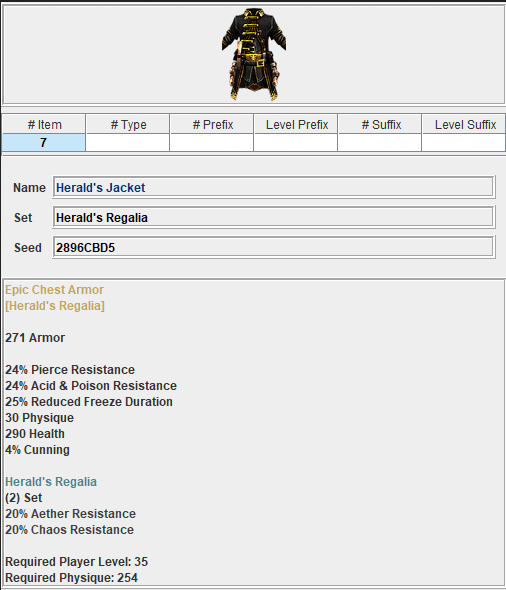
@mamba There seems to be a problem with the 2 Herald’s sets in the Stash. Although both are 3 pieces - cowl, jacket and amulet - the set bonuses only register as 2 set ones; it’s not showing the 3rd which I assume they should have.
Edit: Even without the mod the sets come up as only 2 set bonus. Weird unless that’s what they should be, but seems strange when they have 3 pieces to them.
Hello, is there a way to have GD Stash to store our items in another directory than C:\Users\username\GDStash please? I would prefer in Documents and think it should be the default path to prevent a loss (assuming you have the Documents directory on another drive). I’ve had to reinstall Windows and lost my stored items (hopefully not so many).
extraction location of actual GDstash tool isn’t the same as where GDstash then saves stash storage to
GDstash has 2 location, 1 for the tool itself and then one for storage/save, and save location can’t be changed/is in the path Mandrake mentions
Blockquote
javax.swing.ImageIcon@1757c750 Version not supported
javax.swing.ImageIcon@1757c750 org.gdstash.util.FileVersionException
org.gdstash.util.FileVersionException
at org.gdstash.db.DBStashItem.loadIAS(Unknown Source)
at org.gdstash.ui.GDMassImportPane$ItemAssistantLoadListener.actionPerformed(Unknown Source)
at javax.swing.AbstractButton.fireActionPerformed(Unknown Source)
at javax.swing.AbstractButton$Handler.actionPerformed(Unknown Source)
at javax.swing.DefaultButtonModel.fireActionPerformed(Unknown Source)
at javax.swing.DefaultButtonModel.setPressed(Unknown Source)
at javax.swing.plaf.basic.BasicButtonListener.mouseReleased(Unknown Source)
at java.awt.Component.(Unknown Source)
at javax.swing.JComponent.processMouseEvent(Unknown Source)
at java.awt.Component.processEvent(Unknown Source)
at java.awt.Container.processEvent(Unknown Source)
at java.awt.Component.dispatchEventImpl(Unknown Source)
at java.awt.Container.dispatchEventImpl(Unknown Source)
at java.awt.Component.dispatchEvent(Unknown Source)
at java.awt.LightweightDispatcher.retargetMouseEvent(Unknown Source)
at java.awt.LightweightDispatcher.processMouseEvent(Unknown Source)
at java.awt.LightweightDispatcher.dispatchEvent(Unknown Source)
at java.awt.Container.(Unknown Source)
at java.awt.Window.dispatchEventImpl(Unknown Source)
at java.awt.Component.(Unknown Source)
at java.awt.EventQueue.dispatchEventImpl(Unknown Source)
at java.awt.EventQueue.(Unknown Source)
at java.awt.EventQueue$3.run(Unknown Source)
at java.awt.EventQueue$3.run(Unknown Source)
at java.security.AccessController.(Unknown Source)
at java.security.ProtectionDomain$JavaSecurityAccessImpl.doIntersectionPrivilege(Unknown Source)
at java.security.ProtectionDomain$JavaSecurityAccessImpl.doIntersectionPrivilege(Unknown Source)
at java.awt.EventQueue$4.run(Unknown Source)
at java.awt.EventQueue$4.run(Unknown Source)
at java.security.AccessController.(Unknown Source)
at java.security.ProtectionDomain$JavaSecurityAccessImpl.doIntersectionPrivilege(Unknown Source)
at java.awt.EventQueue.dispatchEvent(Unknown Source)
at java.awt.EventDispatchThread.pumpOneEventForFilters(Unknown Source)
at java.awt.EventDispatchThread.pumpEventsForFilter(Unknown Source)
at java.awt.EventDispatchThread.pumpEventsForHierarchy(Unknown Source)
at java.awt.EventDispatchThread.pumpEvents(Unknown Source)
at java.awt.EventDispatchThread.pumpEvents(Unknown Source)
at java.awt.EventDispatchThread.run(Unknown Source)
Not sure whether this is the place to ask or over on the Grim League Season 4 thread but …
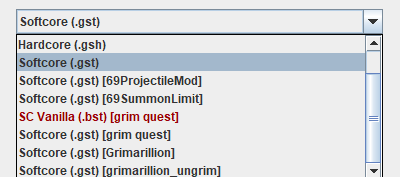
should GDStash have a separate stash option for the season 4 mod like it does for the other mods for the game? Because I can’t see it so I’m not sure if it just doesn’t work with the mod (I know it didn’t for when the season was live) or it should be showing something. The database seems to have installed fine, but I wouldn’t have thought that items from the mod should go in with the vanilla game items.
Doesn’t look like it’s supported; it doesn’t see my character either.
Edit: Forget this. Seems GDStash needed to be restarted for the League mod to show up in the lists.
Hello everyone. I configured the program and imported the database, but under character editor drop down list there is nothing. I’m on Windows 11. Can someone help me solve this problem? Thank you.