I doubt that I backed up the wrong path. The 10-8-2020 back up is over 900mb. What is alarming is that the GDS folder itself is 113mb. Once I noticed the difference in folder size, and the fact that I haven’t played since 2020, I virus scanned the entire PC (all files including zipped backups). No viruses were found. This is really quite strange because I’ve been meticulous about backing up GDS and the GD save folder. It is a habit I’ve carried forward from D2-LoD. Maybe its a good thing that I’ve come across this now since the old HD wasn’t wiped and I was able to recover over 15K items.
Of course I’ve done an immediate full backup the the Grim_Dawn folder within Gaming_Data.
reason i suggested that is you never mentioned which gdstash folder you backed up, and there is more than 1 ofc
and on appearance your steps “today” then doesn’t match up with that, since you say you copied folder into folder, and the 2 folders are separate (atleast on windows, no idea where gdstash saves to on linux)
*i know this from when i asked Mamba how to backup, and i could either copy the db folder in the user folder, or export ofc - and i would not just copy GDstash new install/folder into that users db folder (where GDS auto saves to) on my new drive
but the 900mb size you mention does kinda match up
My GD Stash Backups ==> {drive:}\Gaming_Data\Grim_Dawn\Backups of GDStash
The Grim Dawn install folder lives somewhere within the Steam install folder ==> C:\Program Files (x86)\Steam…
#3 would be copied into #4. The copied folder into #4 would then be renamed appropriately based on the date. The copied folder is the backup. #3 doesn’t get moved/renamed.
pretty simple
there is your GDstash folder (A), whichever place you installed/unzipped GDstash
then there is your actual GDstash storage folder (B), the one you’re supposed to copy if you don’t export: C:\Users\username\GDStash\db
the way i’m reading your steps is, either
1, you copied A, and not B,
2, or you placed “new GDS” (a) into your backed up stash storage (B)
either which seems wrong to me
(tho suppose scenario 2 might not actually do anything wrong)
Ah you solved it!!! Now I see why the 10-8-2020 backup was over 900mb. I completely forgot about the {drive:}\users\username\GDStash. On Linux {username}/GDStash is in the user home folder as in “/home/ghoultek/GDStash”.
This is very bad. I’ve intentionally installed Steam, Lutris, and their games outside of the user home partition/folder structure. This allows me to back up the partition that has user home folders without it being ballooned by game install files and game related data. On Windows I don’t use the “My Documents” folder. Microsoft is notorious for changing and moving stuff around seemingly without rhyme, reason, or warning. All of my data on Windows would be on a separate partition and thus a separate drive letter. Anything under drive C, is likely to get nuked with a clean re-install of Windows thus one must never, ever store data on drive C. It is a cardinal sin. I know that the “My Documents” folder can be redirected to an alternate location. However, I, as an I.T. professional, have personally training users and colleagues away from using the “My Documents” folder structure. From Win 98 → 2000 → Windows 7, Microsoft has expanded the folder structure under the user profile that exists on Drive C, which includes the “My Documents” folder. The user profile folder structure is ripe for random change, thus it is best to avoid it completely.
Now I need to get Mamba to create a way for us to be able to move that GDStash folder that would exist in the user’s profile on Windows and the user home in Linux. I really need to be able to make quick, lean snap shots of the user home folder. As I continue to play GD and generate tons of loot that db in the user home is going to balloon.
Having my data away from the user home partition and away the partition where the OS is installed allows me to:
backup all of my data in one place
wipe OS and user home partitions without worrying about data loss
Having Steam and Lutris installed on yet another separate partition allows me to:
switch Linux distros/OSes
re-install Steam and just point it to the location where the games are installed thus I get a big fat time savings.
experiment with different distros/OSes for a variety of reasons
In general I would not want to re-use a previous user home folder with a new clean install of a Linux OS and definitely not if I’m switching distros. You don’t want existing stuff to pollute a new install. Its akin to taking a shower and then putting on dirty, smelly clothes.
Hey guys!
i have a little trouble getting my items back on my new PC.
I copied the old GD Stash folder on my new computer and launched it but the items arent there. i didnt do an export back then so import seems to be out of the question (?), the databes should still be there though?
i can “load items from dir” just fine in my “save” folder but that only bringts in the items on my characters.
did you copy the right folder, and into the right location
there are 2 gdstash folders, one for the tool itself (whichever directory you installed/unzipped it), and then the actual storage folder in
C:\Users\username\GDStash\db
After some weeks of manual muling it got too tedious, so I installed GDStash. Emptied all of my 50+ mules and wanted to delete them. But there are new folders starting with an underscore, so now I’m hesitant to delete them. Do these folders have any purpose or can I delete them?
all GD character folders start with an underscore, regardless of GDstash
if a character folder has 2 underscores i believe it’s the game’s normal “backup” version for pre-expansion character that hasn’t been updated into the “latest” of your game version, ie been played without XY expansion enabled but the game knows those expansions have been utilized before or something
that should not be a ‘now’, all dirs containing chars start with an underscore. At a minimum they were not created by GD Stash, if you are talking about the GD save dir
Hello, I changed my PC and installed Win11 on it then I reinstalled all my Steam games including Grim Dawn since GDStash does not work anymore. Always the same error message “Wrong directory”. How can I fix this problem. Thanks in advance.
Shortly before closing GDstash last time, I clicked something.
Now, after startup, the Icon is only displayed in the taskbar. No window is being opened, on neither of my screens.
Had this minimized(?) issue before, but there was at least some tiny bar in a corner. Now nothing.
Someone got a hint …?
Yeah, I had this “glitch” happening as well a couple of times now, and for anyone in the future wondering what is it… basically, it’s dragged to all way right side (at least for me) and if u hover your mouse up right u will catch it so u can drag it a bit to the left to see it again.
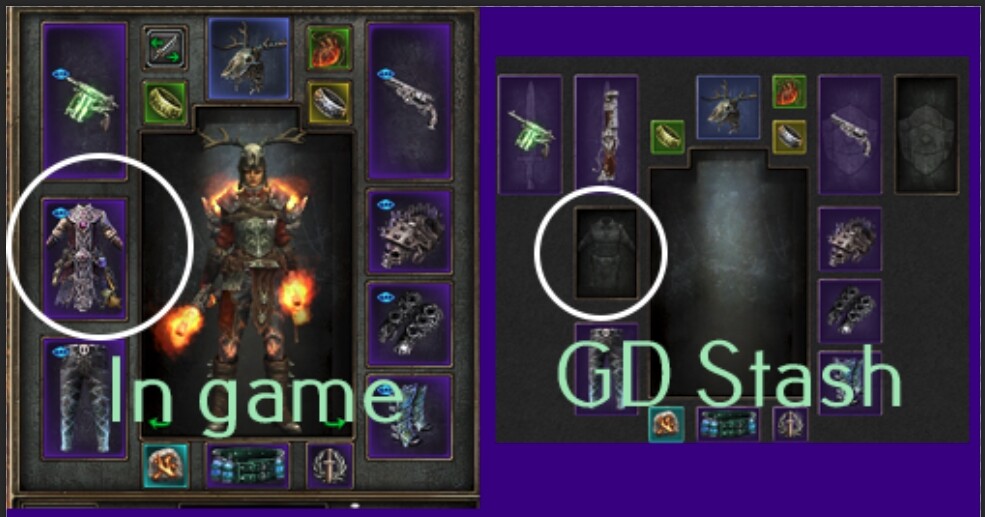
I loaded Forgotten Gods yesterday and today I noticed that items from this new DLC do not appear in GD Stash when I try to save them to the DB, there is just a blank spot where the item is in my inventory.
How do I resolve this? I am playing with a mod Smash N Grab. Mostly what I’ve noticed is Legendary items since that’s the only ones I put in my stash. See pics
Update. Normal other items too. Seems to be items included with FG expansion.