The latest version of IA only shows 1000 items per search, to improve rendering performance.
If it’s essential for you to display >1000 items I can see about adding a setting for it.
So the rest of my items are safe, right? To be honest, I was worried I wouldn’t be able to access my rest of items. If it’s not too much trouble to set that up option and if it doesn’t take too much effort for you, I’d really appreciate it.
They’re all there, just doesn’t list them all at once.
I’ll see about adding pagination per 1000 items 
1 Like
Thank you very much. If it’s going to be a problem, a number showing just the total number of items would be fine. If it’s going to be a headache, just knowing that the items are safe is enough for me. Thank you very much for your lightning-fast response as well 
I used to have over 4,000 items. Now upon loading the program, it shows at the top right: “Displaying 38/1733”
Where did my 2,500 other items disappear to? How do I get them back?
EDIT: When selecting for all levels and each category (other than “armor”), the total number add up to over 6,000. Whew. So they’re in there, just not counted?
Can somebody clarify why this happens and whether it means my stash is in jeopardy of some bug or something?
You’ll need to filter to reduce your result set to below 1000.
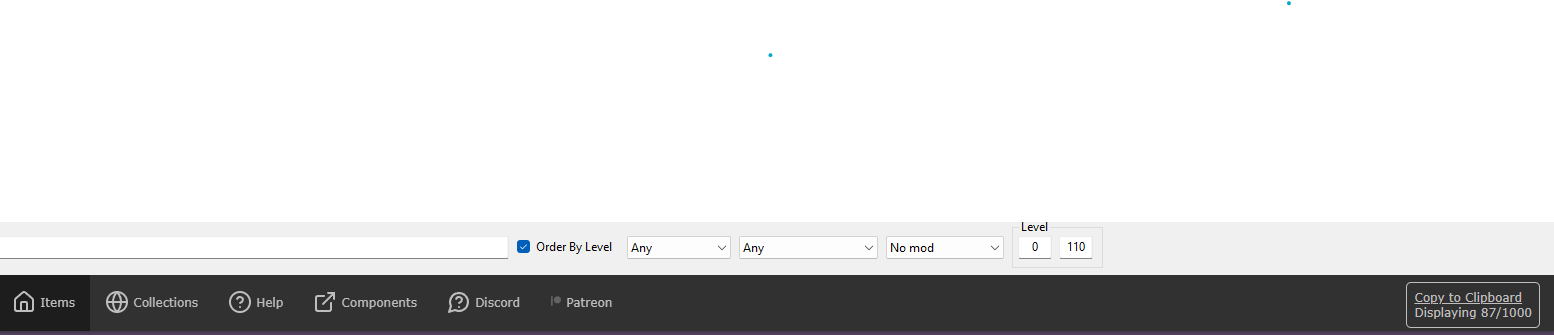
I think you are filtering your items. To show all items you need to select all filters to “Any”. Mine IA is like:
1 Like
That and the fact that the current version stops at 1,000 while my “no filters” view showed 1,733 total was confusing to me.
Turns out my wife’s account was set to “visible”, hence the 733 additional items.
It seems all OK to me now after all.
1 Like
5 Likes
Thank you so much, Much appreciated 
I don’t know if you are taking requests for this tool, but if so, I have a small suggestion:
We already have “sort by level”, so could we possibly have a dropbox of “sort by” with these options: Total resistances, total damage, total damage bonus, total skill bonuses, total mastery bonuses, level obviously, and uh, well whatever else could be useful?
I’ll keep it in mind. It would take a few people requesting it for it to be included.
The more features, the higher the cognitive cost of actually using IA.
The goal has always been simplicity over complexity.
2 Likes
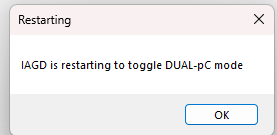
I installed the latest version of Grim Dawn Item Assistant on my laptop (first time using my laptop in a long time), and every time I try to press the ‘Settings’ tab, I get the following error and can never get past it:
“IAGD is restarting to toggle DUAL-pC mode”
…and then the cycle repeats once GDIA restarts.
Does anyone know how to avoid this issue so I can get to the Settings page?
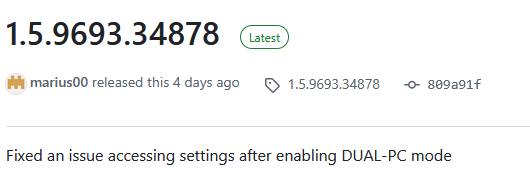
Update to the latest version.
The latest version does not have this bug.
Weird, I honestly didn’t even catch that the version of GDIA that I had installed wasn’t the newest version. I think what happened is that Windows Defender might have been blocking the installation even though there was no indication that it failed (I got the ‘blue window’ pop-up saying the file might potentially be dangerous or whatever, but I selected the ‘Run Anyway’ button in the Windows dialogue box).
I went to the ‘Properties’ of the ‘GDItemAssistant.exe’ next to the ‘This file came from another computer and might be blocked to help protect this computer’ box, selected ‘Unblock’ → ‘Apply’.
Then I right-clicked and re-ran the installer as ‘Administrator’ and now everything is working just fine.
Thank you for the reply! Figured I’d mention those two steps just in case anyone else runs into the same thing.
Hey, sorry if this has been already discussed, but what would you think about an option that when active refuses to transfer items you already have?
Basically to avoid duplicates, I’d expect them to simply sit in the shared stash tab, while “new” items are “siphoned” into GDIA. Of course it should be toggleable at will, in case you’d want to actually store duplicates again (or if you just need to store a duplicate of a specific item).
Thanks in advance and congrats on the great work, btw
Might be a bit resource intense for those with a lot of items, having to keep updated records for this in the game memory. An easier solution would be for IA to reject them by transferring them to the output tab again, similar to unrecognized items.
Sure, that should work just fine
FoA / GD 1.3 Checklist
Is Item Assistant compatible with GD 1.3. / FoA?
Yes
Items being deposited back ınto the game?
Go to the Grim Dawn tab inside Item Assistant, click clean database then load database. Make sure the game is not running.
New skills / changes on items not visible inside Item Assistant?
Go to the Grim Dawn tab inside Item Assistant, click clear cache. Afterwards the game will start lagging for a few seconds up to a minute, depending on how many items you have, while IA is running the items trough the game tooltip generator.
A popup mentioning WebView2
“Something” is broken in your windows install. Try installing Microsoft WebView2 manually. The issue is not IA. (One user created a new login/profile and it worked. Obviously an extreme example, but just proved the issue was local to his current profile/login)
Missing icons for new items.
Close the game and restart IA, IA will (hopefully) start parsing new icons. (May need an update in the future… unsure)
Item Assistant says I’m not running 64 bit but I am!
You’re not. Add /x64 to the application arguments in steam. Steam sometimes lies, even if you’ve selected “always start as 64bit”
Can I use this with steam cloud saving on?
Yes. (Not FoA related, but very frequent question)
IA closes on it’s own right after opening it
Vague reports of DPI scaling settings causing this. Need more details.
Help I have a problem! :panic:
Hop unto the IA discord. Make sure you provide the FULL log file, and any screenshots should not be cropped. The logs are at %appdata%\..\local\evilsoft\iagd
Known issues:
- The berserker checkbox may have some issues. Looking into it.
4 Likes
Hi, when using IAGD, after clicking ‘setting’, a pop-up appears saying ‘IA is restarting to toggle DUAL PC mode’, then IA restarts automatically, and this keeps looping.