[Tool] Grim Gleaner: a loot grading/build advisor utility

TL;DR: I built a standalone utility for Grim Dawn called Grim Gleaner. The core idea is to help you identify what is relevant to your character, not necessarily what is optimal. It helps with filtering loot in-game and identifying key build-defining items and add-ons out-of-game. I’d love for you to check it out.
NOTE: An earlier download was triggering false positives with some virus protection programs due to an issue with how it was packaged. The packaging issue has been resolved and the current release shouldn’t cause any issues. (Though you’ll likely have to do the More Info → Run Anyway thing on first launch.)

Github: Grim Gleaner
Latest Release: Grim Gleaner v0.9.2-beta

(Currently only for English language and Windows x64 machines.)

_____

Here’s the full pitch. Tell me if you relate to any of these scenarios:

Scenario 1: You’ve just wiped out a totem and half-dozen elites, the ground is covered with loot in the form of so many words. Actually trying to analyze them all kills the flow so you clog up your inventory with junk and move on. But eventually it’s time for the homework part.

Scenario 2: You like to craft your own builds, but even with GrimTools, there are hundreds of affixes and almost 1,000 unique items to sift through. How do you even know what you’re hunting for?

Scenario 3: It’s time to optimize your gear for the next difficulty spike. Do you remember which components and augments you need to cap resistances and squeeze out more damage? Do you remember who sells them!?

Grim Gleaner can help.

How It Works:

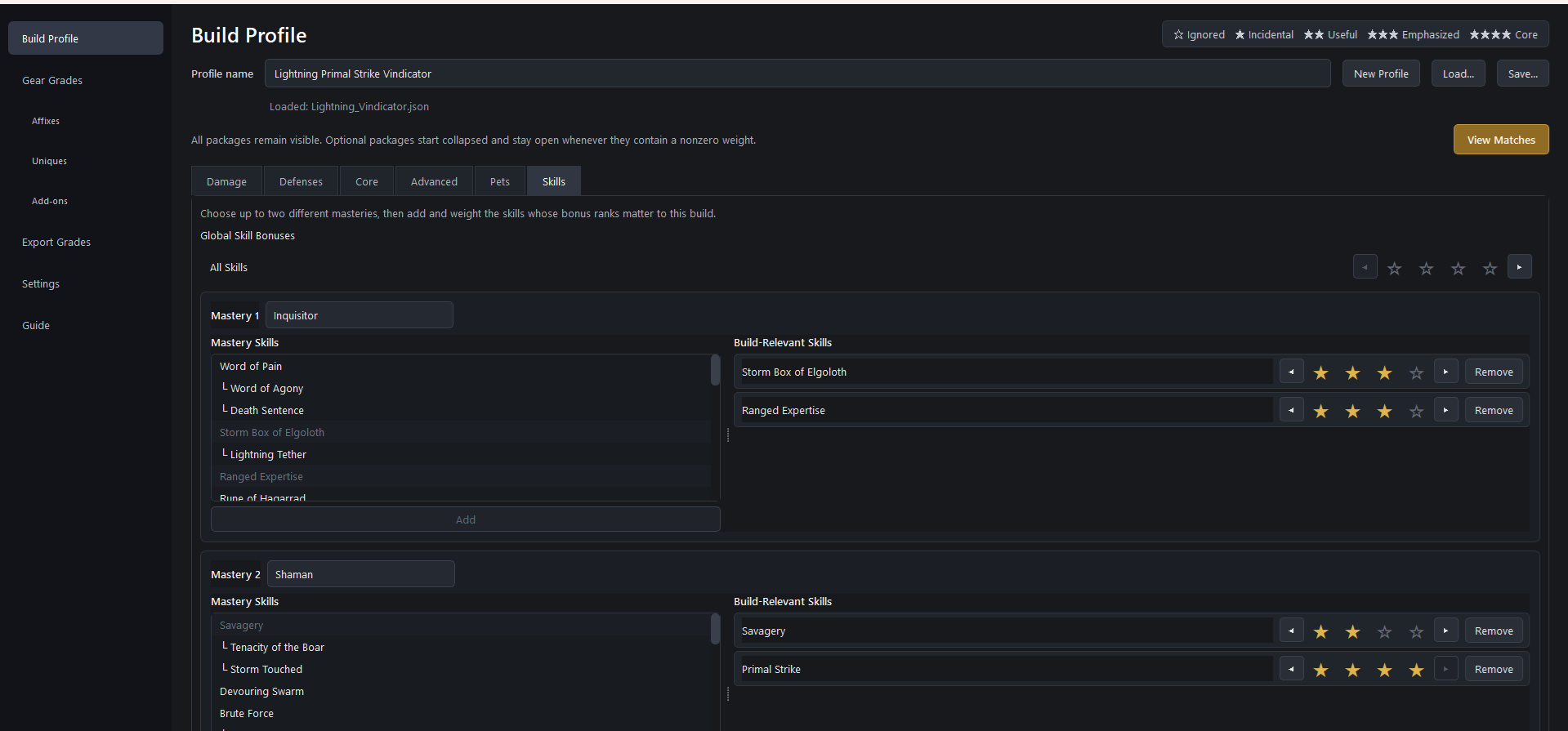
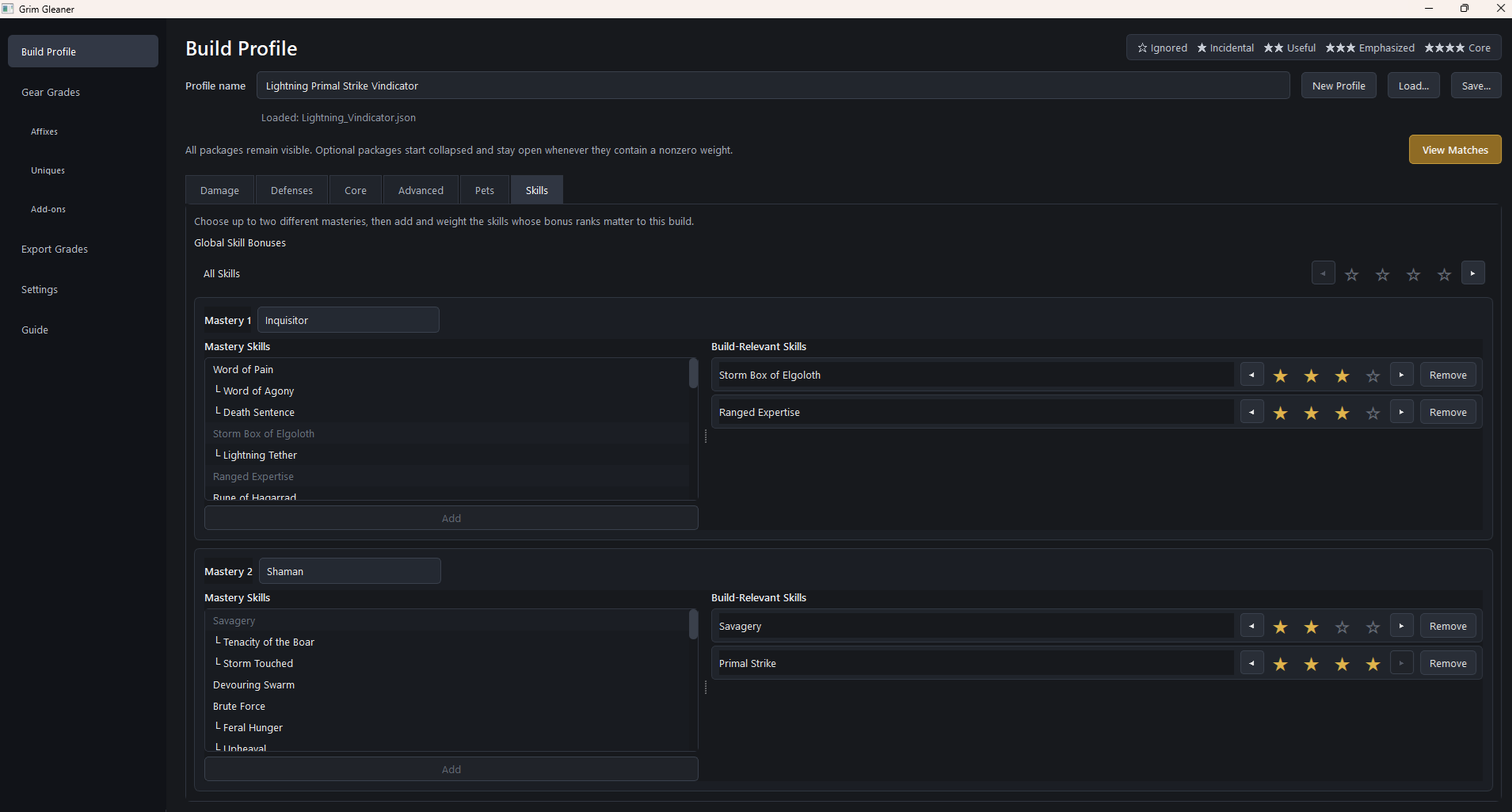
- You rank which stats your build cares about, giving each one a weight from 0 (totally irrelevant) to 4 (core).
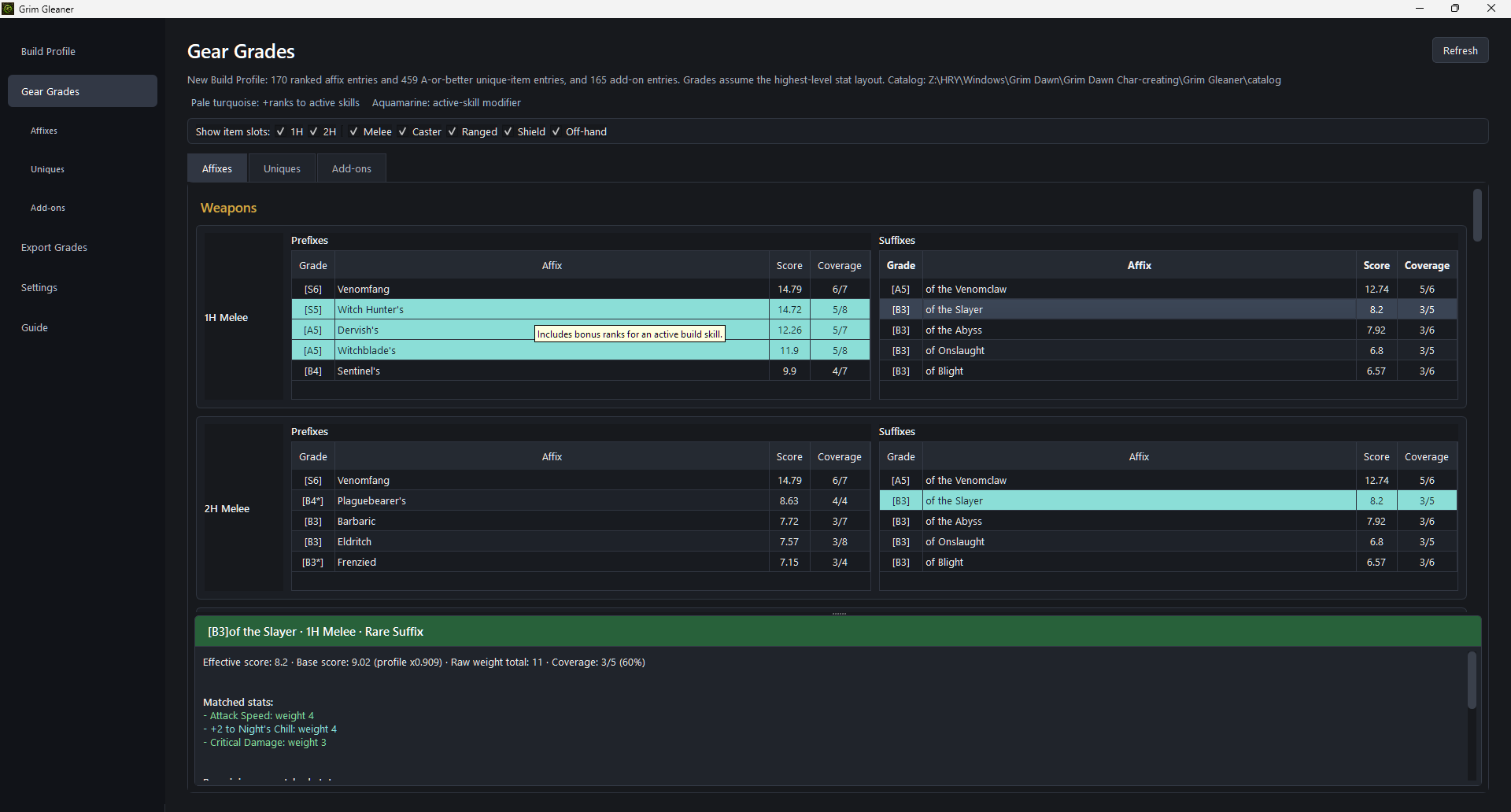
- Grim Gleaner will give you graded lists, item slot by item slot, of which affixes, items, components and augments best match your priorities, as well as which monsters you need to kill or rep vendors you need to visit to find them.
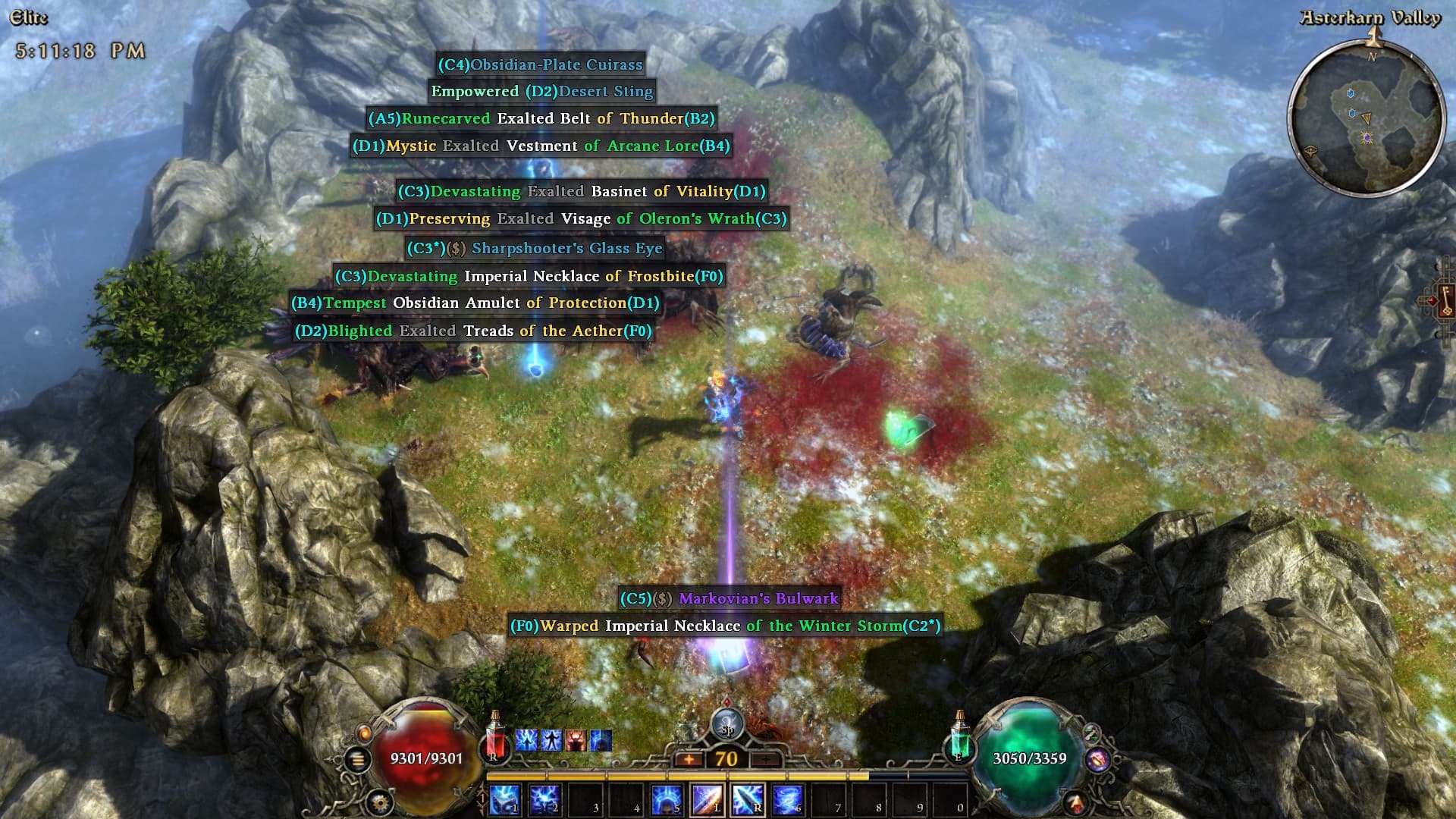
- You can export those grades so they appear in-game, giving you a quick way to identify which drops have stats you want and which you can ignore, without having to try and remember which damage type the “Devastating” prefix supports.

Profile Setup and Weights:

There’s a bit of of setup required, as you need to provide weights for the various stats that can roll on gear. And as we all know, Grim Dawn has a lot of stats. It’s also important to select and weight your primary skills. I’ve included a few example profiles if you want to get a sense of how it works, and I hope people who use the tool will share theirs as well.
Gear Advisor:

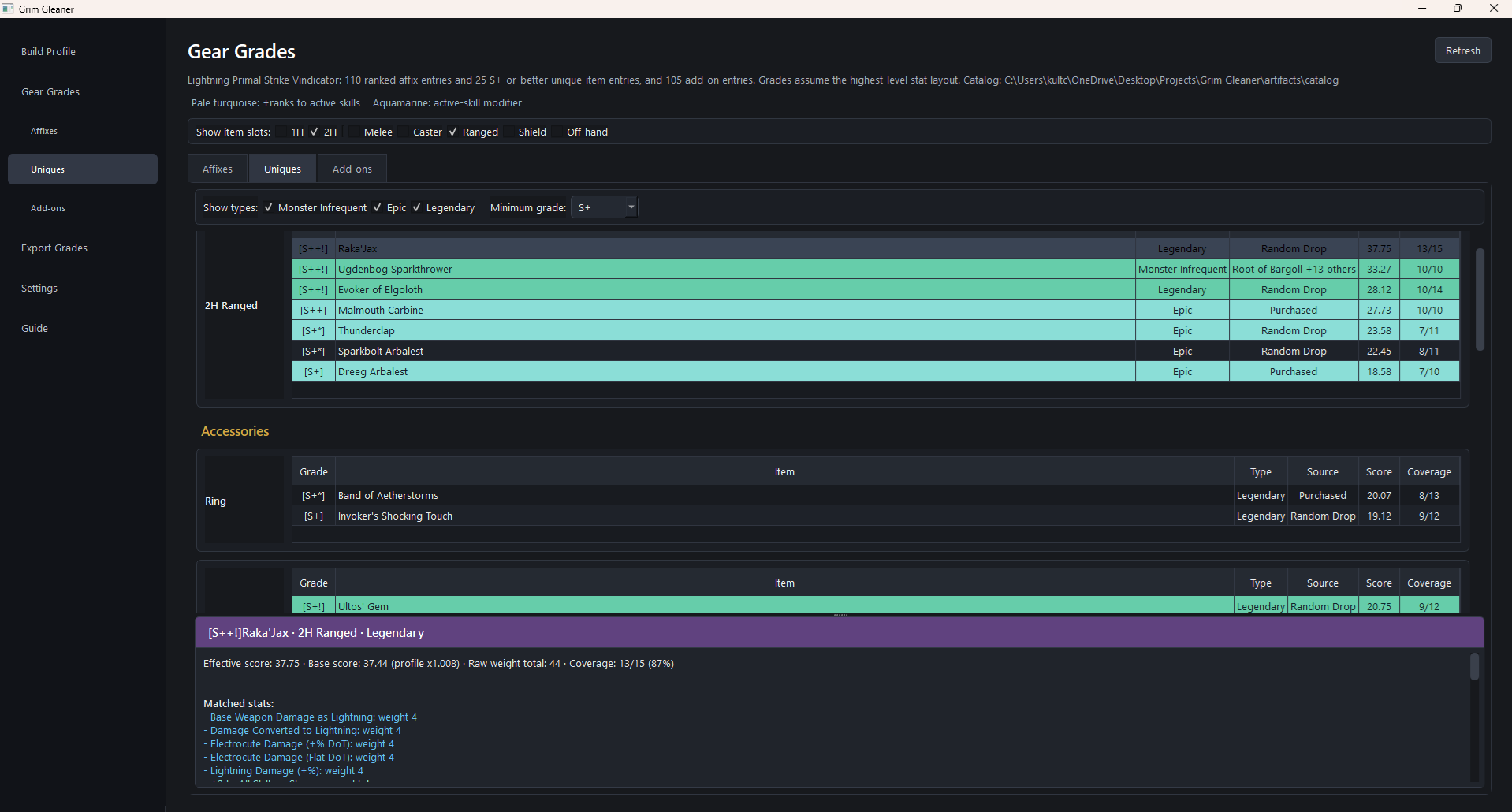
Once the weights are set, you can click over to the “Gear Grades” section. There you’ll find sorted and graded lists of the most relevant gear and affixes, graded from D to S++. Each grade also includes a number*, which tells you the exact number of relevant stats. (* S+ and S++ omit numbers to keep character length down.)

The Affixes tab here will give you a breakdown, by slot, of the best affixes, based on the weights you provided.

The Uniques tab has similar breakdown for Monster Infrequents, Epics and Legendaries. Both items with +skill ranks bonuses and items with Skill Modifiers for your chosen skills are highlighted here. In the screenshots, you can see a breakdown for my Primal Strike Vindicator.

Use this to help you target which items to chase for your build or just theorycraft a new build, and see how much itemization support it has.
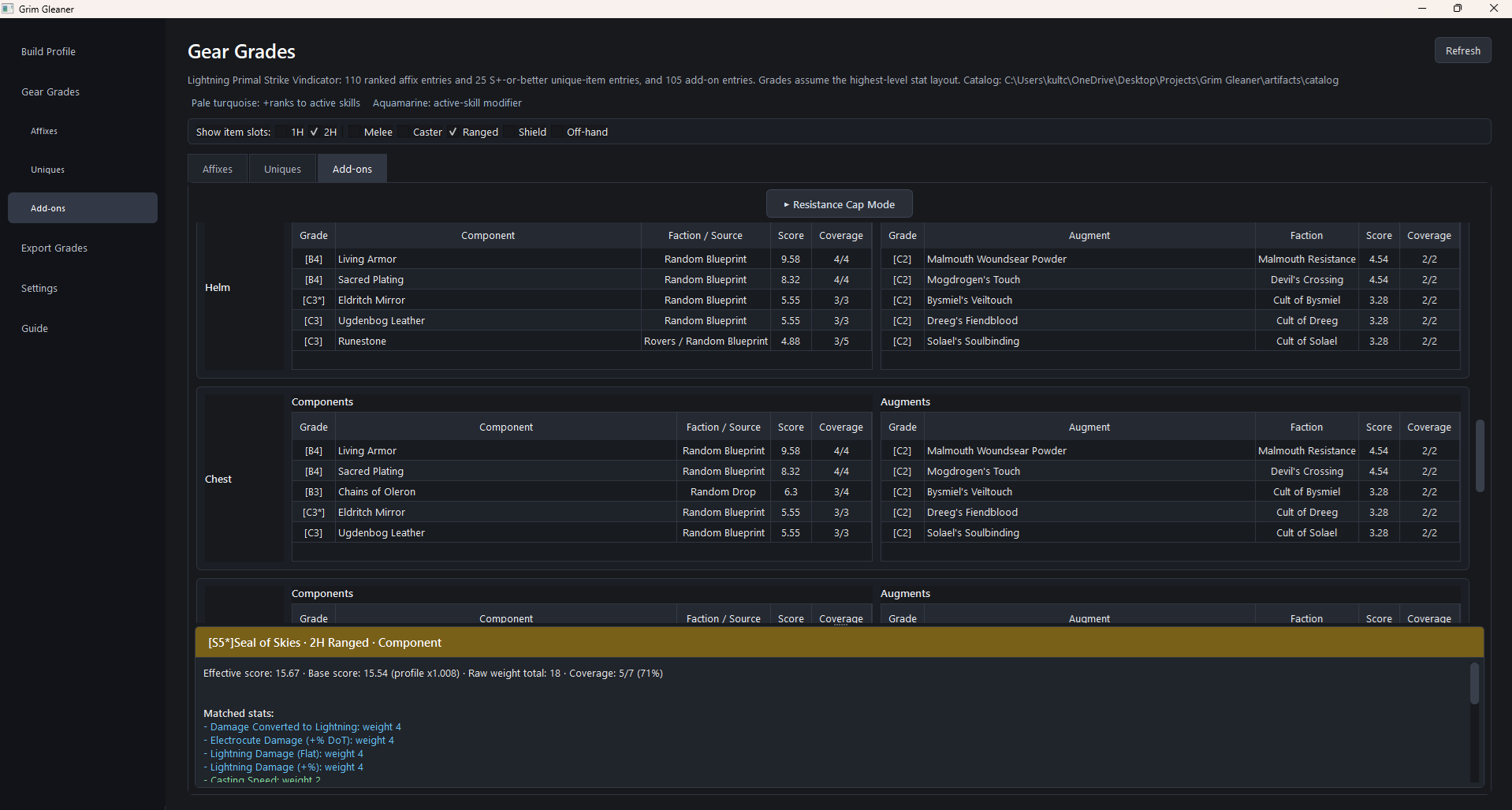
Finally, the Add-ons tab gives slot-by-slot rankings for components and augments. It also has a “Resistance Cap Mode” that gives extra weight to Resistances so you can quickly ID the augments that’ll help you cap out.
Grade Export:

Using the same localization tagging system that Rainbow Filter does, Grim Gleaner can add the grade it generates to the item’s in-game drop text and detail tooltip. (It’s also compatible with Rainbow Filter and similar mods).

Feedback:

If you like what this tool is trying to do, I’m happy to hear feedback and feature ideas. I’m by no means an expert at the game, so I welcome your thoughts on how stat weights should be calculated, etc., or any in-game mechanics that aren’t reflected in the tool, etc.

Limitations:

TL;DR: The grading system is far from an exact science. It tries to measure stat relevance, not power.

Beyond the natural fuzziness of buildcrafting, there are also a few cases where the way the game exposes information makes what this tool is trying to do somewhat inconsistent, and working around them is quite difficult, though I have some ideas to help improve things.

- Many affixes gain new stats as the affix level gets higher, but they all share the same name so they all get the same grade tag. Currently, the tool assumes the max level possible. I plan to add the ability to set a level and adjust the grading based on that.
- Localization files are loaded on game launch, so you’ll need to exit the game, and rerun the Export process (it takes less than a second) when you switch characters.
- The tool can’t see an item’s actual rolls. It doesn’t know the difference between +12% Lightning Damage and +95% Lightning Damage, it only sees “Lightning Damage.” A good grade is “the right kinds of stats” not well-rolled ones.

(Disclaimer: I did use AI to help me build this. I did not use it to help me write this post, despite the bullet points and bolding. FWIW, I do have a CS degree, so I know enough to promise it won’t delete your hard drive or anything. Grim Gleaner only writes to Grim Dawn’s localization files, and it backs them up before making changes.)

Here’s the repo/download links again for posterity:

Github: Grim Gleaner
Latest Release: Grim Gleaner v0.9.2-beta

7 Likes

Windows Defender tells me that within the ZIP file, there is a serious threat!
“Trojan:Win32/Wacatac.H!ml” !!!

1 Like

Yeah, I’m hearing the same from where I posted this on Reddit. Weird, I tested the download multiple times on multiple machines yesterday with no issues, but today even my primary machine is flagging new downloads and even the same downloaded file from yesterday as having a virus. Not sure what’s up. Scans on my machine come up clean, so I’m fairly certain these are false positives.

Investigating the issue, will update later.

EDIT (08/14/26): Resolved the issue.

Okay, 99% confirmed that this was an issue with how the the program was packaged. Apparently it’s a known issue with the Nuitka Python Compiler. I’ve repackaged it in a way that seems to avoid the false positive, but I’m going to hold off releasing it for a moment. Stay tuned!

EDIT (08/14/26): Resolved the issue.

2 Likes

I am looking forward to try your app. I really do. And I am also very curious how the app will handle the builds I am going to “throw” on it.

I made for my needs spreadsheets with skill support, skill modifiers and tried to search for optimal gear within the spreadsheets…

Interesting idea! Not sure if it is something I will be using constantly, but it might be nice to find some build item synergies easier than in grimtools.

Just a few question:
How do I run the cli app to generate the required files myself? I suppose it is via compile-catalog and requires as data-root the working directory of the unpacked game files? do I have to specify localization-root for every text_en file for every expansion?

Since you listed gdse, I am sure you might know the tool behind it, gddb (GitHub - gregates/gddb · GitHub). Would it be possible to use this (or similar) to parse the database directly without having to unpack the whole game after every update to update the artifacts?

I actually hadn’t checked out gddb. Probably would’ve saved a bit of time in understanding the database structure, but alas. As for using it to update, I think it’d be technically possible, but it’d mean rewriting the current database parsing logic a bit and it would functionally make gddb a dependency. Grim Dawn doesn’t update all that often, so I’m not sure the manual extraction process is such as hassle/time-sink that it’d be worth making that move.

As for your other questions: to be honest, I was focused on the packaged release so I didn’t really put much thought into properly preparing it for people who wanted to mess around with the internals. Since I’ve gotten a few requests about that, I’ll try and rearrange things for the next release so it’s more intuitive instead of based on what I had thrown together.

In the meantime:
If you want to try, you’d need a folder structure like this:

game_data/
├── base/
│   ├── records/
│   └── text_en/
├── gdx1/
│   ├── records/
│   └── text_en/
├── gdx2/
│   ├── records/
│   └── text_en/
└── gdx3/
    ├── records/
    └── text_en/

Use the game’s ArchiveTool Unpack the game’s .arz files and copy the records folders for base game and each expansion into that structure. Then do the same for the each of the text_en.arc files into their respective text_en folders.

Then you can run:

grim-gleaner compile-catalog --data-root <path to game_data folder> --localization-root <path to game_data/gdx3/text_en folder> (repeat for gdx2, gdx1, and base, in that order) --output-dir <path to /grim_gleaner/artifacts/catalog folder>

Yeah I know that feeling. At least it’s the experienced gained that makes it worth it anyway :smiley:

Thanks for the detailed explanation!
Yeah I guess there will not be that many major changes anymore. Using the asset manager on Linux is really a hassle (at least on my system) so I try to avoid it as much as possible. Maybe one could change gddb to extract the necessary files but as you said, that’s probably not worth it.

Thanks to the app being in python, the app runs without any issue on Linux. Similar to windows you just do:

python3 -m venv venv
source venv/bin/activate
pip install -e .
grim-gleaner-ui

The tool of yours @kultcher is awesome!

I would like to ask - what exactly is the finished “product” of the utility? I mean - how can I “transfer” the lists of recommended items into Grim Tools, meaning how to “convert” the suggested items into builds?

Thanks, glad you like it!

I guess there isn’t a finished product in the sense that you’re looking for, although some kind of export to GrimTools would be a cool idea that I might look into!

But personally, I don’t usually plan my builds out at that level of detail. My idea behind building this was mostly based around two things:

  1. The limitations of the in-game loot filter given how complicated Grim Dawn loot is and
  2. Not knowing if your build concept has strong item support, or which items you should even be hunting for

So for me personally it’s less about finding the absolute perfect items and plug them into a GrimTools build and more about just highlighting the most relevant items so you waste less time in-game having to study each piece of potentially-useful loot.

1 Like

In very rare occasions, there are only one item, BiS item (best in slot), e.g. Obsidian Grasp for any fire oriented Demolitionist. But in the vast majority of cases, you have a lot of opportunities, what to equip. Some setups provide better results, some provide worse results and it is great to have at least something in advance.

Would it be possible, when hovering over the results of items, prefixes, suffixes, etc., to see the actual stats of the prefix, item, component … ? [if it jitters, use the min-max values or the medium ones…]

Yep, that’s actually in the works!

Next update will account for the level of the item/affix, so it’ll be able to correctly rate the ones that gain new statlines in their higher-level versions instead of just relying on the max-level. Since it’s getting more granular on that level, I’ll be adding the actual values (probably median value) as well.

1 Like

This might not be directly related to the tool itself but is there a way to determine and display the rarity of the MIs that drop? like Nemesis MIs are rare since nemesis encounters itself are rare, also some other MIs like Harbinger’s Dominator Blade is also very rare. Only drops at 2-5% drop rate from some mobs in Bastion of Chaos dungeon.

I believe this can be useful since with the new re-rolling system, having multiple copies of rare MIs will help for specific builds to get the affixes we need through re-rolling. Also, this can help me keep some of the rare MIs for future builds if needed.

@Faust404: I think that’s doable. Not really what the program is aiming to do but if it turns out to be simple enough to add, I’ll consider it.

1 Like

That would be great if its possible to just open my inventory and have it tell me if any of the MIs are rare drops that are possibly worth keeping.

Grim Gleaner is a great tool you have developed btw! Cheers!

1 Like