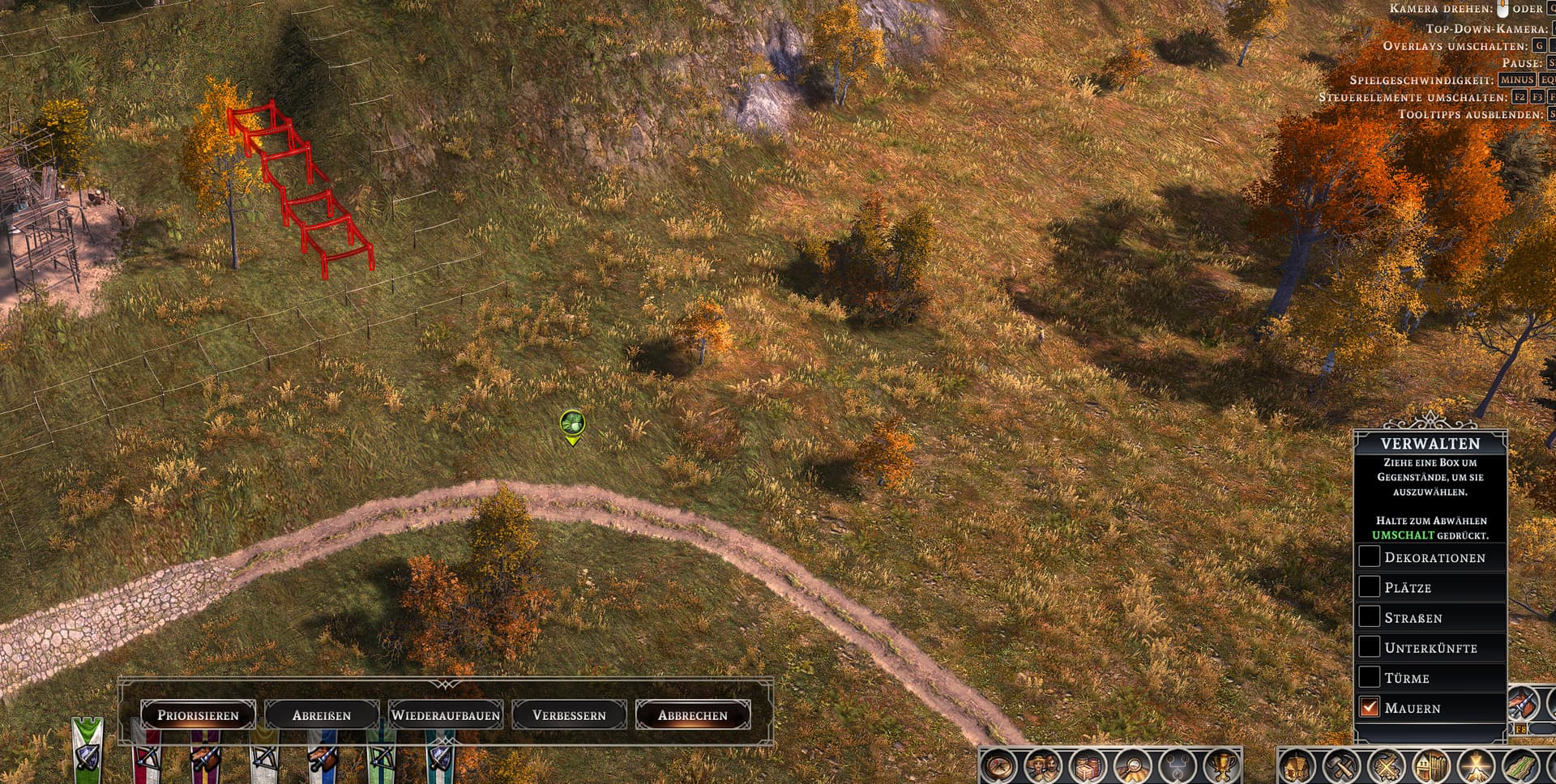
I’d like to point out a UI friction point when managing planned fortifications and wall lines:
The Issue:
Currently, there is no way to cancel multiple active wall construction sites at once.
When using the mass-selection tool (Verwalten / Manage ) to drag a box over multiple placed/queued wall segments, the Abreißen (Demolish) button at the bottom remain disabled/inactive.
Impact: If a long section of wall is misplaced or needs to be re-routed, players are forced to manually click on every single individual wall segment one by one to cancel the construction site.
Enable the Cancel / Demolish multi-selection actions in the Management menu for unbuilt wall construction sites, allowing players to box-select and clear multiple planned wall segments simultaneously.
Attached screenshot showing the management menu with selected wall segments where the action buttons remain inactive.
Thanks for the hint! Just to clarify: I’m aware of the Clear tool (C), but that’s precisely where the issue lies.
The problem isn’t opening the tool, but the fact that mass-selecting unbuilt wall construction sites with the multi-selection tool does not allow you to cancel them.
When you drag a box over multiple queued/planned wall segments using the management selection, the “Abbrechen” (Cancel) and “Abreißen” (Demolish) buttons remain grayed out / inactive at the bottom.
The Clear tool (C) works fine for existing objects, but queued wall blueprints still have to be canceled manually one by one.
My suggestion is specifically to allow the mass-selection tool to bulk-cancel these pending construction sites!
Thanks for the reply! Just to clarify, the confusion seems to be about which tool is being used.
I am specifically referring to the Management (Verwalten) menu when box-selecting multiple queued structures.
As shown in my video demonstration here:
The action buttons (such as Demolish / Cancel ) are physically present in the management interface when wall segments are selected.
However, they remain grayed out and completely inactive for unbuilt/queued wall construction sites.
While the individual Clear tool can remove them one by one, the mass-selection management menu fails to handle them, even though the UI buttons are already there. That inconsistency is what this feedback is about!
Ohh I’m glad you posted this – I was getting frustrated by having to delete every single fence section, one at a time, instead of using the Clear tool – I didn’t even realize or remember the latter even existed.