The current version of the game on Windows doesn’t have the issue of being tied to one core via affinity settings (or otherwise). I just double checked to be sure. So…  must be a LiNuZ thing.


read what was written earlier?
i don’t get what it is with people just ignoring stuff already adressed 
after you read that previous answer, then here’s a quick contrast to re-illustrate what’s been ever since Pow’s comparisons

edit. i see you typing Bas, i’m gonna be miffed if you reply something indicating you didn’t read what was pointed out
2 Likes
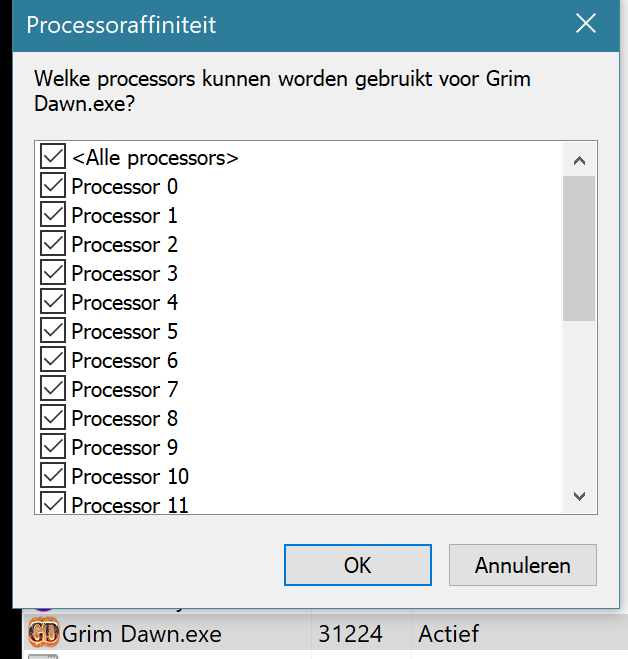
This whole thread is about it being limited to one core on linux. I can’t check that claim, but it isn’t on windows as it allows for all cores to be used. (See my screenshot.)
Then you showed a graph with how busy your cores are, which could be related but is something different. And it’s hard to tell if it’s good or bad because I don’t know if it’s one thread using that first core or multiple. Having one thread jump around cores doesn’t give better performance because it has to move all the cached data and registers to the other core. If it’s multiple they may be happier on multiple cores, so they don’t have to time-share the core.
I know about the core switcher, I’ve had issues with perf myself in the past. But core switcher makes no (technical) sense and it didn’t help for me either.
Bottom line is that
This may be true, but the affinity of Grim Dawn.exe is not limited to one core on windows.
→
you made me miffed 

1 Like
This picture only shows that you’re using the default affinity settings ie. use all available cores (Edit. as corrected by Toxophilic linux defaults to using maskset 1 ie. cpu 0 only, which can be changed using taskset. Perhaps this is an indication that the windows version has a similar hidden default, even though it does not appear to be so?). The issue here is that the game is only using a single core, despite the default settings saying otherwise, but can be forced to use multiple by manually selecting which ones to use, as shown in Gnomish’s screenshots.
edit.
also regarding the game not being linux supported etc. this is clearly not a linux only thing seeing as there are also reports of it happening on windows (myself included).
The game not being officially supported on linux also doesn’t really matter here as afaik it just means there is not a linux native version. The game’s windows native version is however playable using Valve’s proton tools, and it seems to function identically to the windows one from what I’ve seen.
1 Like
From what I see on my own system (and what Ketchup posted) this isn’t exactly the case. On Linux the Grim Dawn.exe process has a cpu mask of 1, so it is locked to core 0.
On Windows it is notionally allowed to use other cores, even if it doesn’t in practice.
1 Like
Thanks for the correction! I do indeed remember this being the default maskset as well, now that you mention it.
It does, because any translation for whatever OS functionality it uses from the Windows one to the Linux one may behave a little different.
For example with this core issue, maybe it’s setting it only on the main thread after the others are started and Linux handles that different from Windows. And maybe some windows versions do it different again. Or maybe the timing is off sometimes and it accidentally applies to all threads. (Not saying this is what’s happening, I don’t know the exact calls by heart of if this is even possible, but there can be subtle things like that.)
This was my point earlier. It’s something more complicated than the simple affinity mask for the process.
2 Likes
*i’m not a tech guy so have no clue how it works
but i “feel” like, windows has been sorta notorious for lying/doing stuff otherwise indicated before, you select one setting and it ignores it or doesn’t do it etc. (i’ve tried it with ex powerplans where windows will just suddenly act like i’ve switched mode and is in eco or max or whatever, you turn windows update off and it turns on again/still updates etc)
So my thinking is it “says” all affinity is enabled, because it “thinks” it/default assumption interaction or whatever/“Windows LyingCharacterScreen”. But it isn’t actually “registered” as enabled, so that’s why it first kicks in when manually woken up by disabling or re-enabling a core.
It then not being universal across all users in terms of effect or load benefit might then also be that OS personalization relation.
Whatever happens on linux might just be shining a different or brighter light on it by outright displaying it being disabled from the getgo.
2 Likes
I used to set this in process lasso when I used windows, but not sure if there’s a specific command equivalent for powershell etc.
Found someone’s PoE2 affinity powershell script that might be modifiable for GD, or let you figure out the commands used if you feel like digging around a bit.
Yes perhaps that could be the case, however seeing as this does also happen on some windows system, I doubt it is the case
At all events, on Linux, this suggestion from @F0x will set whatever mask you like when running from Steam.
I guess that if you are running the standalone GoG version you can just start it with taskset, and don’t need to hunt for the PID afterwards.
If it might be of help to anyone, here’s how I start Grim Dawn on Linux:
#!/bin/sh
wine 'Grim Dawn.exe' /x64
until PID=`pidof 'Grim Dawn.exe'`;do sleep 0.2;done && sleep 2 && taskset -pc 2-$(expr `nproc` - 1) $PID
EDIT:
Made the script slightly less arbitrary. We need the 2 second sleep after it’s found the PID because Wine startup takes some extra time. Also made POSIX arithmetic and disregarding core 0 and its hyperthread (starts from 2-). I haven’t found any particular difference, and I’m instead experimenting with 3 cores (-pc 2,4,6).
1 Like