not sure what you mean by playtest version but in the grim dawn properties>game versions section it just says default public version.
There is currently public playtesting of v1.3 with changes to the UI among other things. It would probably cause problems with mods since they haven’t been updated for it yet. Default live version is 1.2.1.6.

it doesnt even tell me current version here, but in game it says 1.2.1.6. and i just updated RoT w/in the last month or so.
I assume it is just that the shared stash is now always locked, ie if a tool changes it outside the game while a character is in game, that update will be missed.
I have not tried crafting items, but I moved items around and the game recognized that. Given that the item format within the save files has not changed I would expect crafting to still work too
Those are warnings, not errors, let me look into this, the most likely explanation is what it says, those tags do not exist in the text files
ok you can ignore me i guess. i was trying to use the wrong tab to make items in my stash. i was trying it in the stash transfer tab, not the crafting tab. coulda swore i seen my friend do it from the stash transfer tab so thats where i was trying to do it, and i was just checking every tab and hit search on the crafting tab and i can now add items to my stash just fine. sorry to waste your time.
yep, the tags do not exist, so blame the mod
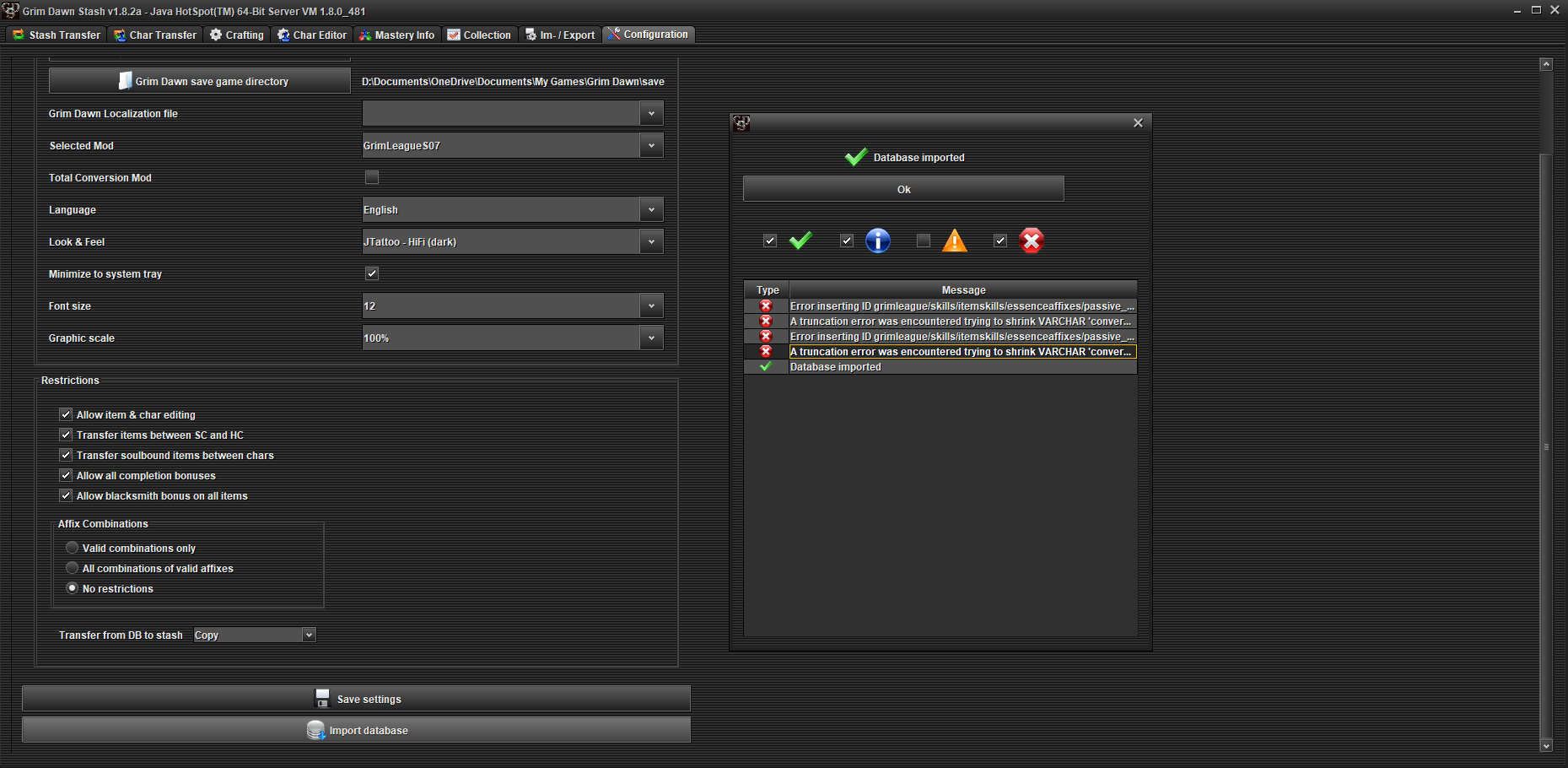
Just downloaded 1.8.2a and trying to import GrimLeague Season 7 database and getting the following errors. If I only import Grim Dawn database without the mod everything works fine. With these errors I cannot search for any items to move into stash.
#1 javax.swing.ImageIcon@5c9a796f Error inserting ID grimleague/skills/itemskills/essenceaffixes/passive_prefix18.dbr in table GD_SKILL
#2 javax.swing.ImageIcon@5c9a796f A truncation error was encountered trying to shrink VARCHAR ’
conversionPercentage’ to length 16.
java.sql.SQLDataException: A truncation error was encountered trying to shrink VARCHAR ’
conversionPercentage’ to length 16.
at org.apache.derby.impl.jdbc.SQLExceptionFactory.getSQLException(Unknown Source)
at org.apache.derby.impl.jdbc.Util.generateCsSQLException(Unknown Source)
at org.apache.derby.impl.jdbc.TransactionResourceImpl.wrapInSQLException(Unknown Source)
at org.apache.derby.impl.jdbc.TransactionResourceImpl.handleException(Unknown Source)
at org.apache.derby.impl.jdbc.EmbedConnection.handleException(Unknown Source)
at org.apache.derby.impl.jdbc.ConnectionChild.handleException(Unknown Source)
at org.apache.derby.impl.jdbc.EmbedStatement.executeStatement(Unknown Source)
at org.apache.derby.impl.jdbc.EmbedPreparedStatement.executeStatement(Unknown Source)
at org.apache.derby.impl.jdbc.EmbedPreparedStatement.executeLargeUpdate(Unknown Source)
at org.apache.derby.impl.jdbc.EmbedPreparedStatement.executeUpdate(Unknown Source)
at org.gdstash.db.DBSkill.insert(DBSkill.java:766)
at org.gdstash.db.GDDBData.insertRecords(GDDBData.java:392)
at org.gdstash.db.GDDBData.insertData(GDDBData.java:227)
at org.gdstash.file.ARZDecompress.insertData(ARZDecompress.java:3690)
at org.gdstash.ui.GDConfigPane$DBImportWorker.doInBackground(GDConfigPane.java:194)
at org.gdstash.ui.GDConfigPane$DBImportWorker.doInBackground(GDConfigPane.java:80)
at javax.swing.SwingWorker$1.call(Unknown Source)
at java.util.concurrent.FutureTask.run(Unknown Source)
at javax.swing.SwingWorker.run(Unknown Source)
at java.util.concurrent.ThreadPoolExecutor.runWorker(Unknown Source)
at java.util.concurrent.ThreadPoolExecutor$Worker.run(Unknown Source)
at java.lang.Thread.run(Unknown Source)
Caused by: ERROR 22001: A truncation error was encountered trying to shrink VARCHAR ’
conversionPercentage’ to length 16.
at org.apache.derby.iapi.error.StandardException.newException(Unknown Source)
at org.apache.derby.iapi.error.StandardException.newException(Unknown Source)
at org.apache.derby.iapi.types.SQLChar.hasNonBlankChars(Unknown Source)
at org.apache.derby.iapi.types.SQLVarchar.normalize(Unknown Source)
at org.apache.derby.iapi.types.SQLVarchar.normalize(Unknown Source)
at org.apache.derby.iapi.types.DataTypeDescriptor.normalize(Unknown Source)
at org.apache.derby.impl.sql.execute.NormalizeResultSet.normalizeColumn(Unknown Source)
at org.apache.derby.impl.sql.execute.NormalizeResultSet.normalizeRow(Unknown Source)
at org.apache.derby.impl.sql.execute.NormalizeResultSet.getNextRowCore(Unknown Source)
at org.apache.derby.impl.sql.execute.DMLWriteResultSet.getNextRowCore(Unknown Source)
at org.apache.derby.impl.sql.execute.InsertResultSet.getNextRowCore(Unknown Source)
at org.apache.derby.impl.sql.execute.InsertResultSet.open(Unknown Source)
at org.apache.derby.impl.sql.GenericPreparedStatement.executeStmt(Unknown Source)
at org.apache.derby.impl.sql.GenericPreparedStatement.execute(Unknown Source)
… 16 more
#3 javax.swing.ImageIcon@5c9a796f Error inserting ID grimleague/skills/itemskills/essenceaffixes/passive_prefix19.dbr in table GD_SKILL
#4 javax.swing.ImageIcon@5c9a796f A truncation error was encountered trying to shrink VARCHAR ’
conversionPercentage’ to length 16.
java.sql.SQLDataException: A truncation error was encountered trying to shrink VARCHAR ’
conversionPercentage’ to length 16.
at org.apache.derby.impl.jdbc.SQLExceptionFactory.getSQLException(Unknown Source)
at org.apache.derby.impl.jdbc.Util.generateCsSQLException(Unknown Source)
at org.apache.derby.impl.jdbc.TransactionResourceImpl.wrapInSQLException(Unknown Source)
at org.apache.derby.impl.jdbc.TransactionResourceImpl.handleException(Unknown Source)
at org.apache.derby.impl.jdbc.EmbedConnection.handleException(Unknown Source)
at org.apache.derby.impl.jdbc.ConnectionChild.handleException(Unknown Source)
at org.apache.derby.impl.jdbc.EmbedStatement.executeStatement(Unknown Source)
at org.apache.derby.impl.jdbc.EmbedPreparedStatement.executeStatement(Unknown Source)
at org.apache.derby.impl.jdbc.EmbedPreparedStatement.executeLargeUpdate(Unknown Source)
at org.apache.derby.impl.jdbc.EmbedPreparedStatement.executeUpdate(Unknown Source)
at org.gdstash.db.DBSkill.insert(DBSkill.java:766)
at org.gdstash.db.GDDBData.insertRecords(GDDBData.java:392)
at org.gdstash.db.GDDBData.insertData(GDDBData.java:227)
at org.gdstash.file.ARZDecompress.insertData(ARZDecompress.java:3690)
at org.gdstash.ui.GDConfigPane$DBImportWorker.doInBackground(GDConfigPane.java:194)
at org.gdstash.ui.GDConfigPane$DBImportWorker.doInBackground(GDConfigPane.java:80)
at javax.swing.SwingWorker$1.call(Unknown Source)
at java.util.concurrent.FutureTask.run(Unknown Source)
at javax.swing.SwingWorker.run(Unknown Source)
at java.util.concurrent.ThreadPoolExecutor.runWorker(Unknown Source)
at java.util.concurrent.ThreadPoolExecutor$Worker.run(Unknown Source)
at java.lang.Thread.run(Unknown Source)
Caused by: ERROR 22001: A truncation error was encountered trying to shrink VARCHAR ’
conversionPercentage’ to length 16.
at org.apache.derby.iapi.error.StandardException.newException(Unknown Source)
at org.apache.derby.iapi.error.StandardException.newException(Unknown Source)
at org.apache.derby.iapi.types.SQLChar.hasNonBlankChars(Unknown Source)
at org.apache.derby.iapi.types.SQLVarchar.normalize(Unknown Source)
at org.apache.derby.iapi.types.SQLVarchar.normalize(Unknown Source)
at org.apache.derby.iapi.types.DataTypeDescriptor.normalize(Unknown Source)
at org.apache.derby.impl.sql.execute.NormalizeResultSet.normalizeColumn(Unknown Source)
at org.apache.derby.impl.sql.execute.NormalizeResultSet.normalizeRow(Unknown Source)
at org.apache.derby.impl.sql.execute.NormalizeResultSet.getNextRowCore(Unknown Source)
at org.apache.derby.impl.sql.execute.DMLWriteResultSet.getNextRowCore(Unknown Source)
at org.apache.derby.impl.sql.execute.InsertResultSet.getNextRowCore(Unknown Source)
at org.apache.derby.impl.sql.execute.InsertResultSet.open(Unknown Source)
at org.apache.derby.impl.sql.GenericPreparedStatement.executeStmt(Unknown Source)
at org.apache.derby.impl.sql.GenericPreparedStatement.execute(Unknown Source)
… 16 more
I get a green check stating database import success but cannot use the search to find anything in the mod. Hoping someone has some ideas to help.
I have in my stash 28,433 copies of the “Battered Shell” component (this is an example). Is there any way to delete this entry without deleting by 100s, which would take me forever to delete?
Thank you for taking the time to answer
Best Tool ever for Grim Dawn. Helped me a lot to learn and enjoy the game
None that is easily available to you, i.e. through the tool itself rather than via SQL directly.
The limit of 100 was chosen because that was the maximum stack size you could have in the stash, with the recent changes to components it is outdated however. Will think about changes.
2 Likes
Thank you very much for the answer
Another thing nice to have the ability to check for duplicates and delete them. Thank you again.
There aren’t really duplicates, as the seed in the item and GD’s random number generator determine the actual stats of the item, so even if you have 5 copies of the same item, chances are their stats are all slightly different. To delete them, you should check the stats in GD and keep the best, the tool does not replicate GD’s logic and just has the default values of the item without the RNG adjustments
You are the best Thank you very much
i just noticed this for v1.3 test

and for some reason i find it hilarious GDS supports that mini customization too  nice one Mamba
1 Like
I have done dozens of hours of research to no avail. I have the right installation and save file selected. I have turned off steams cloud saving as well as in game. I have downloaded the cloud save in game as well. I can save and input from the configuration screen. However, no item I craft or select and put into my stash tab in GDStash shows in my inventory in game. I even went straight vanilla in game to simplify everything and still cannot get items from my GDStash into my character’s in game stash.
Try going back to the main menu before clicking the Save button in GDstash. As long as you are playing, the stash file is set to read-only and GDstash can’t edit it.
I’m having an issue with installation:
The save directory path is returning an error. Historically, this was never a problem. I did delete that save folder a few days ago to give a completely clean slate for FoA, and formatted my media drive (that was where Steam and GDStash were installed) because it was a mess.
Prior to creating this post, I created that save folder in an attempt satisfy what the application needs, but no dice.
edit: not sure if this matters, but cloud saving is turned off at both locations.
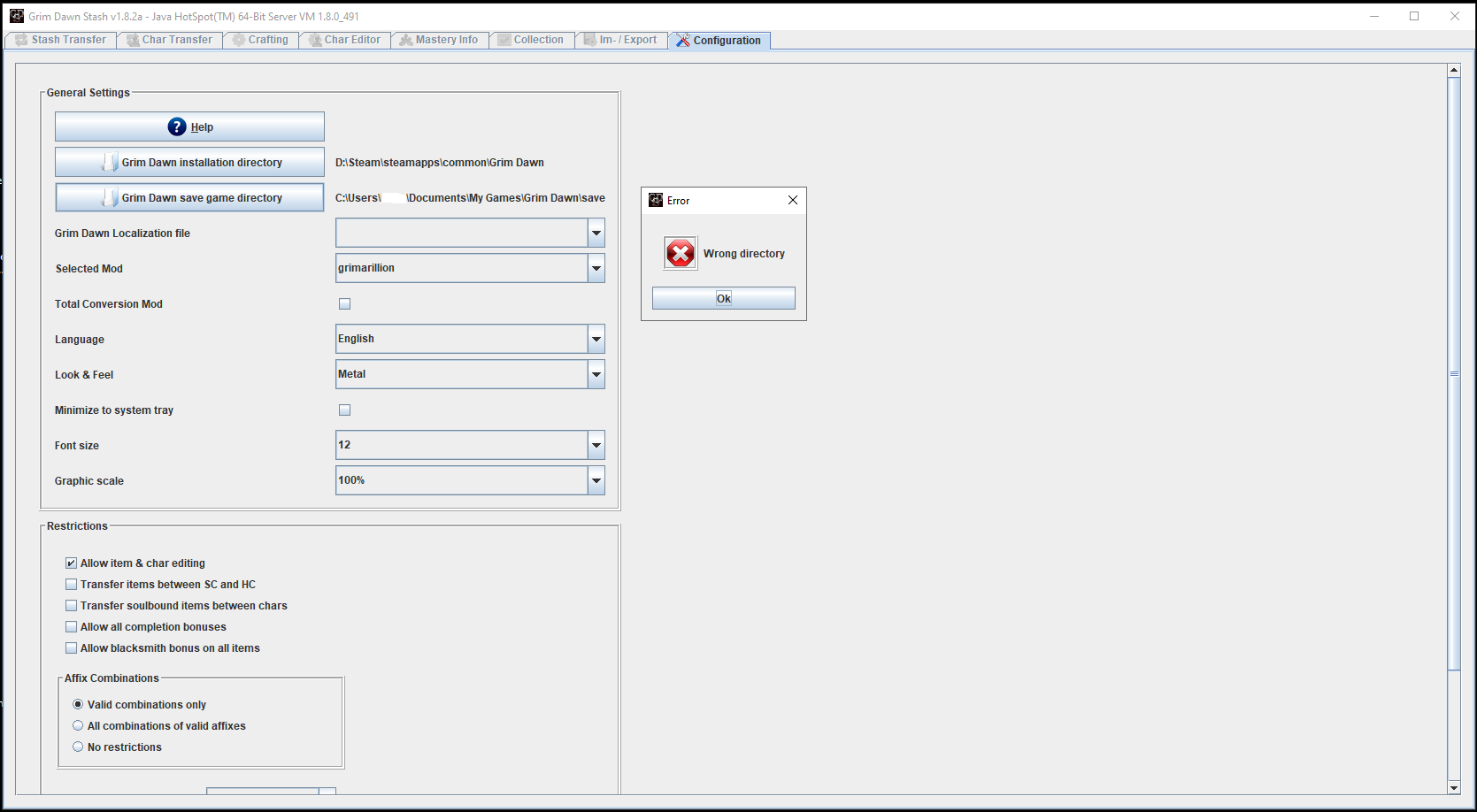
Make sure you have a character and/or transfer stash save file underneath the save dir. Until you do GD Stash considers it the wrong location
I created a character as suggested and attempted to complete the path I’m having issues with, but still an error. I went back into the directories and noticed the save folder I created is gone, but I still have a character that loads up when I boot the game.
edit: I found the save folder. When I created it myself, it was not in the OneDrive subdirectory. It somehow moved itself, or just defaulted the character info there, and deleted the folder I created. Using the OneDrive location doesn’t satisfy GDStash.
edit2: I moved the entire Grim Dawn portion from under the OneDrive location to where it should be in the help section. Still no success.
C:\Users\XXXXXX\OneDrive\Documents\My Games\Grim Dawn\Save\main