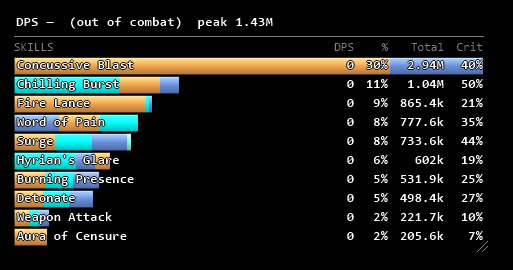
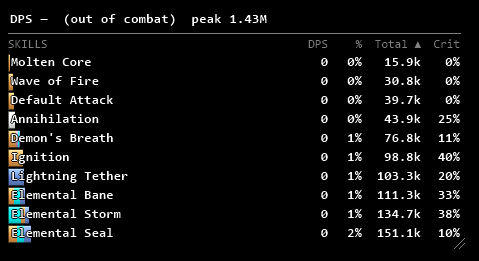
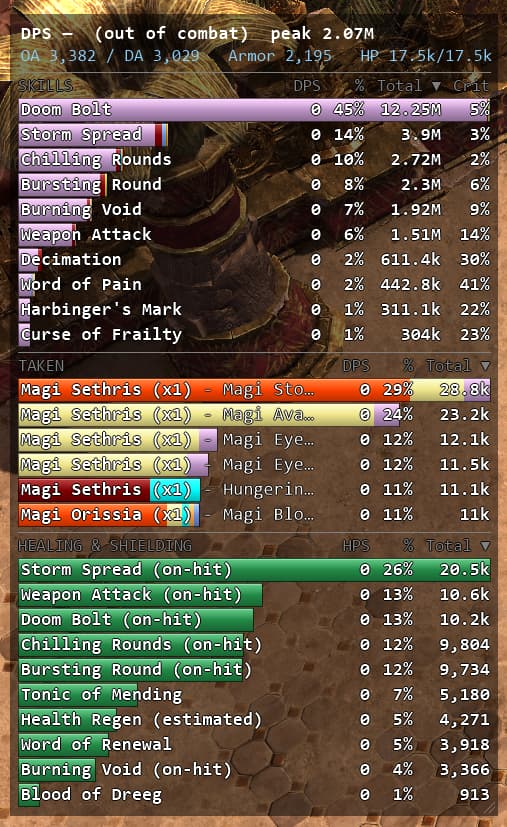
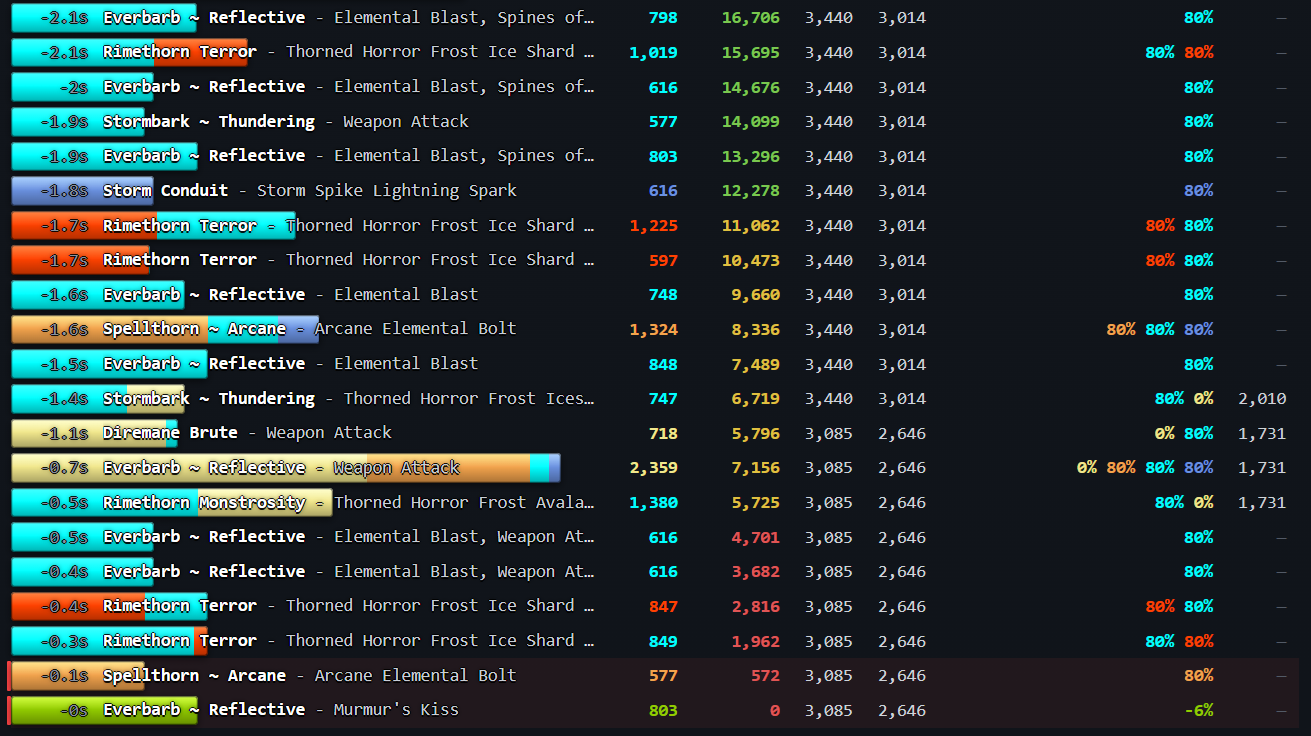
An external DPS/HPS meter overlay and death recap report tool for Grim Dawn 1.3 (64-bit). Opens an HTML page on death listing the damage you took and your defense at the time of each hit in your last seconds.
Screenshots
Summary
A Chaos WPS - Doom Bolt Deceiver with the Harbinger set.
v1.10.0: Download
Surfaced pet damage and healing tracking and added two sections: one for damage taken by pets, and another for healing received by pets.
Summary
v1.9.1: Download (for v1.3.1.1)
Updated engine structure offsets for Grim Dawn 1.3.1.1 (64-bit).
v1.9.0: Download (for v1.3.1.0 playtest)
Updated engine structure offsets for Grim Dawn 1.3.1.0 playtest (64-bit).
v1.8.5: Download (for v1.3.0.8)
No feature changes. Removed debug behavior of dumping a .dmp file into the game folder upon loading a character.
v1.8.4: Download
Now only hostile effects will appear in the Debuff section. Pet and pseudo pet auras, Coven wards etc. should no longer appear.
v1.8.3: Download
Minor fix of DoT damage attribution (again)
v1.8.2: Download
Fixed a long standing bug that would incorrectly attribute fused DoT damage randomly to one of the skills. The bug affected DoT damage distribution wrt. skills within a single damage type, but not total skill DoT damage of each damage type. Fused DoT damage is now correctly attributed proportionally.
Added roguelike dungeon mutators in the recap web page.
v1.7.0: Download
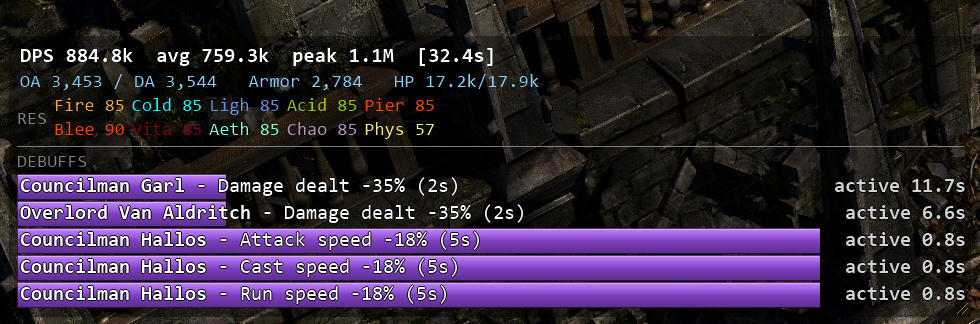
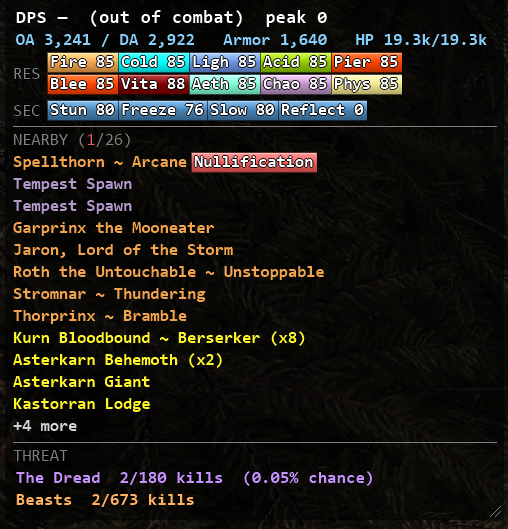
Added a display section for nearby enemies. Now warns if nearby enemies have dangerous combat mechanics (Sunder, Nullification, Reflect). You can use the toggle in the context menu to hide entries of enemies that don’t have dangerous mechanics.
v1.6.2: Download
Fixed incorrect faction tag name.
v1.6.1: Download (Aug-19-2026)
No new features compared to v1.6.0.
Reverted to old DLL injection behavior and asked Microsoft to address the false positives. If v1.6.0 wasn’t blocked by your anti-virus, you don’t need to download this again.
v1.6.0: Download (Aug-18-2026)
Changed how the program does DLL injection - please report if your anti-virus blocks it.
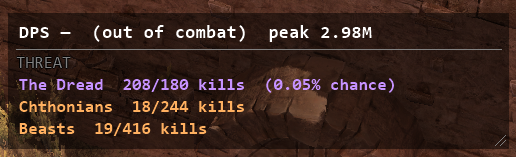
Added a new section that shows Nemesis meter and The Dread meter.
Added a setting to auto reset session after a period out of combat.
Background color can now be changed in the context menu via a color picker.
v1.5.0: Download
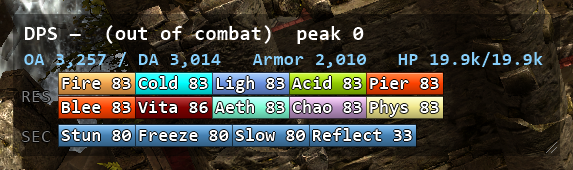
Stats readout now shows secondary resists.
Added main resist warning. Can be disabled in settings.
Section toggles moved to a submenu.
Intensity of sunder is now correctly displayed.
Skill name resolution updated to reflect GD 1.3.0.7 changes.
v1.4.2: Download
Minor skill name resolution fixes.
Debuffs are now shown as draining bars in the overlay.
v1.4.0: Download
GdHook.dll should not get flagged by Windows Defender anymore.
Overlay now tracks enemy debuffs in the debuff section.
Added debuff timeline in the recaps.
Each section can now be individually disabled.
Pets and Taken sections can now be grouped by name instead of (name, skill).
v1.2.0: Download
Fixed resist caps.
The overlay now tracks pet crits, DoT crits and crits taken.
Last fight recap (F)/Last death recap (D) now extend to previous sessions.
v1.1.6: Download
DoT damage no longer being misattributed.
Fight recap - automatically generate a fight recap every fight. Can be toggled in the context menu.
v1.1.3: Download
Pet DoT damage now correctly split when “Show DoT separately” is checked.
v1.1.2: Download
Pet damage is now grouped per pet type+skill.
Damage taken per attacker+skill (“Voidlurker (x2) - Chaos Blast”)
Healing & shielding per source
Debuffs (including CC) per source
Names of nearby enemies within a certain radius
Dangerous combat mechanics warning: warns if nearby enemies have Sunder/Nullification/Reflect
Nemesis meter: kills until next Nemesis/Dread spawn.
Each section can be individually disabled
Death recap: damage-before-death list, threshold slider, killing blows highlighted, per-row HP / OA / DA / resists / armor stats, timeline of your last seconds
Auto-injects when the game starts, re-hooks itself if the pipe goes silent
English and Chinese UI
Supported game versions
Grim Dawn 1.3 (64-bit)
Requirements
Windows 10/11 x64
.NET 9 Desktop Runtime (x64)
Limitation
Only works in Windowed and Windowed (Borderless) mode.
A note on AI assistance
This program was written with the help of an AI coding assistant. If AI-assisted software isn’t your thing, I respect that. We’re all just making things for a game we love.
Coexistence with DPYes
Works with DPYes.
Warnings
Antivirus may flag this tool. All DLL injection tools have the same problem. The program only reads game state.
Multiplayer etiquette. Built and tested for single-player. Use discretion online.
marius00/GrimDamage — symbol dumps, TakeBonus/HP techniques, life-state enum; resist-reading technique (CombatAttributeAccumulator) from its EntityResistMonitor
This software is provided free of charge, as is, without warranty of any kind. You may use/copy it for personal use. Redistribution requires permission.
Thanks a lot for the tool! I’m using it right now, and I’m finding the death recap quite nice.
I have a couple of pieces of feedback. Please consider them as personal preferences and not criticism
Is it possible to generate the HTML report, like the one generated on death, “on demand”? For example, by pressing a shortcut, the tool could generate a report for the last 15 or X seconds. This could be very useful for analyzing a fight, like a SR boss room, even if I’m not dead at the end
I would order the “Taken” section by the mobs that are currently dealing damage, rather than by the “total.” I don’t know if it’s going to be readable like this, but this way it would also be useful in real time.
Similar to the point above, while the “Total Damage Dealt” column in the “Skills” section is useful, I wouldn’t use it as the sorting criterion. While I’m fighting, I’d like to see the currently most damaging skills at the top.
Can you share the shortcuts currently supported? So far, I’ve only found R to reset the counters.
I also have some feedback, mostly about display things rather than actional functionality.
In order of importance:
The overlay is really “busy” – I find it pretty uncomfortable to have it on screen while playing, so I had to end up dragging it to my 2nd monitor. Here are some ways this could be improved:
An option to minimize the overlay window
An option to hide different sections of the meter (OA/DA, resistances, damage done, damage taken, healing), or individual columns (DPS, %, Total, Crit)
Opacity setting for the bar colors
Clickthrough setting
In the death recap window, I think it makes more sense for the bars to represent player HP% (currently I believe they display % of highest damage taken). Or at least, it’s how other games like WoW do it. This could be made into a setting for those who wish to preserve the current display.
A different color (red?) for adcth in the healing section would make the information easier to read.
This one is pretty unimportant, it might also be too time consuming to implement so it is definitely low priority, but having skill icons on the left side of each bar (before skill names) would make things easier to read as well.
This is all that comes to mind for me right now.
Thank you again for your work, this tool will greatly help in so many ways, especially to quantify exactly how valuable are different procs, WPS or damage sources in general.
edit: additionally, number of hits would be another good metric to add for skills
There’s only one issue with the overlay - it accumulates information over the entire play session (or until manual reset), stale historical data here isn’t really useful - and I can’t even envision a scenario where it would be useful. Can we have an option added allowing for automatic reset? Something like “after N seconds of being out of combat” would probably be nice - so you can set up it to clear pretty quickly between fights, or wait long enough for you to look at the numbers. Ideally, it should be able to write a combat report (if it’s enabled) and then reset the overlay. Manual reset is fine for some specific testing, but in a general play it quickly gets tiresome to press it.
Agreed, also an option to filter out mobs by rarity would be helpful as well (so you could choose to only record damage against boss monsters for example)
Not sure if that one is possible



 I have no idea what could have been changed, or how Windows manage this stuff.