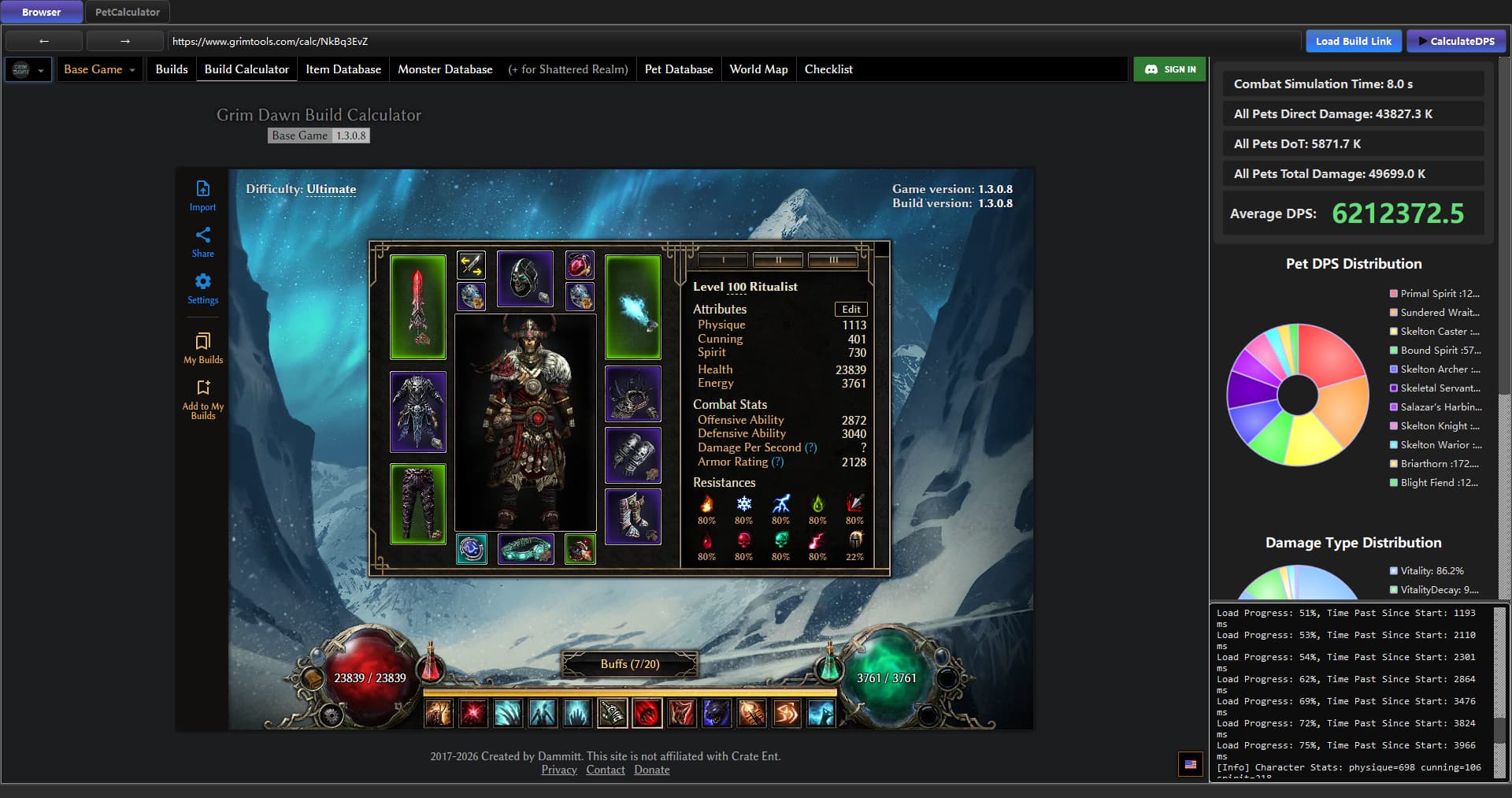
After starting the tool, paste a Grimtools build calc link into the address bar on the “Browser” tab and press Enter or click “Load Build Link”
. Wait for the page to finish loading, then click the flag icon in the bottom-right corner of the window to switch the page language to English.
Once the build page has finished loading, click “Calculate DPS”
and the expected total DPS of all pets in the build will be calculated automatically.
You can modify the build directly on the Browser tab. After changing equipment, devotions or anything, click “Calculate DPS” again to refresh the DPS display.
Works on win10, win11.
Special thanks to mi023. Many tests on pets and improvement on calculation been done.
Optimize pet builds: know the approximate DPS expectation while creating builds, and push toward maximum damage, provided that survivability is enough in the cold dark world.
Compare the value of different attributes, for example the difference between “5% Offensive Ability”, “6% Crit Damage” and “30% All Damage”.
Compare the gains brought by investing skill points.
Compare the damage gains brought by different gear choices and devotions.
Analyze the impact of damage conversion and DOTs and monster armor.
Advanced Usage Notice:
The “PetCalculator”
tab is a standalone pet DPS tool that covers 10 mastery pets and 17 non-mastery pets (granted by gear / devotions). Clicking “Calculate DPS” on the Browser tab essentially pulls the detailed data of the build from the web page, aggregates it, and hands it over to the Pet Calculator, which then calculates the DPS of every relevant pet and sums them up.
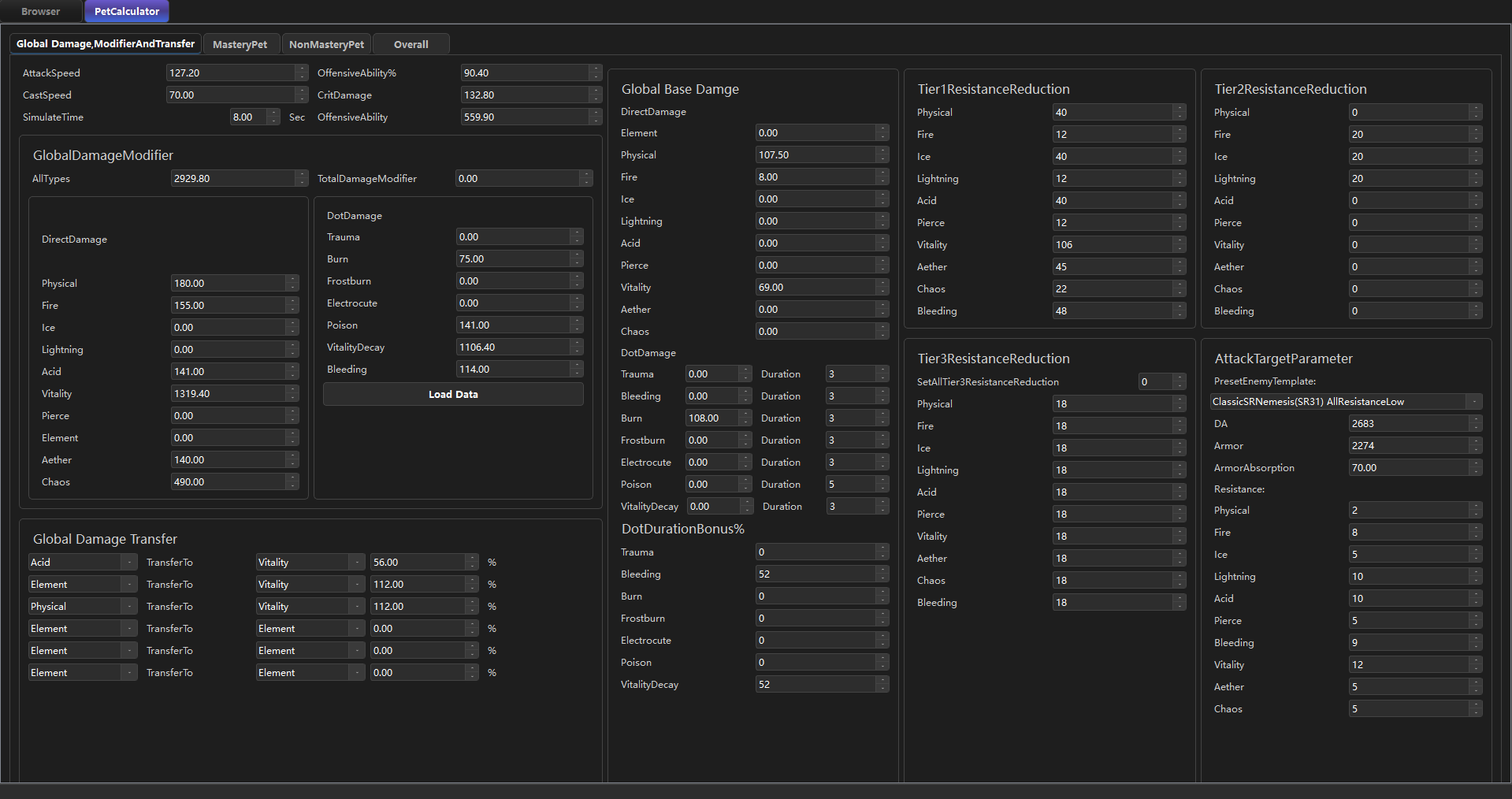
The “Global Damage,ModifierAndTransfer”
section displays and sets the build-wide global pet bonuses, base damage, damage conversion and resistance reduction capability. When you click “Calculate DPS”, the data retrieved and aggregated from the browser is automatically filled in here.
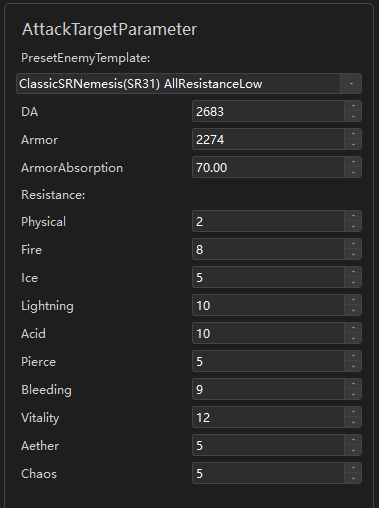
The “AttackTargetParameter” section
is used to enter the Armor, DA and Resistances of the enemy you intend to attack. You can fill these in manually, or apply one of the “PresetEnemyTemplate”. By default it uses “ClassicSRNemesis(SR31) AllResistanceLow”, a virtual enemy whose resistances take the classic low-resistance values of Nemesis monsters.
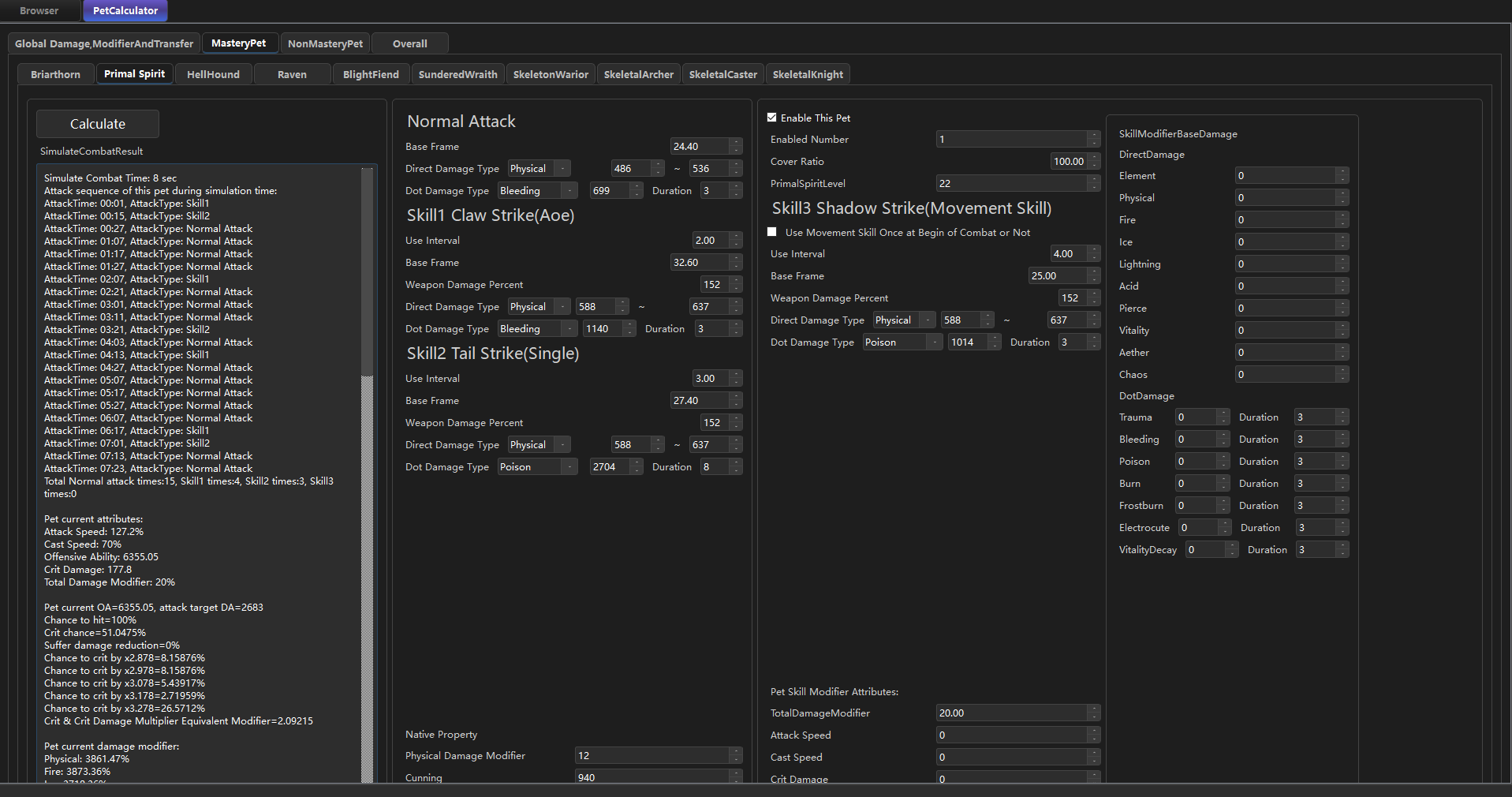
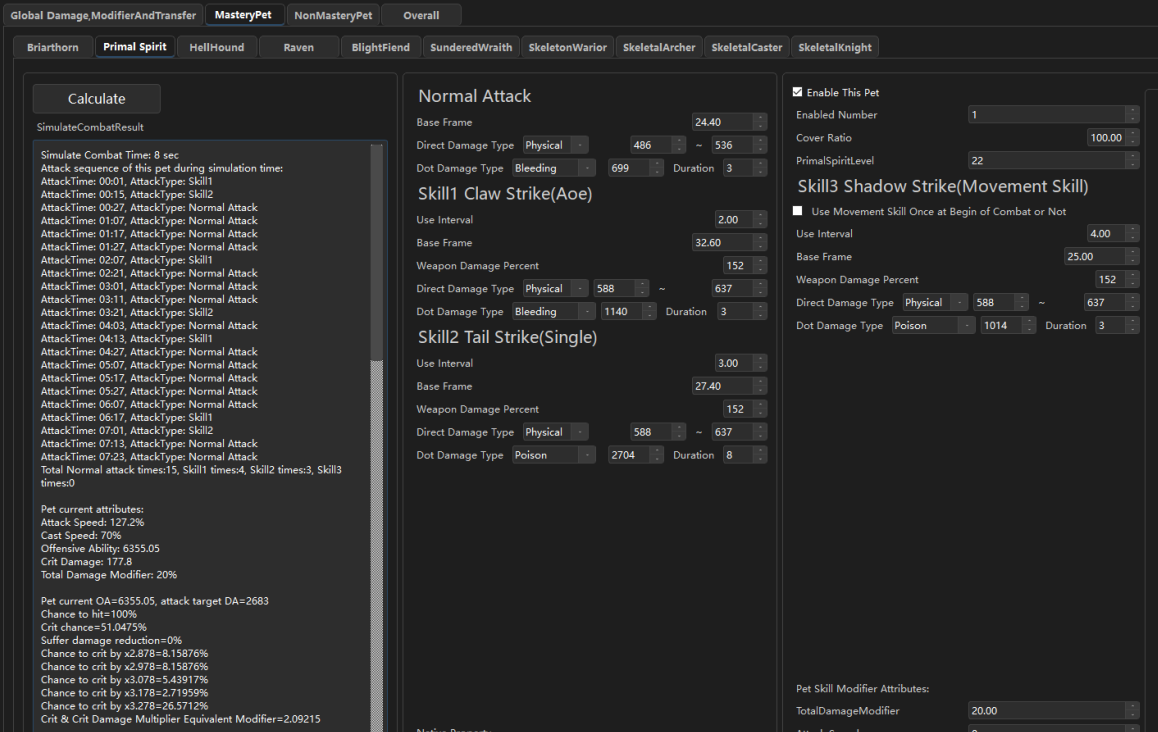
The “MasteryPet” and “NonMasteryPet”
sections contain an individual calculator for every pet. For mastery pets, all skill values, skill levels, the pet’s innate attributes, and pet-specific modifiers (pet skill modifiers include damage conversion,damage modifier, base damage, etc.) are displayed.
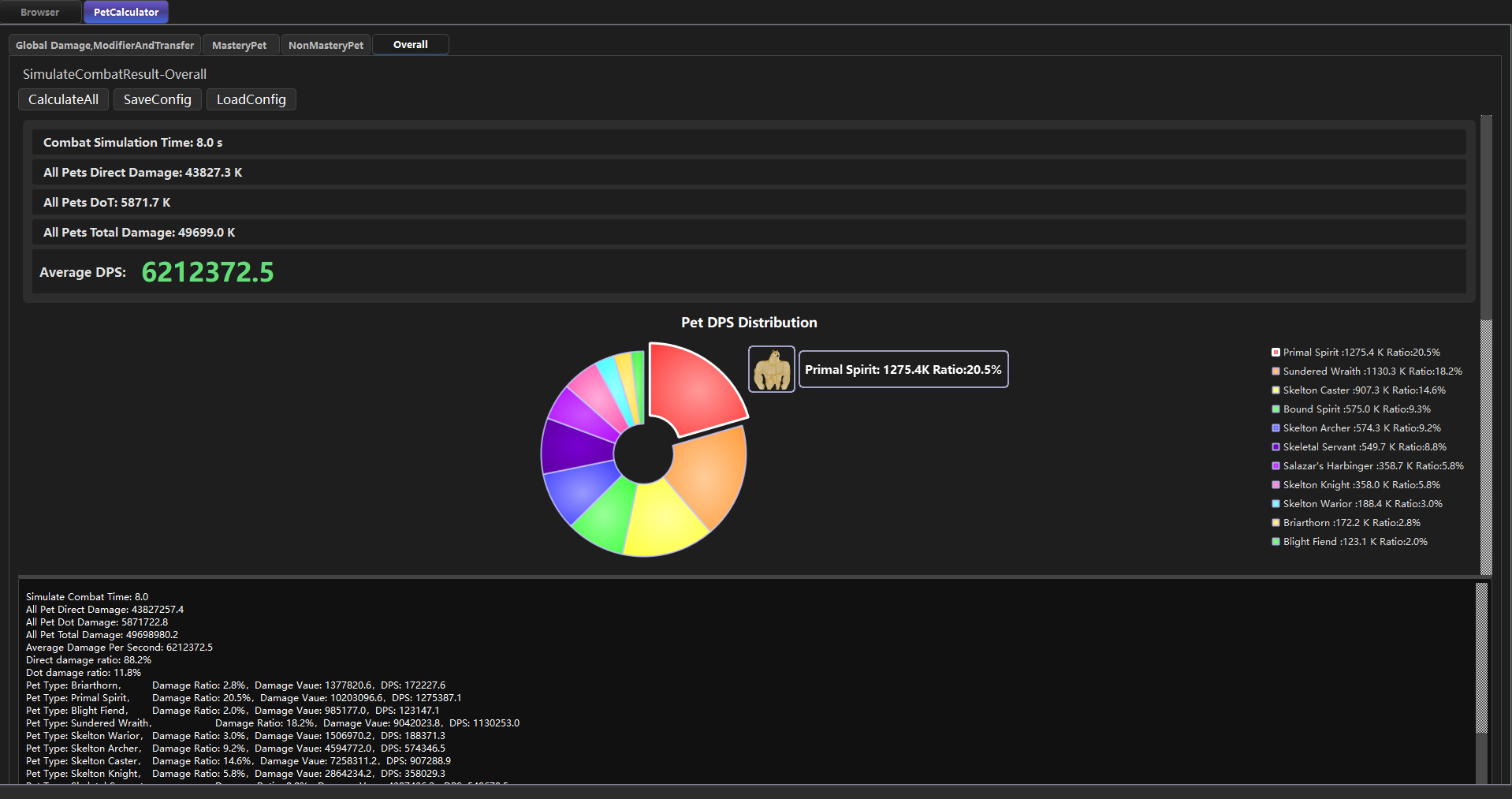
In the “Overall”
section, clicking “Calculate All” also starts a DPS calculation, automatically computing and displaying the aggregated results for every pet that is currently checked and enabled. Note that “Calculate All” does not fetch build data from the web link — it calculates using the values currently filled in the calculator. If you need to fine-tune the calculation details of a pet, adjust them and then click “Calculate All” to run a more precise calculation.
The “SaveConfig” and “LoadConfig” buttons in “Overall” section were frequently used features in old times. They can save most of the information filled in on the Pet Calculator page so that it can be loaded for the next calculation. Now that build links can be loaded to fill in the values automatically, they are not used very often.
The DPS calculation is based on a single-target assumption, namely: all pets are attacking the same designated target, and all resistance reduction debuffs have already been applied. Therefore, the result measures the ideal single-target DPS of the whole pet team. ---- For builds with few pets, this ideal situation is easy to achieve. For builds with many pets, some melee pets may crowd each other out and fail to get an attack position, or wander around the outskirts due to AI behavior, so the ideal situation is harder to reach. From actual testing experience, this calculator predicts DPS fairly accurately for pet-light builds such as the Conjurer, while it overestimates DPS for pet-heavy builds such as the Ritualist or Cabalist, which involve skeletons and a large number of pets.
Every pet is calculated based on a simulated fight. Since the AI logic of pets in game is quite simple when attacking all-out — basically “use a skill whenever its cooldown is up, and use the default attack the rest of the time” — as long as we know the cooldown of each pet skill, the number of frames each skill attack consumes, and the number of frames the default attack consumes (derived from the base attack frames plus attack speed / cast speed bonuses), we can predict the pet’s action sequence within the “SimulatedTime”.
DoT calculation. Based on the simulated fight, the pet’s action sequence is known, i.e. the exact moment each skill and each default attack lands. This provides the basis for calculating pet DoT damage: the calculator uses the moment each attack lands as the starting point of the DoT, and accurately computes the DoT duration. DoTs from the same source do not stack, while DoTs from different sources do stack.
Physical damage vs. armor. When calculating pet attack damage, the physical damage absorbed by armor is deducted according to the armor mechanics.
For the automatic aggregation of gear rolls, a high roll of 80% is used by default. That is, if an item has a 100–200% damage modifier, 180% will be used in the calculation.
All kinds of temporary buffs and resistance reduction effects are, by default, counted in full. In other words, what is calculated is the output during a “full burst window”. If you want to calculate non-burst or average output, you can manually adjust the bonus values and discount the temporary effects.
The number of each skeleton type from “Raise Skeletons” is detected automatically from the web page, including skill modifiers to the maximum summon count. Once the total number is obtained, the program distributes the four skeleton types automatically according to the summon probability of each type at the current “Raise Skeletons” skill level.
Pets granted by gear are detected automatically from the web page, and their resistance reduction skills are also counted into the global resistance reduction. For example, “Salazar’s Vanguard” has a “-12% to All Resistances” debuff skill, which only reduces the resistance of a single target and cannot be maintained at all times. Therefore, in combats that are not single-target, the actual performance of “Salazar’s Vanguard” will be somewhat weaker than the theoretical value.
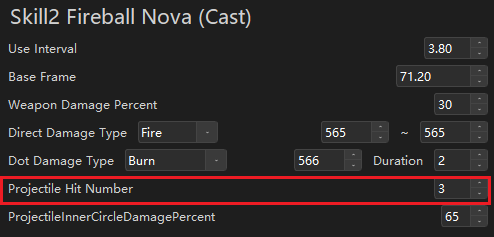
Some pets have a projectile hit count (for example the Raven’s Storm Orb, or the Skeleton Mage’s Fireball Nova)
, and you can configure whether displacement skills are used (a pet’s displacement skill is usually only used once when entering combat, and will not be used again in melee afterwards), as well as the damage falloff for inner-ring projectile hits (for example the Briarthorn’s Ground Slam), so as to better match actual combat conditions.
Some temporary pets have an “Cover Ratio” attribute
, which is used to calculate their average DPS. For example, if the Primal Spirit lasts 20 seconds and has a 40 second cooldown, its “Cover Ratio” is 50%. By default the Cover Ratio is set as 100%, meaning the pet is assumed to be present for the whole fight.
The following have been taken into account: the Hellhound’s Flame Breath hits twice; the Raven’s Lightning Strike hits the main target twice; Chillmane’s Frost Breath deals 4 instances of damage; the Swarmlings’ default attack has a 50% chance to double-hit; and the Blight Fiend’s default attack has a chance to double-hit.
The effects of aura skills from skills, gears and devotions have been taken into account.
A small number of low-level pets that would never be used in endgame builds are excluded (such as the Spirit Crab granted by a low-level relic, or the low-tier pet versions granted by low-level items).
Offensive skills bound to devotions (such as Flame Torrent and Blizzard) are not included in the calculation yet, because their trigger rate vary greatly depending on which pet they are bound to and also related to the pet’s attack speed. I haven’t figured out yet how to reasonably estimate the actual trigger rate of devotions.
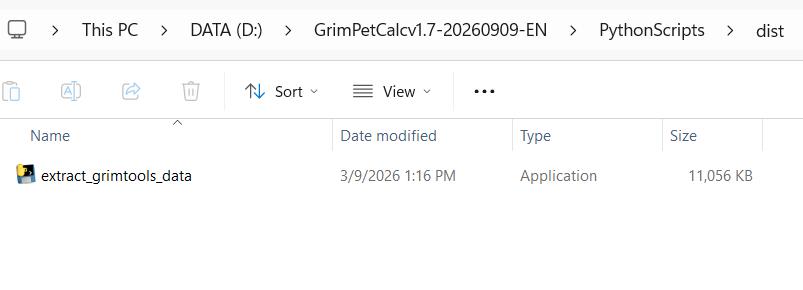
Check software folder\PythonScripts\dist, and see if extract_grimtools_data.exe was still there. This small exe file could have been removed by antivirus, which lead to the “.” spamming behavior.
(The “.” spamming problem is mainly because extract_grimtools_data.exe couldn’t work properly and output a json file to BDFinalParsedData folder.)