I see now, I got it working properly now, with the main module enabled, and just disabling the individual blocks for blues and up. Thank you for the reply!
1 Like
Thanks for making and keeping this up to date!
1 Like
I was intrigued by the “end of support” message in the last release, but I don’t manage to see the release diff on GitHub.
It seems you have released three times the same branch (see the commit hash):
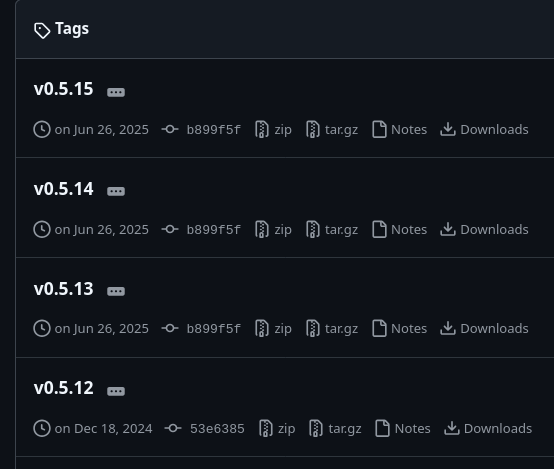
Am I understanding something wrong ?
Could you please always post a quick update down here whenever you make changes to the original post?
I hadn’t even realized you’d updated it, especially when it includes the missing links to upcoming stuff. That’s something I’m really interested in 
Thanks!
1 Like
I just used version 0.3 online and it seems fairly straightforward. Im using my phone so the screen was awfully hard to read. Im hoping you will allow for smaller screens in a future version.
For my real question: I have often wished that the skill modifiers that appear on an item which do not pertain to the current character’s class would not show. (Visual noise makes it harder for me to parse information.)
Do you think it’s possible with your tool to hide those particular lines without leaving a blank line?
1 Like
I only removed the old links and changed outdated information to avoid confusion on what to use for anybody new coming here, didn’t think anybody watching the thread would want to get notified about that. 
I plan on having full support for mobile in the future.
No, the text file will never be able to do that, but once I’ve done everything possible and planned for text files I will move on to another project where this is going to be possible, that is months away though.
1 Like
Works perfectly. Thank you!
it doesn’t really matter as it’s not used anymore. The v0.5.15 branch update was just to add the following message:
Tool support ends with 1.3.0.0 and no FoA items. The new Tool can be found at https://grimraynbow.com and the OP in the official Grim Dawn Forums. No Errors!
So people would know that in order to continue to use the rainbow filter, they’d have to go and use a website instead.
1 Like
Ok tried the online version for the first time, and i sure do miss some things:
- Need my coloration back in the weapon damage tooltip in the character page, when hovering the cursor over the Damage for each hand
- Different colorations for different attributes — like Physique, Speed bonus, Energy, etc, in the item tooltip
Other things:
- Can the choosable colors be softcoded? Is there some reason we’re stuck with these?
- Would love to see your To-Do list on the webpage, so we know what you’ll be adding/changing as you continue programming
- Saw “User15” when opening the buy-sell page in FG. May have something to do with my next observation…
- Went to the text_en folder trying to follow the instructions you laid out for removing “all other rainbow files.” The problem was, i wasnt sure which ones the generated Raynbow file was supposed to replace. So i took out tags_ui.txt and put in tagsgdx2_ui.txt, which fixed all my previously missing tags, but created the User15 mislabel. I would love the Raynbow file to be more clear as to what stays in that folder and what must be replaced with the generated Raynbow file.
All in all, however, the experience is just as easy as the desktop application. I just hope you can do as much as or even more than the old Rainbow. 

Colors are hardcoded in the game and all available colors are selectable on the website.
If this is the only tool you’re using, the new file should be the only one in \text_en\ . That folder is what we can use to change in game texts without actually changing game files. So it’s safe to delete anything inside there.
That being said my database was using the tag from the basegame. It is fine for FG now, but it will probably have missing tags for Factions in base game/AoM filters for now.
Understood, but there are a LOT of tags missing in the gdx2_ui txt file. I had to bring the others back in.
If you’re taking requests, i would like to see the Set marker softcoded. I went thru the generated txt file and got rid of the (S) symbols and replaced it with an asterisk. (I tried first with the § symbol but thats not in GD’s font bitmaps.)
Does anyone know which lines I need to add to the file to recolor the health, cunning and spirit tags? Currently they use the ^f-color which I use for the skill tags.
the resistances are not in rainbow colors any fix for this? i followed the steps above
If you’re talking about the tags for the character page, these are found in ui.txt under tagCharAttributeNamexx about 1/3 the way down.
If you need item tags, those are found in tagsgdx2_ui.txt (the one generated by Raynbow) under tagCharAttributexx — where xx is the number for the attribute.
sir can u upload again the grimarillion mod compatibility i cant find it there anymore xD
Thank you for the tip!
It would be great if these where exposed on the website so we could choose the color there.
The FG filter file should have every tag it needs. If that is the only file in your \text_en\ and you have missing tags, it sounds like you have old files in the other \settings\text_en\ folder.
I’m always open for requests, frankly symbol customization was supposed to be in there as well as overriding the color for an enitre module, but the UI felt too cluttered and overwhelming with it. The EndColor palette will get replaced with a custom symbol field soonish.
Since you were asking for a ToDo before:
I’m currently just refactoring everything before it becomes too much of a mess, most of the code was rushed and prototyped to get the site to the point where it can replace the old files/tool. And it does that now except for what Special Highlighting did.
The customizations currently available are the first layer, the second layer is making custom modules and blocks which is the equivalent of Special Highlighting, those custom modules/blocks can then be made public for others to use and include in layer 1.
Acutal ToDo-List and kinda Roadmap
- v0.0.3.x
- Refactoring and getting ready for the playtest
- Generating a link for current customizations
- v0.0.4
- Adding all Stats/Properties with keywords (probably takes care of the missing colors for you)
- Item DB for keywords to color affixes/items based on their stats
- v0.0.5+
- Custom Modules & Blocks
- Custom Filters
- Full Mod (Custom Game) support
- Desktop App (Launcher) to manage/auto-update files
Anything colored by Raynbow can be changed with it, those are Attributes inside the Stats & Properties Module.
If you downloaded the file for FoA without FoA installed, the game won’t load it you need the file for your latest expansion.
The link from the Grimarillion OP.
Thank you! Found it.
Now for complete happiness I’d love to change the skill names’ color from the default blue.
Example:
tagClass01SkillName05A={^f}Blade Arc (Soldier){^-}
or even
tagClass01SkillName05A={^f}Blade Arc {^k}(Soldier){^-}
instead of the now generated
tagClass01SkillName05A=Blade Arc {^f}(Soldier){^-}
I have set up a list which I simply copy over after each update but it would be great to do it on the website.
1 Like
Yeah i looked in the generated gdx2 file and it didn’t have everything so I’ll just manually fix the txt files until youve assembled everything in one file. The original Rainbow file allowed me to colorize everything in the character page, the item tooltip, and the loot filter (unless i don’t remember that i actually did those outside of or alongside Rainbow), so i know what I’m doing where Raynbow cant. Im just happy that we can customize the display text and colors so easily. I used to mod D2LOD and it could be done, but it was a hassle.
Someday im hoping we can tweak the layout of the actual text windows and design. (That may have to wait till the day when GD1 is open-sourced!  )
)
1 Like
Has anyone ever figured out why none of the blue colour tags are an exact match for the default colour used for epics? It’s quite obvious if you leave the mythical tag as default and then set epics to one of the available blues.
As far as I know this has been present in all versions of the filter to date - it doesn’t really matter much as I leave blues set to the default, more just a curiosity thing.