That’s just limited to the Module, it will be possible to add other Modules to a Filter, like one with all Masteries having different colors.
1 Like
Didn’t expect an MI to slip in during a late hotfix (1.3.0.7) 
It’s flagged as MI now.
Those aren’t marked as MI on GrimTools either, unless I see a screenshot with the MI symbol, I’m not manually flagging them as MI.
1 Like
Change Log [v0.0.3.4]
Mostly backend changes, but those are now finished and the update pipeline has been improved. However, this still brings a new Change Log system and Playtest support. I also need to test if the text generation is bugged and needs fixing before the major v0.0.4 update.
General
- Change Log for filter (left) and game version data (right).
- Playtest filter support.
- Keyword Block - backend fully changed, existing presets have been adjusted to functionally be the same.
- Backend Code, Database and Pipeline changes.
- Note: Unchanged Tags will no longer be added to the file.
1 Like
Hi, are the names of the faction vendors we discussed included in this update?
No, this is just for the playtest and to see if I broke something while cleaning up the code. Everything was rushed to get the site out quickly and it showed given it took me 3 weeks to clean it up.
I’ve added it to the todo that is now visible on the site, I might push it when it’s ready.
1 Like
Since we have these tags
tagStyleUniqueTier2={^A}Empowered{^B}
tagStyleUniqueTier3={^P}Mythical{^B}
Is it redundant if we still keep {^B} before the names of Epic items?
The default color is a slightly different blue than what the color is we can use for tags. If that isn’t a problem, yes they can be removed. Eventually they probably all have an awakened version, so there is not a lot of Epics left that actually get the color.
I, for myself make regular Epics a different color and just leave style tags alone.
1 Like
hi sorry which files should i leave in \steamapps\common\Grim Dawn\settings\text_en folder ? i tried removing all the txt files from there and placed the latest raynbow onefile into \Documents\My Games\Grim Dawn\Settings
as i had some broken tags display, was thinkin it might be due the old rainbowfiles,
5 files ; tags_items ;tagsgdx1_items ;tagsgdx1_storyelements ;tagsgdx2_endlessdungeon ;tagsgdx2_items
thanks for reading this
The one file from the Website is the only file in \text_en\ from now on. It has all the colors.
1 Like
Hello, I’m trying to download the mod but for some reason I’ve been rather unsuccessful with it? I found that I had a settings folder within the my games document which I had copied over to the actual grim dawn folder place of installation, and made an text_en folder, pasted the downloaded text file within that folder and tried to open the game but nothing seemed to work and I don’t understand what I am doing wrong. I had to create the directory to settings/text and such but i’m not really good at these but I tried.
Same here, i just downloaded the mod and tried putting the txt file in settings/text_en in both documents as well as ‘C:\Program Files (x86)\Steam\steamapps\common\Grim Dawn\settings\text_en’, no luck
I checked the files and they are fine, it’s a different file name based on the DLC selected, other than that there is nothing more to it than having the file in \settings\text_en\ and starting the game.
Disabling OneDrive or messing around with Steam/GD cloud safe made it work for some.
I only don’t have the latest expansion is that why its not working? since im installing the text file for that expansion? I just purchased the latest expansion so im going to see if that fixes anything. After getting the dlc expansion the mod worked, so I suppose thats what was causing the issue for me at the very least.
1 Like
Figured it out, Grim Raynbow has 4 different filters, one for the base game and 3 other DLC. So your text_en folder needs 4 files, not one.
Would be good to update the description with this info, as a new player i did not know this just gave up on using the filter till now
You only need 1 file, but you can have them separate afaik. I have only 1 file and no problems at all. So it’s something else that made it work for you.
1 Like
Yeah you definitely dont need 4.
I took Raynbow’s generated tag_gdx2_ui.txt file and went thru and painstakingly added ALL the entries from the vanilla, GD1, and GD2 files, recoloring (and rewording) all the entries as needed, then planting it in the Grim Dawn/settings folder. After some trial-and-error, the GUI text has never looked better!
You only need the one file.
Change Log [v0.0.3.5]
Database updated for Grim Dawn v1.3.1.1.
Things should return to normal for me next week so I’ll have time to work on features and address recent confusions with the tool. The playtest button is still there so be sure to switch it off if you were using it.
3 Likes
Hi! I was wondering how I can customize the colors for the line highlighted in the yellow box?
I downloaded the Full Rainbow version, and everything works fine except for this specific part. The screenshot is from a YouTube video where they had it set up beautifully, but in my game, that part doesn’t show any colors at all.
Could you please guide me on where/how I can adjust this setting? Thanks!
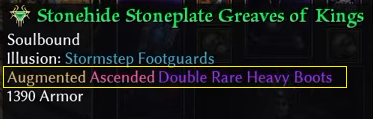
It is possible to manually change that, for items you would need to change letter that does the coloring from {^h} to others, the game supports:
{^clear} – for the record I have no idea how this one looks
{^a} – Aqua
{^b} – Blue
{^c} – Cyan
{^d} – Dark grey
{^e} – Brown
{^f} – Fushia i.e. pink
{^g} – Green
{^h} – Greyish Orange
{^i} – Indigo
{^k} – Khaki
{^l} – Olive
{^m} – Maroon i.e. dark red
{^o} – Orange
{^p} – Purple
{^q} – Greyish Magenta
{^r} – Red
{^s} – Silver
{^t} – Teal
{^w} – White
{^x} – Dark Green
{^y} – Yellow
{^z} – Cobalt
so as an example take this line
tagClass02SkillName08A=Blackwater Cocktail {^h}(Demolitionist){^-}
and make it
tagClass02SkillName08A={^r}Blackwater Cocktail (Demolitionist){^-}
this will result in all of “Blackwater Cocktail (Demolitionist)” being red, which is how the old WanezGD tools did it.
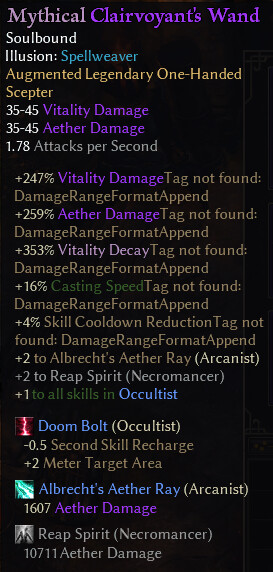
Always had good experience with your mod until just now
The image seen here is the result of trying the new version
Reverting to the old files in text_en failed to change anything
Deleting text_en folder entirely and rebooting failed to change anything
Game is not playable; please help me to revert back to the way it was, which had a few missing bits here and there but was at least familiar and playable.
EDIT: Also i do not want class names listed beside each skill; this is bloat and i would like to remove it; Should that prove impossible i will simply stop using this mod. Thanks in advance for any help.