I’m just going to assume the program was able to write colors and you’re simply confused on selecting it in GD. Only Localizations create a different option with [C], the default ‘English (US)’ uses the generated colors, no new option will show up for it.
Hello - today I downloaded the Rainbow mod but it shows something about “tag health bar not found” anyone knows how to fix this?
My bad fixed
Thanks for the reply. Managed to get it working.
1 Like
Hello WareBare
I have problem with using the mod, i followed the instructions, but the colors doesn’t change.
I installed my Steam in C drive, and Grim dawn in D drive.
I checked the path, and it is correct already.
When i click save color, It stuck on Writing Colors…
I already tried running it as administrator.
I can launch the game from the Wanez Tools, my Grim Internals also working, but somehow only the rainbow mod isn’t working.
Please help me, and thank you in advance!
Not much I can do without more information on what is breaking. My first guess for this is always the program doesn’t have permission to write due to either anti-virus (windows or other) or settings.
The next (upcoming) program is going to have logging so I can see what’s going on, but that doesn’t help us now  . For now you could use the search here (for this topic) and on discord, not the first time it has come up and they usually write their solution, too.
There are more alternatives on the way to solve these issues.
I use manual file, it worked now! Thank you!
1 Like
Is there any need to update for 1.1.9.1? Haven’t encountered any errors so far but I’ve only played an hour or so on the new patch.
1 Like
No update from GD v1.1.9.0 -> v1.1.9.1 needed.
You won’t get any “tag not found” errors with the v1.1.9.0 files, since none of the files we use got any new texts. 
1 Like
Thanks for clarifying for us WareBare!
1 Like
I cant find the files for getting the mastery part of the mod to work? Can someone please help me
Mastery features are only possible with the program. I don’t add them to the files, because I’d imagine not everybody would want them and it’s more of a bonus for the minority.
However, with the Website coming up (soonish), every little feature will be made available for download and without installing any .exe.
Is it possible to change the color or add tags to the pictures of items so when they sit in inventory, you can pick out MIs and Double Rares without having to roll over them in your inventory?
No.
The game only has that one bitmap for an item and it doesn’t care about affixes for it. The only thing that changes for it is the background/border color by rarity, but that is a deeper change inside the files than changing a text (what Rainbow does). And you still couldn’t make a difference between double rare/MI, to the game there only is rare.
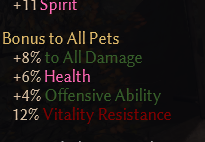
How do I get pet bonuses highlighted?
Not sure what you mean
When I use the Mastery filter only Necromancer and Occultist get colors the rest are the standard grey text. Is there a fix for this or is it just a reinstall type deal? I’m using the Tool btw
I’m guessing those are your two masteries. I can’t overwrite the default color for other masteries, that’s just how the game is.
Not working as intended, but working as far as the game allows it.
I browsed through the tags_items.txt file after applying the rainbow filter and found a few item suffixes that don’t have a color code. I’m not sure if this is a bug or on purpose.
I’m talking about these lines in tags_items.txt:
4081: tagSuffixB008_Wpn_A=of the Devourer
4099: tagSuffixB026_Wpn_A=of Affliction
4101: tagSuffixB028_Wpn_A=of the Winter Storm
4102: tagSuffixB029_Wpn_A=of Squalls
4103: tagSuffixB030_Wpn_A=of the Hurricane
4195: tagSuffixB011_Sh_A=of the Defiler
4209: tagSuffixB025_Sh_A=of Affliction
4212: tagSuffixB028_Sh_A=of Storms
4213: tagSuffixB029_Sh_A=of Conflagration
4214: tagSuffixB030_Sh_A=of the Winter Storm
4215: tagSuffixB031_Sh_A=of Squalls
Most likely not being used or at least not the way you think. Until you find it ingame not being colored properly - it’s not a bug to me
Thanks for clearing it up.