Hi everyone,
I’d like to share a Quality of Life (QoL) UI suggestion regarding the Production Quota / Limits menu (e.g. “Mindestquote” & “Höchstquote”).
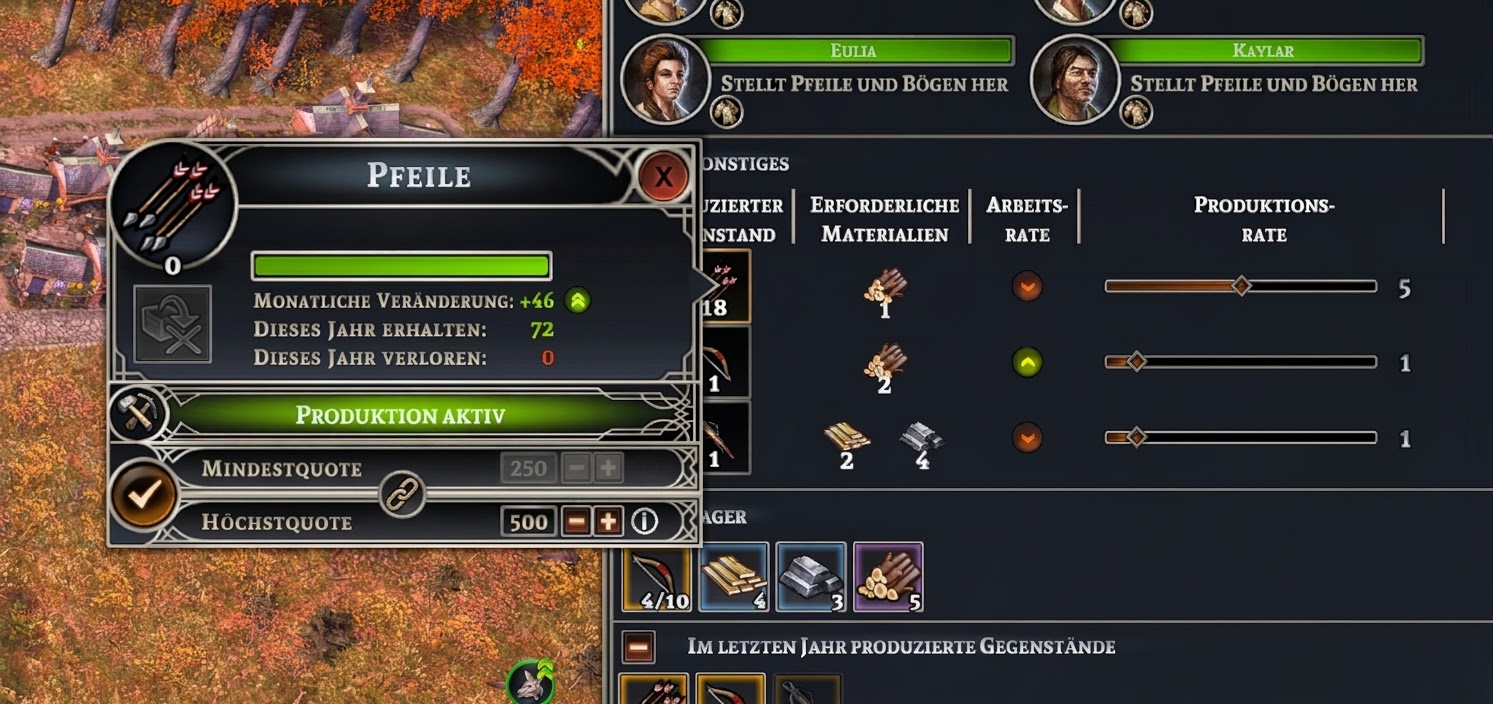
Currently, when the minimum production limit is set to Auto, the UI simply displays “Auto” instead of the actual calculated quantity (which defaults to 50% of the maximum limit). To know what the minimum quota currently is, players have to calculate it manually in their head.
Here is a picture generated with gemini. Which is not completely accurate, but you get the Idea
Proposed Improvement:
-
Display the Calculated Value (Greyed Out): Instead of writing “Auto”, display the actual calculated number (e.g., 250 if the maximum limit is 500). Keep this number in a greyed-out font to clearly indicate that it is automatically calculated and not a manually fixed value.
-
Linked Quotas (Chain Icon Toggle):
- Add a small chain link icon on the left between the Minimum Quota and Maximum Quota fields.
- When the chain is closed/linked, changing the maximum quota automatically scales the minimum quota accordingly.
- Clicking into the input box to manually enter a custom number (e.g., changing 250 to 300) unlinks the values, displaying an open chain icon.
- Clicking the chain icon again reconnects the values and recalculates the minimum quota automatically based on the maximum quota setting.
ting.
This would make production limit management much clearer visually while giving players a seamless way to switch between automatic scaling and custom fixed quotas!