Table of contents
- Preface
- Currency
- How to actually trade in the game
- Multiplayer
- Trade through the forum
- Trade through discord
- Facebook trading
- Trade through steam
- Forum post template
- Crafting and blueprints
- ‘A more or less complete guide to trading’
- Video tutorials/where to farm certain materials and components
- Advice on asking prices
- Final comments
Preface
If you were to ask the average player what the main characteristics of a Diablo-style ARPG are, there’s a good chance they’ll say that they are build progression and the collecting of loot.
To me personally it has indeed always been about these two, and being the magpie that I am I want to collect any item of value that I can!
I have no experience with trading in Titan Quest, but I do remember vividly how it was done in Diablo II.
There were certain servers that were called ‘trade’ or something in that regard, that you could visit to trade with other players.
There were even servers called ‘free’ with players in them that offered you the unique items they had in abundance.
I also traded in Path of Exile for a while, and that was an entirely different experience all together!
Initially trade went through their forum and there were websites that indexed everything offered on there, you also had trade chat in the game.
These days they have a trade system built in, which used to be on an external website.
The ingame droprates are designed to cater to this trading system.
In other words, the availability of higher tier items in the game seems is based on this supply and demand.
Grim Dawn is mostly a single player experience, although it does offer multiplayer.
For that reason, the community has its own ways of trading.
I will explain each one of them in this guide, and will also provide some tips and a useful template for a trading message in the designated threads on the forum.
Currency
Diablo II has gold and Ist runes, Path of Exile has a currency orb system.
In Grim Dawn you of course have iron, but it is not always the usual currency for trading.
Trading for iron has become more attractive with the release of Forgotten Gods, due to the addition of the transmute function on the inventor and the ability to stash your iron in the form of iron bars and stacks at the banker.
A lot of trades however, are either trading item A for item B, or more often trading rare materials for items.
Since the release of Fangs of Asterkarn, most materials are in a higher demand, as a result the asking price in materials will differ between what players currently lack.
In other games the prices can be pretty much set in stone because supply and demand are being indexed.
In Grim Dawn this is not the case, the price is up to the player and can vary.
That said, it is very usual for a Mythical Legendary to have a similar rate among different players, a triple rare item on the other hand can go for a lot and have a very subjective price point.
Depending on the current build of the game, a price can really be anything.
How to actually trade in the game
For new(er) players it can sometimes be a bit puzzling how multiplayer and trading in Grim Dawn actually works.
The process is pretty straightforward but there are some things to pay attention to.
For instance, trading through steam has the benefit of being able to click and join games by your friends, so you don’t have to look up the game’s name in the lobby.
It is for that reason useful to add your trading partners as friends, which you can then of course remove later.
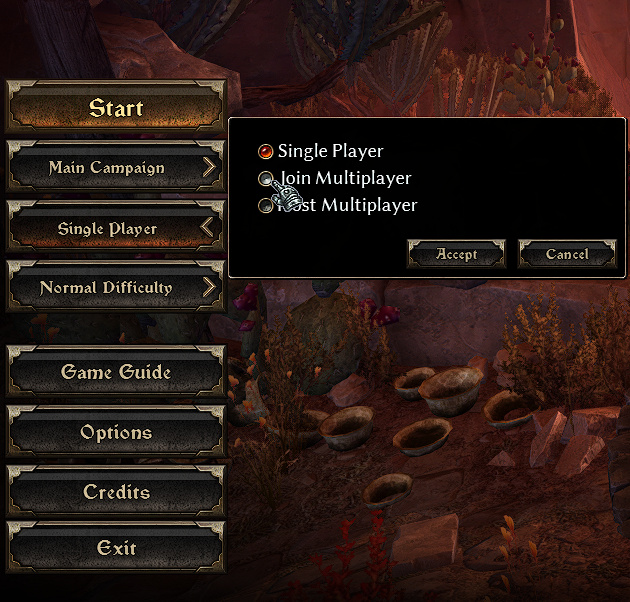
When you host a game you can set up a game name and a password.
For trading it’s recommended to start a game on normal difficulty, so it will be accessible to players of any level.
To ensure this, it’s also common practice to set the level range from 1 to 200, which is the default.
Steam trading
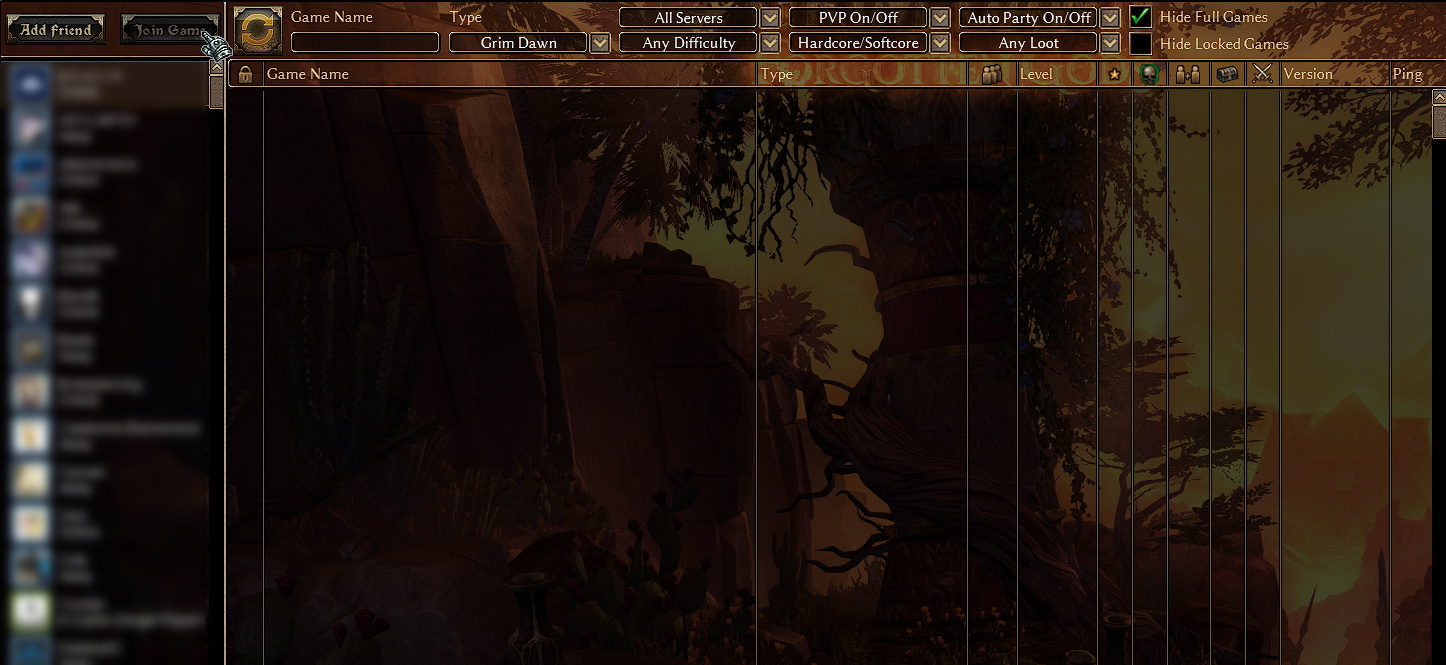
When trading with steam friends it suffices to click their name on the bar on the left of the lobby and then click ‘join game’.
On closed servers you are then prompted to enter the password, open servers will grant you immediate access.
non-Steam trading
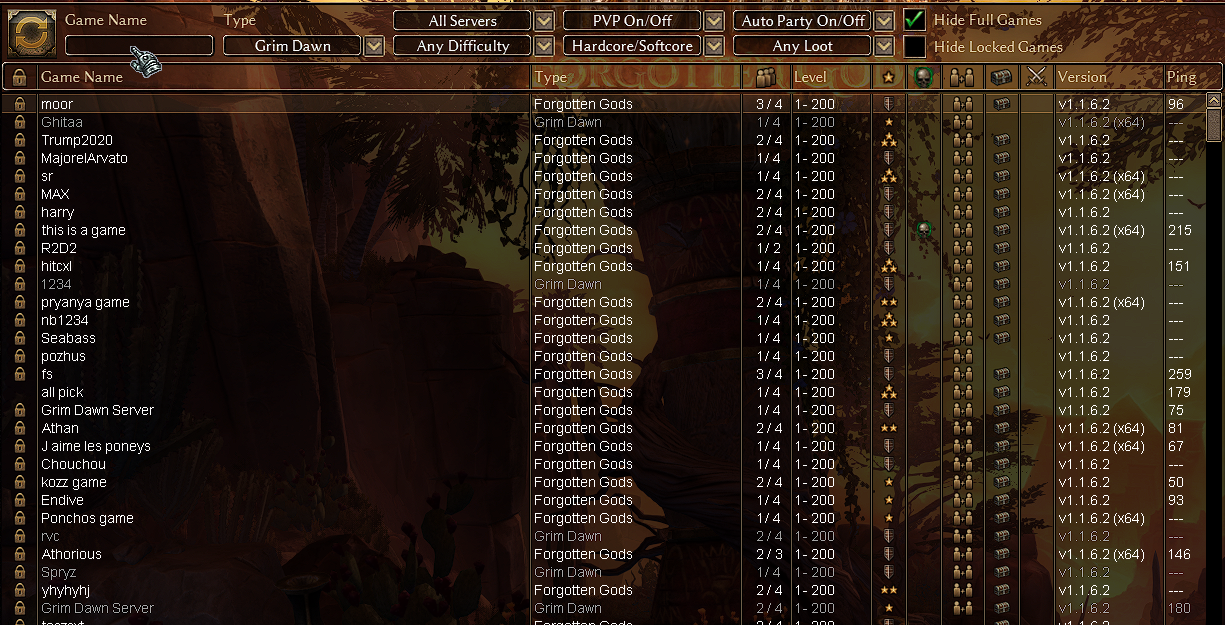
When you first enter the lobby the server list will be empty.
If you know the name of the server you’re going to trade in, type in the game name and then click refresh.
If you don’t, just click refresh and pick a game from the list.
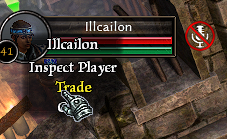
Once you have entered the game, you and the player you’re going to trade with, need to be in the same area, in a relatively close proximity of each other.
On the left side of the screen you’ll see their name, right click on it to get a list of options.
Once you click ‘trade’, the trading window will open.
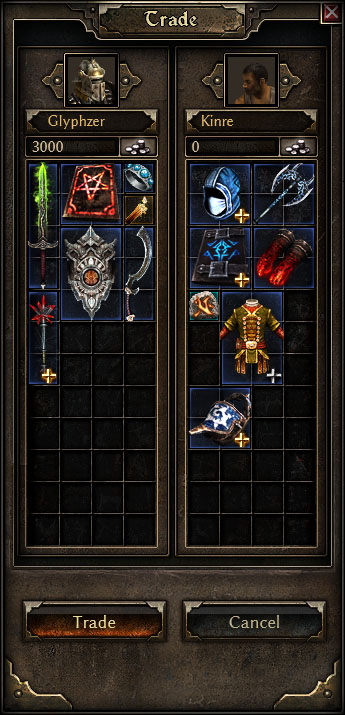
You can now put the items you want to trade, or the payment, in the trade window by shift-clicking them.
When both players have clicked the trade button, the trade will be done.
Multiplayer
This way of trading is obvious, but also a bit rare nowadays.
Like in the old days of Diablo 2, there are sometimes servers specifically for trading.
You can just enter them and look if someone has the item you need, and then haggle over the price.
Some years ago I saw these servers quite often, but nowadays they aren’t usually there.
Nevertheless, this is a known way of trading gear
Trade through the forum
To my knowledge this is the most popular way of trading and it occurs right in the hub of our community, this forum.
There are few different variants available:
FoA softcore legit item trading
FoA hardcore legit item trading
there is also a list of trading threads available here
When we talk about ‘legit’ we mean that all items bought and sold and all currency paid for them was legitimately farmed in game
To many players, including myself, this is a sensitive issue
Because Grim Dawn is a single player experience, it’s easy to duplicate or cheat items, which is fine if that is how you want to play!
The distinction in the different threads is meant to make sure that if you want legitimate gear, that is what you’re getting
(Lately the forum hasn’t had non-legit threads, so I don’t currently list them).
The way this works is that people can look up items available for trade and will then either send the seller a PM or a steam friend request.
I will come back later in this post to what a good trading post in such a thread should look like in my opinion
Trade through discord
Discord is an app/program that you can install on your PC, laptop, tablet or phone, or approach through their website.
It is mostly meant for communication with others while gaming, but is also a collection of message boards with chat functionality.
Most modern games and companies have their own discord channel, and Grim Dawn is no exception (although the discord server is not maintained by Crate Entertainment, they have a presence there).
In the Grim Dawn discord channel there is also a messageboard that is used for trading.
Usually you list what you need there and/or what you are offering.
I do this myself by saying for example:
SC (softcore) LEGIT LF (Looking for)
-list
-of
-items
After that, I list a URL to a google document containing what I offer for trade and crafting.
The benefit of this is that I can keep that file up to date without the need to change my post every time.
When I post on the trading board of discord, it looks like this:
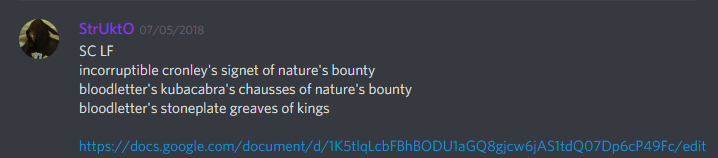
Discord will automatically show the first lines of this document under this, but it will all become visible when you click the link.
Facebook trading
I would like to take the opportunity to do an extra shoutout to a facebook group called ‘Grim Dawn (community)’, this group is huge!
It has its own discord for its many members which also contains a trade channel, adding even more options for reaching out with your trade requests.
It can be found here