hello , great mod ty for the efforts , but i have a questions for the dps meteres - the dmg dealt one is there a way to color it like grim internals ? also is there a way to show more dmg types like internal trauma ?
and for dmg taken there is 2 unknown lines and i dunno how to fix that !
Fixes affix filtering after exiting to main menu and re-loading into the world
Hides “Broken” items when using the DPYes loot filter – GrimDawn does this internally and this was the cause of TagNotFound: TagQualityBrokenA01 showing up on some elusive items
This is well and good, but this does not make a useful DPS meter in the general case.
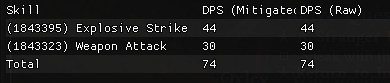
Fire Strike shows up as Weapon Attack for me:
This is currently not possible with DPYes, it is on my eventual todo list though.
The current default DPS tracking can’t distinguish between a normal hit vs. a tick from damage over time. The WiP damage tracking you can find in the debug menu can distinguish between these, but overall this feature still needs some more work.
I successfully opened the game by using DPSYes.exe, but
Config Menu does not open (When I pressed F5), and the program does not generate DPYes.ini file
I am playing Grim Dawn Latest Version (Without DLC) with 2 monitors and 2 GPUs, is it possible this is the cause of my problem?
Hey, im using the grim cam tool and trying to play from third person perspective but each time i rotate the camera my game stutters or freezes for a second. is there a way around this?
hey there, just found this tool and its finally made Grim Dawn playable for me as I really needed WASD to move. My only request/question is that I was wondering if it was possible when using WASD to disable left click to move? It’s easy to accidentally still move in combat when trying to click an enemy to attack and I don’t always want to be holding Shift. if thats at all possible.
Minor bug with the 1.2.1.6 GOG version, if WASD movement is enabled, you cannot use lowercase w,a,s,d when creating a new character. If you temporarily disable WASD movement then those letters can be typed.
Also, is there any chance of the option to play our ‘custom game’ characters in crucible? This was an option I used in GrimInternals to help level up. Right now I have a character in a custom game for larger inventory but she is not available under crucible.
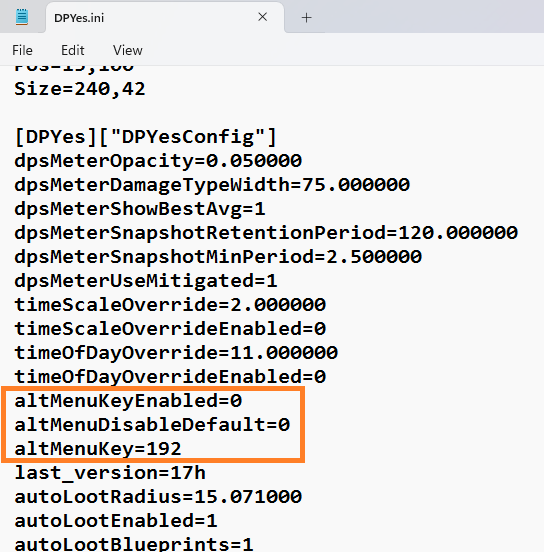
Where do we find keycodes for the GrimCam implementation here? In DPYes.ini it shows “key=123” but in game it shows 0x7B. The tooltip says “0x04” middle mouse.
I have a razer mouse and it is currently mapped to the button behind the wheel and I want to change the camera control to one of my side buttons.
I dont know if this is possible or even if any others would want. The main reason I use this tool is the teleport system. well besides auto pickup etc & etc.
Is there anyway to put different teleport saves in different folders or perhaps a drop down menu system? I play alot of mods including world ones like Redawn & the places I want to save are different from the normal campaign. My list is getting a little long.
Is it possible to add features like GI:
display its own buff and debuff;
Display target buff, debuff.
If it is temporary, the remaining time is displayed.
The filter works very well.
However, it doesn’t allow you to temporarily display all items by pressing ALT like the game’s built-in filter.
Could you add a shortcut to temporarily display all items? This would make it less likely to miss any items.
Disable DPYes loot filter while “Show all items” key is held
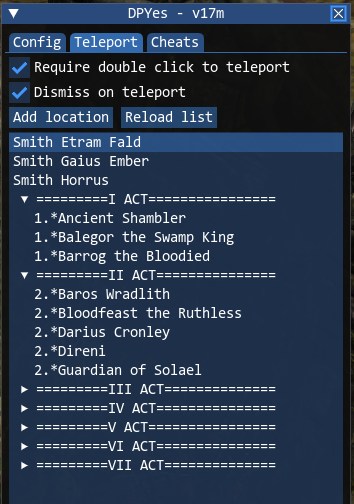
Allow grouping multiple teleport entries under a header
Currently limited to a level of headings (no nesting)
Teleport list currently needs to be edited externally in a text editor to create the headings
Group headings are those prefixed with #, the position of a group heading is unused
e.g.,
Smith Etram Fald, -1834.39, 0.2, 2501.95,
Smith Gaius Ember, -2514.25, 13.49, -4451.3,
Smith Horrus, -4995.56, 19.63, -1291.27,
#=========I ACT================, 85.31, 7.52, 45.96,
1.*Ancient Shambler, 770.5, 7.63, -1474.36,
1.*Balegor the Swamp King, -248.31, 4.22, -1320.49,
1.*Barrog the Bloodied, -6.38, 1.42, -176.23,
#=========II ACT===============, -11.29, 8, 104.33,
2.*Baros Wradlith, -919.2, 12.43, 2169.1,
2.*Bloodfeast the Ruthless, -2049.12, 0.2, 2431.68,
2.*Darius Cronley, -617.94, 15, 1133.3,
2.*Direni, -474.86, 15, 1089.33,
2.*Guardian of Solael, -790, 7.15, 521.34,
#=========III ACT==============, -1859, 10.84, 332,
3.*Ballog'Nath the Hellfire, -3859.65, -0.13, 1027.95,
3.*Bolvar the Bloodbinder 1, -2766.16, 20.66, -227.6,
3.*Bolvar the Bloodbinder 2, -2742.88, 16.17, -115.86,
[cut]
There is a work in progress skill dps window under Debug / Show skill DPS window (player dealt).
However, this feature is not fully ready yet, with known issues.
I’m not really sure, I suspect this might be adjacent areas being loaded in and out as you change your viewing angle. Is it alleviated if you reduce your FarClip GrimCam setting?
When I originally looking into resolving this, I wasn’t able to figure out how to determine whether the character should have ‘focus’ (i.e., when pressing a normal skill hotkey would activate it) vs. another UI element (text box).
As a crude workaround, alt+wasd works for lowercase and shift+WASD for uppercase.
The crucible variant of DPYes should allow you to bring your modded characters into crucible.
After enabling it in the DPYes settings, you may need to change the selected game mode back and forth if your non-modded characters are still showing in the list.
0x7B displayed in game is hexadecimal for 123, these values are typically referenced in hexadecimal elsewhere, so DPYes also displays them as such.
You can find the list of key codes at the link below, I’m not sure if or how exactly mouse buttons past Mouse4(0x05) and Mouse5(0x06) are mapped here.
Buff/debuff info would be really nice to add, but is a moderately difficult undertaking to actually implement
Version 17m now properly respects the “Show all items” key when held.
Tx for your response. I remember vaguely about being able to use a test editor. I never tried afraid I would screw things up. First where do I find this teleport list to edit? Can you rearrange the listings w/o any problems? If im understanding how that works it shouldnt. Ill give that a try. yea with doing other mods like diablo & redawn its getting a little long. Shame they dont collapse but being able to put in headings should help some. (esp as I have a poor memory forgetting what a place was called etc.) Maybe someday you can figure out a way to make it collapse or nest & include it in your tool. Tx again.
Does this mod by chance save these settings to a configuration file that we can edit? Specifically, I would love to be able to remap WASD to ESDF, thanks!