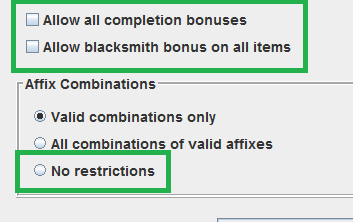
you’re mistaken, you can still create legendaries, including with affixes and illegitimate items, not merely greens, you just gotta enable the “all combinations” in the config
*GDstash spawning regular legends and epics is also the reason why so many builds have been theorycrafted over the years, as it makes it super quick and easy to actually test run those chars without needing to farm the blues and purples
I fixed it i believe but I kinda lost things from my stash and some other stuff like that wick is a bummer along some other illusion armor pieces but better then losing the entire character i suppose :')
Check what name GDStash shows and check what name the save dir of the character has. The names should be identical, i.e. if the Character name is Tom, it should be in save\main_Tom (or save\user_Tom)
If the two do not match, rename the directory so it matches
Alternatively (i.e. before you rename the dir), try whether one of the backups works. GDStash creates a backup every time you save your changes. The most recent ones are in player.g00, the ones before are in playewr.g01. Copy that file (so you still have it…) and rename the copy to player.gdc. See if the game finds the character now. Once you found the save file from before you renamed it, the game should find it again (provided the save directory still has the original name)
Cloud save is definitely a problem. The non-latin characters might be a problem, not sure, probably depends on the characters
Given this, try restoring your old save file as I described in my previous post.
Not sure what you mean by the game won’t show it though. Given that it exists in the cloud, I would assume it still shows the original name rather than no character at all
I intend to update it whenever there are updates to the file format, just like I did in the past. There usually is a few days delay though between when the format gets released by Crate and when I can implement it
Artwork is ‘automatic’ as that is being extracted from the GD files. You only need to worry about new file formats and me supporting the new expansions (i.e. actually knowing that there are additional files to analyze)
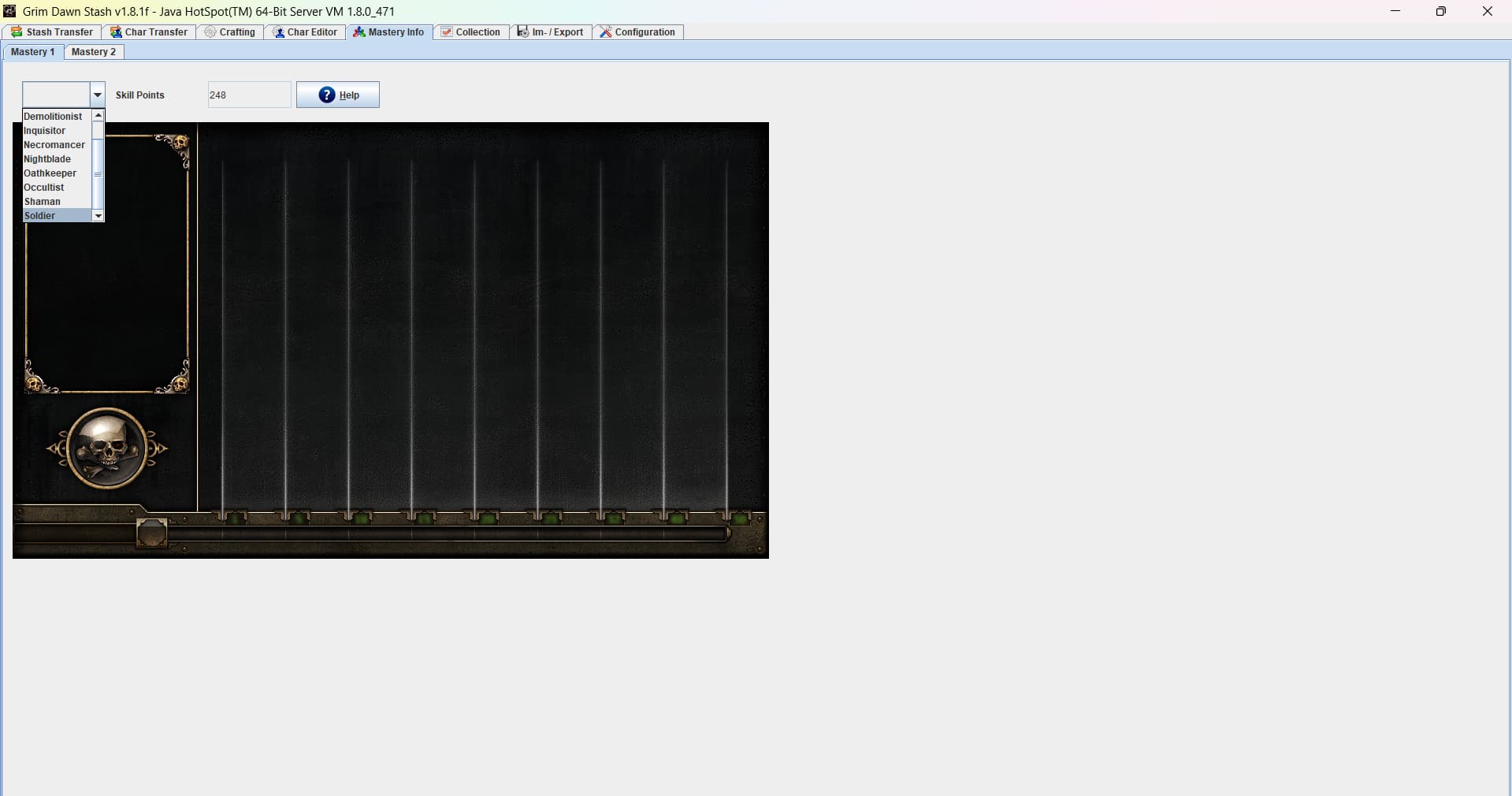
Our latest iterations of the Grimarillion mod appear to be breaking the Mastery Info section. The relevant error message appears to be this:
Error inserting ID records/ui/skills/skills_mastertable.dbr in table GDC_SKILL_MASTER
The statement was aborted because it would have caused a duplicate key value in a unique or primary key constraint or unique index identified by ‘SQL260118175839210’ defined on ‘GDC_SKILL_MASTER’.
org.apache.derby.shared.common.error.DerbySQLIntegrityConstraintViolationException: The statement was aborted because it would have caused a duplicate key value in a unique or primary key constraint or unique index identified by ‘SQL260118175839210’ defined on ‘GDC_SKILL_MASTER’.
at org.apache.derby.impl.jdbc.SQLExceptionFactory.getSQLException(Unknown Source)
at org.apache.derby.impl.jdbc.Util.generateCsSQLException(Unknown Source)
at org.apache.derby.impl.jdbc.TransactionResourceImpl.wrapInSQLException(Unknown Source)
at org.apache.derby.impl.jdbc.TransactionResourceImpl.handleException(Unknown Source)
at org.apache.derby.impl.jdbc.EmbedConnection.handleException(Unknown Source)
at org.apache.derby.impl.jdbc.ConnectionChild.handleException(Unknown Source)
at org.apache.derby.impl.jdbc.EmbedStatement.executeStatement(Unknown Source)
at org.apache.derby.impl.jdbc.EmbedPreparedStatement.executeStatement(Unknown Source)
at org.apache.derby.impl.jdbc.EmbedPreparedStatement.executeLargeUpdate(Unknown Source)
at org.apache.derby.impl.jdbc.EmbedPreparedStatement.executeUpdate(Unknown Source)
at org.gdstash.db.DBEngineSkillMasterAlloc.insert(DBEngineSkillMasterAlloc.java:62)
at org.gdstash.db.DBEngineSkillMaster.insert(DBEngineSkillMaster.java:88)
at org.gdstash.db.GDDBData.insertRecords(GDDBData.java:272)
at org.gdstash.db.GDDBData.insertData(GDDBData.java:227)
at org.gdstash.file.ARZDecompress.insertData(ARZDecompress.java:3690)
at org.gdstash.ui.GDConfigPane$DBImportWorker.doInBackground(GDConfigPane.java:194)
at org.gdstash.ui.GDConfigPane$DBImportWorker.doInBackground(GDConfigPane.java:80)
at javax.swing.SwingWorker$1.call(Unknown Source)
at java.util.concurrent.FutureTask.run(Unknown Source)
at javax.swing.SwingWorker.run(Unknown Source)
at java.util.concurrent.ThreadPoolExecutor.runWorker(Unknown Source)
at java.util.concurrent.ThreadPoolExecutor$Worker.run(Unknown Source)
at java.lang.Thread.run(Unknown Source)
Should I dig deeper to figure out a way to fix this error?
“Ours” meaning multiple people have reported this bug in the Grimarillion Discord and nobody can figure out a way to fix it. Specifically, while the database can be imported, the “Mastery Info” tab only shows the vanilla classes; none of the modded classes show up on the tab.
Would you please show an image of the Mastery Info tab working on your end so our Discord can find the cause of this bug?
EDIT: Tried a completely clean installation to ensure that no remnants of prior versions were getting in the way. The error still persists.
I tried the released version rather than running it in the Java Editor (to debug it), as I initially did, and in the released version I can replicate your issue of only seeing the standard masteries (I do not get any import errors however).
I don’t think I had made any changes since I released the previous version, but since the one in the editor worked and the released one did not, I created a new version. Has some minimal changes too, i.e. it should now ignore the case that resulted in the error messages you got.
With the new playtest patch making big changes in the stash, does GDStash still work if I switch to it? Been enjoying this tool for years and I really can’t function without it anymore. Cheers.
I do not have the patch yet, so cannot say either way. From the announcement it sounds like it will not be compatible. Once I have the patch, I will look into what needs updating
I was secretly hoping you’d have prior knowledge from being a praetorian, but alas. I will wait patiently then, I’m useless in testing unless I can create items myself I’m afraid.
Tried it a bit on FoA version of the patch and it seems to work. Very strange in that it no longer seems to save changes when you are in game; you must be in the menu or it doesn’t save shit.
You could always…do it before the patch
Update: Apparently that was a one time deal upon restarting the game I can no longer edit stash or characters that have been loaded.
Make up a backup of your stash file! You can gdstash what you need on initial load then paste in the old transfer.gst/gsh file and it’ll work again temporarily if you need to stash more shit