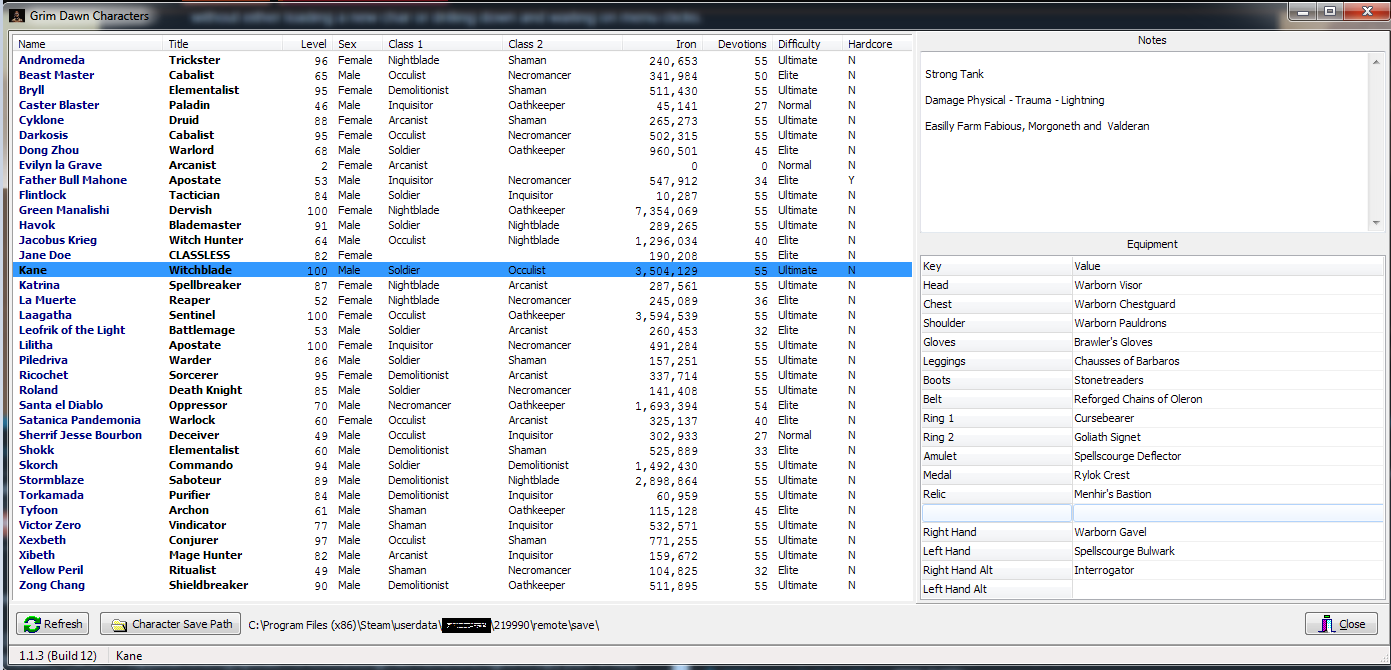
[Tool] GDViewer - Fast lightweight character viewer and note keeper

Just a list of the equipment character is using would do. For example Dagallon Annihilator, Absolution, Jaxxon’s Luncy Bullet, etc. Maybe could get fancy and have a category first like weapon and then a name i.e, Weapon - Dagallon’s Annihilator Relic - Absolution LHR - Jaxxon’s Lucky Bullet and so on, but as you said - the trade off of that is keeping the utility light weight. The more you add the less lightweight is becomes.

Could you add a version number somewhere ? Not sure what version I have. Also maybe an update button in the future so it is easier to keep up to date with new releases (I’m assuming updates are manual by pulling down the latest release here atm).

Working on the equipment list currently - coming shortly
There is a version number now - it is on bottom left of the status bar.

1 Like

Have loaded the Beta with character equipment display.
I think I have resolved most of the Tags.
If it does not know a Tag it will display the DB name path instead.
You can send any of these to me and I will have a look to see why it is not finding them.

1 Like

Ok @tqFan you have me both totally confused and intrigued. :confused:

I am failing to understand why my app cannot process the files in your “My Games” directory.
I am losing sleep and sanity over this and it is niggling me endlessly. There must be some reasonable solution here.

As @powbam mentioned, there are numerous funnies in the community as well with users having issues with options and other stuff not saving properly. Your issue may be related and relevant and maybe we can get an idea of what is causing this.

Can I pick your brain and use your scenario to figure some of this stuff out as a “Guinea Pig” (don’t tell @Maya she might have us arrested for animal cruelty :policeman:) ?

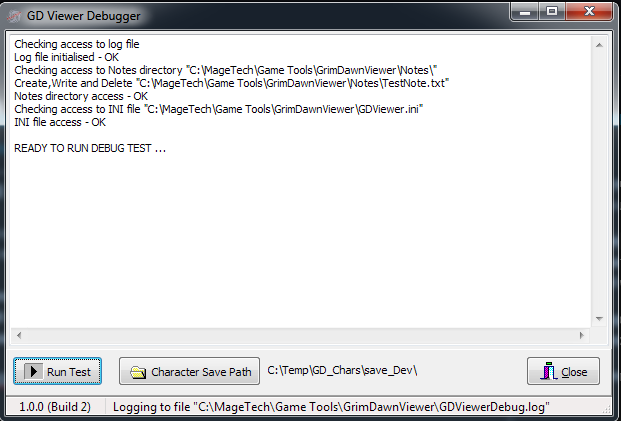
I have developed a GDViewerDebug app that logs step by step what the GDViewer is trying to do both to the screen and in a log file.

The initial form looks like this if it passes the file access permissions to it’s OWN install directory.
image

When you run the test it will give a detailed log of what it is finding in the Grim Dawn save directory and will report on any errors or even warnings (will touch on that later with your setup).

Example of a run looks like this is successful.

Notice that in this case I have intentionally added 3 rubbish entries to the save directory and the GDViewer will ignore them exactly as the debugger log will state.

Log files are generated which will be a great help to me if anyone is experiencing weird errors.
One interesting observation in YOUR @tqFan save dir debug output is that you actually have 3 character directories with a DOUBLE underscore as a directory name? Either you created those characters yourself with a name that starts with an underscore, or something else renamed them to that. They are not BAD characters and they do process as a valid GD char in the viewer - not sure what Grim Dawn does with them or why they have double underscore prefixes.
(-Anyone modder have an answer?)

Look at the output of the debugger for your setup …


2020/05/13 15:14:31 - Looking for character directories in “C:\Temp\GD_Chars\save_TQFan\main”
_Eaint Clestwood OK
_Khione OK
_Korvan Wyrm OK
_Raiden OK
_Sakura OK
_Sirocco OK
_Xorton OK
_Zeo OK
__Arundel OK
__Li Ming OK
__Sirocco OK
11 Valid Grim Dawn character directories found
0 Entries ignored
Checking header read of the character player.gdc files
_Eaint Clestwood : Eaint Clestwood - Oppressor
_Khione : Khione - Trickster
_Korvan Wyrm : Korvan Wyrm - Vindicator
_Raiden : Raiden - Warder
_Sakura : Sakura - Witchblade
_Sirocco : Sirocco - Conjurer
_Xorton : Xorton - Warder
_Zeo : Zeo - Paladin
__Arundel : Arundel - Druid : WARNING Name does not match standard directory naming
__Li Ming : Li Ming - Spellbreaker : WARNING Name does not match standard directory naming
__Sirocco : Sirocco - Occulist : WARNING Name does not match standard directory naming

8/11 Characters have been validated as genuine Grim Dawn characters
GDViewer.exe may have issues - please resolve above errors or investigate warnings

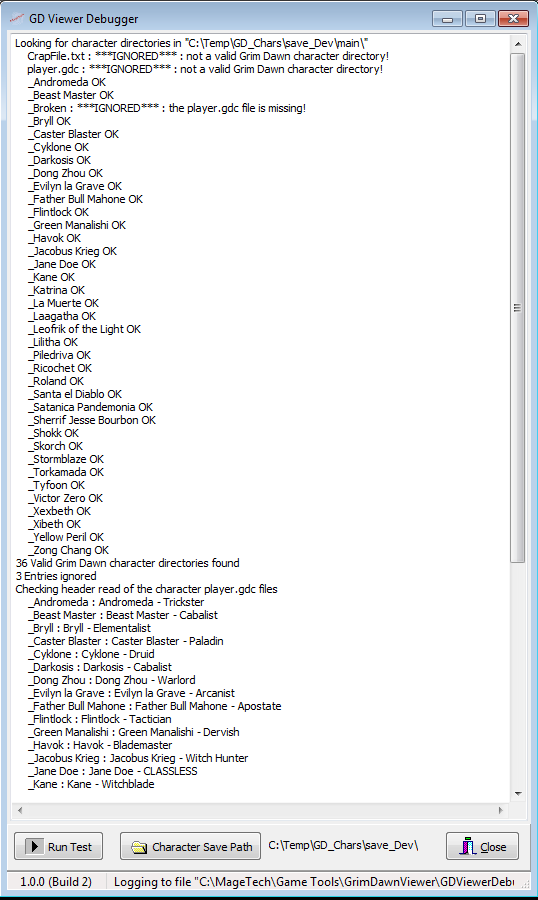
For a comparison I added some nonsense files to my test environment and the debug goes like this …


2020/05/13 15:16:01 - Looking for character directories in “C:\Temp\GD_Chars\save_Dev\main”
CrapFile.txt : IGNORED : not a valid Grim Dawn character directory!
player.gdc : IGNORED : not a valid Grim Dawn character directory!
_Andromeda OK
_Beast Master OK
_Broken : IGNORED : the player.gdc file is missing!
_Bryll OK
_Caster Blaster OK
_Cyklone OK
_Darkosis OK
_Dong Zhou OK
_Evilyn la Grave OK
_Father Bull Mahone OK
_Flintlock OK
_Green Manalishi OK
_Havok OK
_Jacobus Krieg OK
_Jane Doe OK
_Kane OK
_Katrina OK
_La Muerte OK
_Laagatha OK
_Leofrik of the Light OK
_Lilitha OK
_Piledriva OK
_Ricochet OK
_Roland OK
_Santa el Diablo OK
_Satanica Pandemonia OK
_Sherrif Jesse Bourbon OK
_Shokk OK
_Skorch OK
_Stormblaze OK
_Torkamada OK
_Tyfoon OK
_Victor Zero OK
_Xexbeth OK
_Xibeth OK
_Yellow Peril OK
_Zong Chang OK
36 Valid Grim Dawn character directories found
3 Entries ignored
Checking header read of the character player.gdc files
_Andromeda : Andromeda - Trickster
_Beast Master : Beast Master - Cabalist
_Bryll : Bryll - Elementalist
_Caster Blaster : Caster Blaster - Paladin
_Cyklone : Cyklone - Druid
_Darkosis : Darkosis - Cabalist
_Dong Zhou : Dong Zhou - Warlord
_Evilyn la Grave : Evilyn la Grave - Arcanist
_Father Bull Mahone : Father Bull Mahone - Apostate
_Flintlock : Flintlock - Tactician
_Green Manalishi : Green Manalishi - Dervish
_Havok : Havok - Blademaster
_Jacobus Krieg : Jacobus Krieg - Witch Hunter
_Jane Doe : Jane Doe - CLASSLESS
_Kane : Kane - Witchblade
_Katrina : Katrina - Spellbreaker
_La Muerte : La Muerte - Reaper
_Laagatha : Laagatha - Sentinel
_Leofrik of the Light : Leofrik of the Light - Battlemage
_Lilitha : Lilitha - Apostate
_Piledriva : Piledriva - Warder
_Ricochet : Ricochet - Sorcerer
_Roland : Roland - Death Knight
_Santa el Diablo : Santa el Diablo - Oppressor
_Satanica Pandemonia : Satanica Pandemonia - Warlock
_Sherrif Jesse Bourbon : Sherrif Jesse Bourbon - Deceiver
_Shokk : Shokk - Elementalist
_Skorch : Skorch - Commando
_Stormblaze : Stormblaze - Saboteur
_Torkamada : Torkamada - Purifier
_Tyfoon : Tyfoon - Archon
_Victor Zero : Victor Zero - Vindicator
_Xexbeth : Xexbeth - Conjurer
_Xibeth : Xibeth - Mage Hunter
_Yellow Peril : Yellow Peril - Ritualist
_Zong Chang : Zong Chang - Shieldbreaker

36/36 Characters have been validated as genuine Grim Dawn characters
GDViewer.exe should execute OK with no issues

Here is a link to the debugger.
Anyone is welcome to use this tool as well to see what apps actually detect in their Grim Dawn save directory.

See later posts for updated.
2 Likes

__ characters are from Ashes of Malmouth I think. They are differentiated this way.

Hahaha, now I’ve ninja’d you.

FYI: This is actually intentional. Lets say you own just the base game and are playing a while, got some characters, and then you decide to purchase AoM - the game will create a duplicate folder with the double underscore in front. These characters are a copy of your original and any folder with double underscores will ONLY appear in the Vanilla game menu.

Close :wink: but you were wrong… they aren’t AoM characters - they are the Vanilla-only toons.
Dunno about that?
All my character directories start with a SINGLE underscore and I have all the expansions.
Could be an early throwback to an early release of AOM or something?

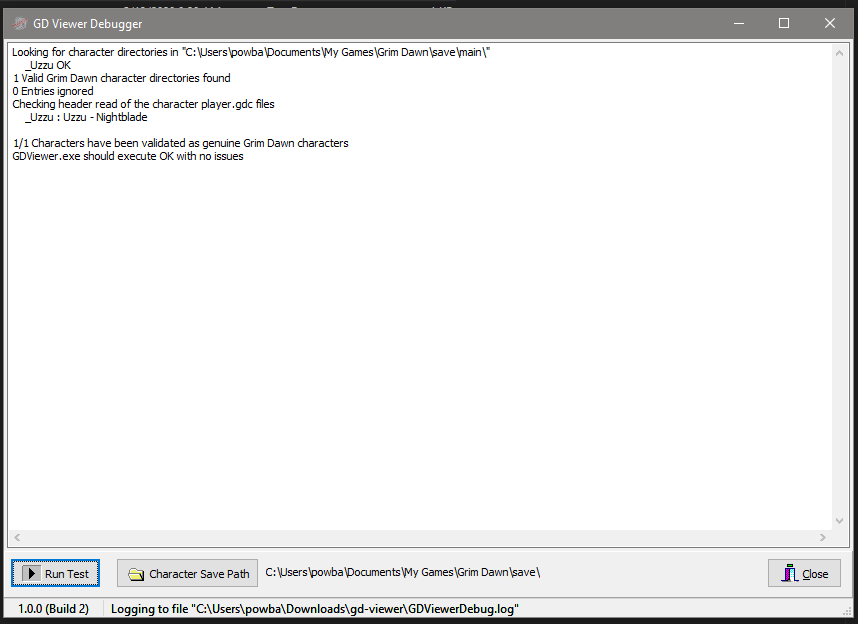
Looking for character directories in "C:\Users\TOP_SECRET\Documents\My Games\Grim Dawn\save\main\"
    _Eaint Clestwood : ***IGNORED*** : not a valid Grim Dawn character directory!
    _Khione : ***IGNORED*** : not a valid Grim Dawn character directory!
    _Korvan Wyrm : ***IGNORED*** : not a valid Grim Dawn character directory!
    _Raiden : ***IGNORED*** : not a valid Grim Dawn character directory!
    _Sakura : ***IGNORED*** : not a valid Grim Dawn character directory!
    _Sirocco : ***IGNORED*** : not a valid Grim Dawn character directory!
    _Xorton : ***IGNORED*** : not a valid Grim Dawn character directory!
    _Zeo : ***IGNORED*** : not a valid Grim Dawn character directory!
    __Arundel : ***IGNORED*** : not a valid Grim Dawn character directory!
    __Li Ming : ***IGNORED*** : not a valid Grim Dawn character directory!
    __Sirocco : ***IGNORED*** : not a valid Grim Dawn character directory!
There are NO valid Grim Dawn character directories in "C:\Users\TOP_SECRET\Documents\My Games\Grim Dawn\save\main\"
Please check your "Character Save Path" setting and try again

Cool,
It seem that any character directory that starts with a single or multiple underscores can be a valid GD character. That is OK as my viewer will process those now as long as they have a player.gdc in them.

What I am interested in is though is what the log output of the debugger show for your “My Games” directory where you are getting zero characters in the viewer.

This is what it shows. No characters are displayed. Last stable version.
I mean this the debugger log from directory the viewer doesn’t show anything from.

Looking good for me.

They are a backup that is made when you buy an expansion. So if you started with all expansions right away, you would have no __ dirs. If you played vanilla and then got AoM, the vanilla chars would be copied to __ and still exist as _. The _ chars are used when you play regularly, regardless of which expansions you have. The __ exist in case you want to play vanilla again in MP with someone who does not have AoM. Same for when playing AoM and getting FG.

2 Likes

Ah thanks, that helps a tremendous amount.
Enlightenment. :smiley:

That message kicks in when it deems that the file dir listing is NOT a directory.

ie. in code is …

if (rInfo.Attr = faDirectory) hen begin – this is FAILING in your situation

I have an idea that the attribute of the directory is not just EQUAL to faDirectory, but has other attributes like SHARED or something else in the bit mask. I need to do a binary AND of the attribute to isolate the directory attribute only.

Old memory stirrings of knowing this decades ago, just forgot and got lazy, Windows just added more attributes while I slept.

I will add the logic to the debugger first so we can check if all is ok, and then apply to the viewer once validating your setup.

New debugger on the post coming shortly.

1 Like

Hi Mike - ran the new program 1.1.3.12. It sees all my vanilla characters with no issue (it sees them all including my classless base character). I also ran the debug program and it ran clean. The output is great. Exactly what I wanted to see :+1:

The unexpected bonus to the added feature is that it highlighted that I was running with my weapons in the alt slots, not the main slots, for one character. There seems to be an issue when I put the weapons in the main slots (my damage p/s goes to zero) but that isn’t an artefact of the program. I’ll have to look in to that. If the utility could also see mod characters as well it would even more awesome than it already is. And the day someone cracks the nut so you can display augments and components on each weapon as well will be glorious :grinning:

BTW - I encountered a permissions issue recently with another program I use with GD. I used to have it in the Program Files x86 folder. Worked for a while then just stopped working. After I moved it to the root directory in its own folder (C:\App for example) it’s all good again. This is one of the joys of Windows …

1 Like

Ok, here is the one that will mask out and check the Directory attribute correctly.
Let me know if this one runs with no errors in the log file.

GDViewerDebug.zip (679.2 KB)

Looking for character directories in "C:\Users\sdfsdfs\Documents\My Games\Grim Dawn\save\main\"
    _Eaint Clestwood OK
    _Khione OK
    _Korvan Wyrm OK
    _Raiden OK
    _Sakura OK
    _Sirocco OK
    _Xorton OK
    _Zeo OK
    __Arundel OK
    __Li Ming OK
    __Sirocco OK
11 Valid Grim Dawn character directories found
0 Entries ignored
Checking header read of the character player.gdc files
    _Eaint Clestwood : Eaint Clestwood - Oppressor
    _Khione : Khione - Trickster
    _Korvan Wyrm : Korvan Wyrm - Vindicator
    _Raiden : Raiden - Warder
    _Sakura : Sakura - Witchblade
    _Sirocco : Sirocco - Conjurer
    _Xorton : Xorton - Warder
    _Zeo : Zeo - Paladin
    __Arundel : Arundel - Druid : WARNING Name does not match standard directory naming
    __Li Ming : Li Ming - Spellbreaker : WARNING Name does not match standard directory naming
    __Sirocco : Sirocco - Occulist : WARNING Name does not match standard directory naming

8/11 Characters have been validated as genuine Grim Dawn characters
GDViewer.exe may have issues - please resolve above errors or investigate warnings

Nice to see it working for you.
We still working around a few Win 8 and Win 10 issues, but getting there.

I have not installed any mods whatsoever, so if you have a nice zipped save folder containing mods that I could work with would be cool. I can the run on that and see what comes up. Something like the Diablo II mod would be interesting as I know that ALL the class and dual names are very different.

Aaaaaah marvelous :crazy_face:
Let me quickly update the Viewer for you and post it on the forum.

That is exactly what the issue was. The file attribute from the dir listing contained multiple attribute masks as well as just being a faDirectory.

Thanks @tqFan for you patience,

I think after that last debug output I have hopefully fixed your issue in the “My Games” folder". Stupid oversight of mine that I should have known better and not assumed a single state for that attribute.
Problem is that I have actually forgot far more than I have learned over the too many years. :poop:

I have posted version 1.1.4 (build 13) at top of the post that should now work for you.
Give it a go and lets see if it resolves your issue. Otherwise - we back to drawing board, but definitely zeriong in.

Might also be worth having a look at that folder and see why it has extra attributes?
Always a chance that something nasty is lurking around in your system.