Well, it comes up every now and again, but the fact you have to either play the custom game mode or update the files each time there is a new GD patch as well as figure out how to do any of that in the first place probably scares people off.
I will look into it when I get around to redoing my modding tools, but that is going to be a while.
When there is a new Playtest patch and you are not using the program to generate the files yourself you will have to check the repo for an update. The files on the repo will have the playtest number in the version tooltip on the ingame filter button, to keep track of it more easily, new files should be available within 12 hours of the new version becoming available on Steam. If you’re generating the files yourself, it won’t update the version tooltip. Keep in mind you cannot generate the files yourself if the tool is saying it is using internal files (a workaround for errors), as those have not been updated.
Hey, thanks a lot for this, i’ve been using it since i started playing and it’s amazing!
I’ve always downloaded the files directly, but recently i got the tool to keep up with the patches myself and to get the mastery tags too, unfortunately i have a problem.
Even if running as admin this message still appears “Currently using internal Texts. This is a workaround for an error. (“Run As Admin” might fix this)”, so i can’t update the files myself.
In some cases the program can’t extract the game files and running it as admin resolved it in a few cases, but not all, so I added the files it uses from the extraction to the program itself. That message only really applies in the time between a game patch and a program update. The new program won’t need to extract the files so that won’t be an issue.
If you’re trying the playtest you would have to download the files on the repo and I can upload the skills file for the mastery tags. Or you try fixing it, could be writing permissions in the user directory, anti-virus settings and I even had people message me that uninstalling OneDrive solved weird conflicts.
I am playing the 1.3 playtest which has frequent updating and this last patch broke some tags, hence why i decide to get the tool myself.
I tried changing permissions, disabling anti-virus (i only use Windows’) and OneDrive is long uninstalled, unfortunately nothing worked.
It’s all good tho, i generated the mastery tags myself and used the files you uploaded so it’s working fine, i guess that’s what i’ll have to keep doing. Appreciate the help.
“Currently using internal Texts. This is a workaround for an error.”
Rainbow Filter works correctly when both the game and the mod are set to English.
I downloaded the Spanish files (text_es) and placed them in Documents\My Games\Grim Dawn\Settings\text_es, but it doesn’t seem to work properly in Spanish.
Has anyone had this issue or knows how to make Rainbow Filter work with Spanish?
Two posts above you is a possible solution, but if it doesn’t get resolved you’re out of luck, the program doesn’t have non-english files internally. But unless you want to change a color the files are the same.
If by not properly you mean tags not found and you’re playing the playtest that is relatively normal. Localizations usually don’t get updated with playtests, so non-english playtests have tags not found with or without Rainbow. And as far as I can tell the Spanish files are fine.
Hello, I really appreciate your tool. One thing I noticed, on Windows 11 25H2 I found that closing the tool does not actually close the app, it minimizes it and adds it to the tray, opening the tool a second time it opens a second instance of the application rather than returning an earlier one, which can be reopened from the tray. I’m not sure if this would impact performance or anything, but it seemed strange to me. Only realized because I added the tool to Steam and Steam kept telling me that the app was still open.
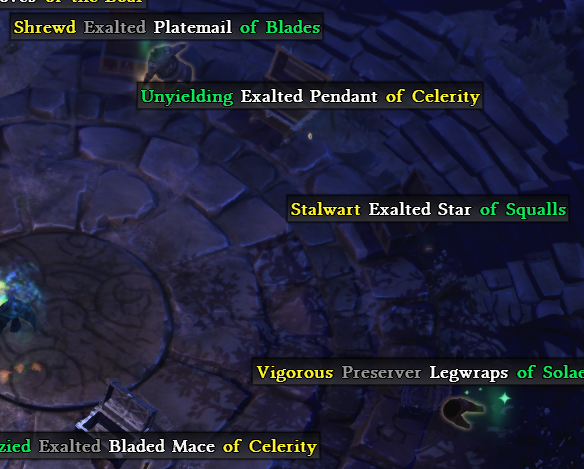
Also, new player, I’m not really understanding all the keywords. In particular what is it that determines the color/rarity of the ending of an item’s name? First part is the item’s rarity as painted in inventory but is the second color judging its quality in some way?
You can change the tray behaviour in the “Advanced Rainbow Tool Settings”, but shouldn’t have any impact on performance, it checks for an update every 10 mins, that’s all it does in the background. Main reason for the tray was for the game launch options from the tray icon.
If you’re coming from PoE/Diablo, item generation works differently here. In short, an item can have a prefix and/or suffix, all parts of the item have their own rarity and it takes on the highest rarity, so a white item could have a magic prefix and rare suffix and the item would be rare, if a rare item has a magic prefix and no suffix it is still rare. Rainbow will show you the different rarities of the parts rather than just the end result.
Skimming through it, this looks like something you would want to read:
The program only has internal texts for English, there is no other version for it. The intention of the program is to extract the texts that come with the game using the modding tools that also come with the game to then add the colors. If the program cannot extract the files it falls back to using the internal files.
The issue was pretty rare in the past, it seems to have become a larger thing, perhaps due to win 11. One thing I never considered was a missing .NET version, win usually comes with those, but older versions may not be included in win 11 anymore. You can see if you can open “AssetManager.exe” inside your Grim Dawn folder or if it gives you an error. Besides that it only comes down to permissions of running the modding tools and it writing the files.
You can download the files when the program doesn’t work. I’m reworking everything and making everything more accessible, but for now those are the only options. The program works as intended or you only need English otherwise you download the files. Languages usually don’t get updated during the Playtest, so it won’t matter if you play the Live or Playtest.