Grimarillion Item Color Coding File
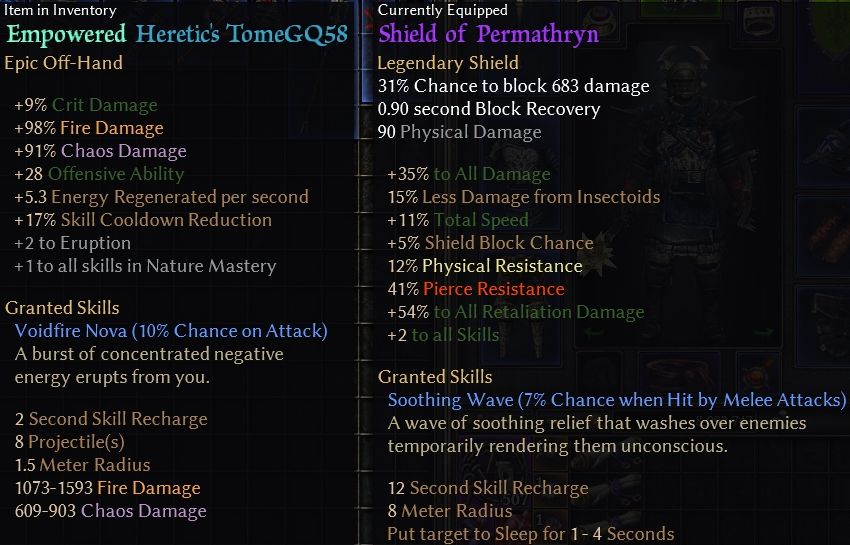
This is an item color coding file for the Grimarillion colored based on WareBare’s Grim Raynbow (aka Rainbow Filter).
10.9 (2026) update for Grimarillion v97d
Grimarillion_97d_rainbow_03.zip (591.5 KB)
- _02: Replaced the file with WareBare’s “Grim Raynbow” v0.0.3.5 update file and changed the color codes for several Grim Quest items.
- Some rare items such as “Francis’ Gun” and “Olman’s Axe, etc” which can be easily obtained early in the game, occasionally have prefixes or suffixes attached to them. So, I’ve treated them as “MI” entries to make the base names easier to read.
- NOTE: If there is a “Grim Dawn\setting\text_en” folder for vanilla, it will take precedence, so delete or rename that “text_en” folder.
- Also, in this Rainbow File, the detailed display for some set items are entirely highlighted, making it impossible to tell whether they are equipped or not. I am currently considering how to resolve this issue.
-
Usage:
Grim Dawn\mods\grimarillion\resources\Text_EN.arc
Replace the Text_EN.arc in the resources folder with the one in the zip. Change the old file to something like “Text_EN_org.arc” and put it back when you want the normal view. -
Note:
If you have created a “Grim Dawn\localization” folder as the way before GDv1.2.0.0.
With the GDv1.2 update, the localization folder is no longer functional and the Text_EN.arc in the mod must be changed. So, you may delete the localization folder.
Text file for translation
-
for v97d
grimaril97d_eng_color_for_translate_05.zip (608.5 KB) -
_05: Replaced the file with WareBare’s “Grim Raynbow” v0.0.3.5 update file and changed the color codes for several Grim Quest items.
-
This translation file differs significantly from previous versions. As you may know, with the release of GD v1.3, WareBare consolidated the files that need to be colored into a single file (tagsgdx3_uimain.txt), and this translation file uses that file. As a result, it has become more difficult to compare the old and new text. That said, I personally translate using the traditional method while referring to the files on WareBare.
-
old files (cannot be used with v97)
grimaril95b_eng_color_for_translate_02.zip (604.3 KB)
grimaril96_eng_color_for_translate_05.zip (618.0 KB)